


Mastering Class Diagrams with VPasCode: A Text-First Approach
Welcome to this tutorial on modern software modeling. Today, we are diving into a powerful feature of the Visual Paradigm ecosystem: VPasCode. As developers and architects, we often find ourselves toggling between drawing tools and our actual code. VPasCode bridges this gap by allowing you to generate complex UML diagrams directly from text code. This approach not only speeds up your workflow but also ensures your diagrams remain synchronized with your source code logic.
In this session, we will analyze a representative PlantUML snippet that defines an e-commerce domain model. By the end of this article, you will understand how to structure classes, define relationships, and handle inheritance using a text-based syntax within Visual Paradigm.
The Power of Code-First Modeling
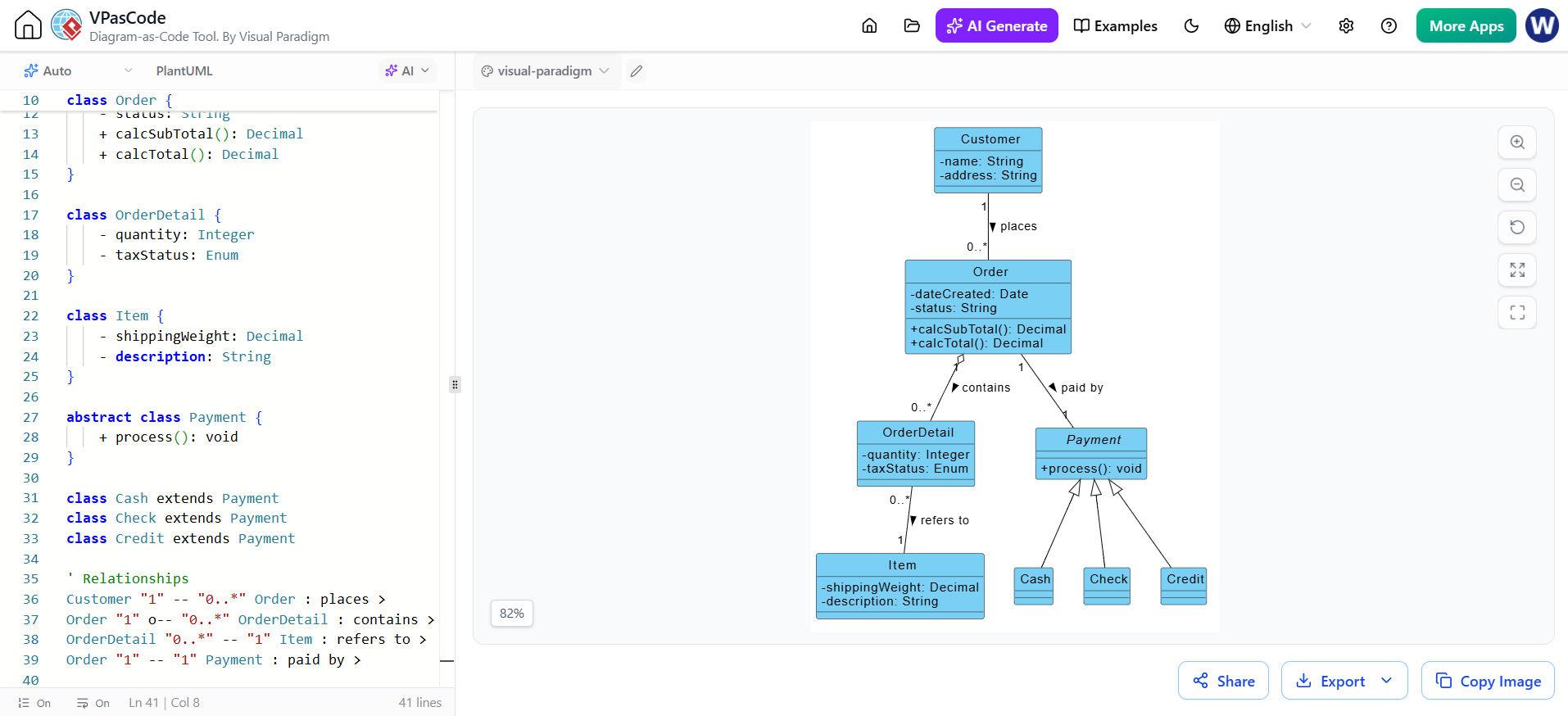
Traditionally, creating a class diagram involves dragging and dropping boxes onto a canvas. While intuitive, this method can be slow for large systems. VPasCode flips this paradigm. By writing code, you leverage the speed of text editors and the version control capabilities of Git. The image above demonstrates this beautifully: on the left, we have the raw PlantUML code, and on the right, the rendered visual representation. This immediate feedback loop is a hallmark of the Visual Paradigm toolset.
Deconstructing the Class Definitions
Let’s look at how we define our core entities. In the code snippet, we see standard UML class definitions using the class keyword. Visual Paradigm interprets these definitions to build the structure you see in the diagram.
- Encapsulation: Notice the use of symbols like
-and+. In theOrderclass,- status: Stringdenotes a private attribute, while+ calcSubTotal()denotes a public method. This syntax strictly adheres to UML standards, ensuring your diagram accurately reflects your object-oriented design principles. - Abstract Classes: We encounter the
abstract class Paymentdefinition. This is crucial for modeling polymorphism. By marking a class as abstract, we indicate that it cannot be instantiated directly but serves as a parent blueprint for specific payment types.
Mapping Relationships and Multiplicity
The true power of a class diagram lies in how these entities interact. VPasCode allows you to define these connections explicitly in the code, which are then rendered as lines with specific arrowheads and cardinalities.
Consider the relationship between Customer and Order. The code line Customer "1" -- "0.." Order : places > tells a clear story:
- Association: The
--syntax creates a standard association line. - Multiplicity: The numbers
"1"and"0.."define the cardinality. One Customer can place zero or many Orders, which is visually represented in the diagram by the numbers near the respective boxes. - Directionality: The
>at the end of the line indicates the direction of the relationship, pointing towards theOrderclass.
Similarly, look at the relationship between Order and OrderDetail. The code uses o--, which represents Aggregation. In the visual diagram, this appears as a line with an open diamond attached to the Order class, signifying that an Order is composed of OrderDetails, but the details can conceptually exist independently or be shared.
Implementing Inheritance and Polymorphism
One of the most elegant features in object-oriented design is inheritance, allowing you to model “is-a” relationships. VPasCode handles this seamlessly with the extends keyword.
In our example, we have a hierarchy of payments:
- We define a base
abstract class Paymentwith a genericprocess()method. - We then define specific implementations:
Cash,Check, andCredit. - By using
class Cash extends Payment, we establish that a Cash object is a Payment object.
Visually, this is rendered as a solid line with a hollow triangle arrowhead pointing from Cash, Check, and Credit up to the Payment class. This visual cue instantly communicates to any stakeholder that these classes share a common interface defined in the parent class.
Conclusion
By utilizing VPasCode within Visual Paradigm, you gain the best of both worlds: the precision and structure of text-based coding and the clarity of visual modeling. Whether you are designing a simple order system or a complex enterprise architecture, this “Diagram-as-Code” approach ensures your documentation is as maintainable and version-controlled as your actual source code.