Understanding Event Dynamics in BPMN
Welcome to this tutorial session on Business Process Model and Notation (BPMN). Today, we are diving deep into the nuances of events, specifically focusing on the distinctions between Boundary, Interrupting, Non-Interrupting, Catching, and Throwing events. These concepts are fundamental to creating dynamic, responsive, and accurate process models.
Events are the heartbeat of any BPMN diagram. They represent something that happens during a process—something that starts, stops, or alters the flow. While standard events occur at the start or end of a path, Boundary events introduce a layer of complexity by occurring alongside an activity.
The Essence of Boundary Events
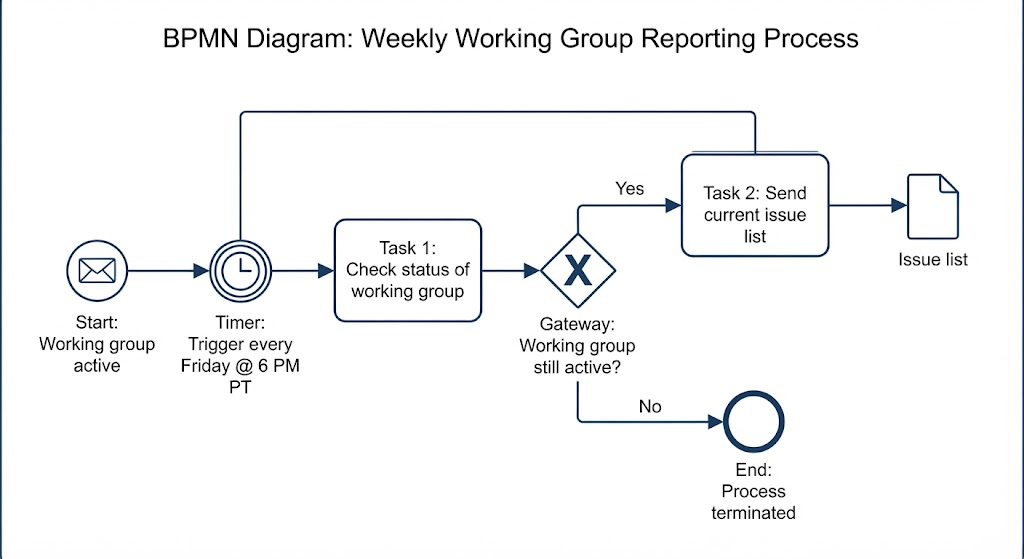
A Boundary event is a specific type of event attached to the boundary of an activity, such as a task or a sub-process. As the name suggests, it sits on the edge. These events are unique because they can be triggered or thrown at any time while the associated activity is being performed.
Think of a standard process flow, like the sequence shown in our diagram: starting with Hunger Noticed, moving to Acquire Groceries, then Prepare Meal, passing through an intermediate state of Meal Prepared, proceeding to Eat Meal, and finally reaching Hunger Satisfied. A Boundary event would attach to one of these tasks, like “Prepare Meal,” waiting for a specific condition to happen while the meal is being cooked.
These events are often time-based, such as a Timer, or condition-based, requiring a specific outcome to resolve to ‘True’ before the process branch can proceed. For instance, if you are preparing a meal, a Boundary event might trigger if the food burns, forcing the process to divert to a “Reheat” or “Order Pizza” path instead of continuing to the “Eat Meal” stage.
Interrupting vs. Non-Interrupting Behavior
One of the most critical distinctions to master is whether a Boundary event interrupts the activity it is attached to.
Interrupting Boundary Events: When these are triggered, they immediately stop the activity they are attached to. If a Timer event triggers on a “Prepare Meal” task, the cooking process stops, and the flow immediately diverts to the next path. This is useful for scenarios where the original activity becomes irrelevant once the event occurs.
Non-Interrupting Boundary Events: In contrast, these events trigger an alternative path without stopping the original activity. For example, if an email notification (a message event) is attached to “Prepare Meal” in a non-interrupting manner, the email might alert the chef, but the cooking process continues uninterrupted. This allows for parallel processing of information or side-quests without derailing the main task.
Catching and Throwing: The Direction of Flow
To fully understand events, we must look at their direction relative to the process flow: Catching and Throwing.
Catching Events are the most common. They “catch” the flow of the process. When a process reaches a Catching event, the event occurs, and the flow continues to the next element. In our meal example, the Meal Prepared intermediate event is a Catching event; the process waits for the meal to be ready before proceeding to “Eat Meal.”
Throwing Events are less common in standard flow but vital for initiating processes. A Throwing event sends a signal out of the process or triggers the start of a new process. Boundary events are typically Catching events—they catch a condition (like a timer going off) while the activity is running. However, some Boundary events can be configured to Throw a message to another part of the system.
Implementing These Concepts in Visual Paradigm
Visual Paradigm provides a robust environment for modeling these complex event behaviors. When designing your BPMN diagrams in Visual Paradigm, the tool offers intuitive ways to handle the nuances of Boundary and Intermediate events.
To create a Boundary event, you can simply drag an event from the Toolbox onto the boundary of your task. Visual Paradigm makes the distinction between Interrupting and Non-Interrupting events seamless. When you select a Boundary event in the diagram, the Property Editor allows you to toggle the “Interrupting” checkbox. This simple configuration dictates whether the attached task is halted or runs in parallel when the event triggers.
Furthermore, Visual Paradigm handles the visual distinction of these events clearly. Whether you are using a Timer, a Message, or a Condition, the tool renders the event correctly on the activity boundary. This ensures that your diagrams are not only logically sound but also visually standard-compliant, making it easy for stakeholders to understand that a specific condition (like a time limit) is active while a task is in progress.
By mastering these event types, you can build process models that are not just static representations of work, but dynamic simulations of real-world scenarios where things can go wrong, time runs out, or external signals need to be acknowledged.