


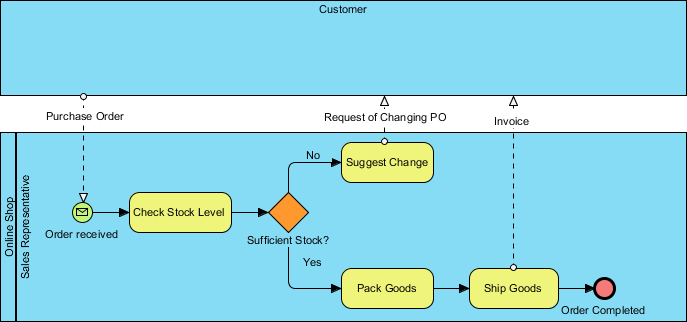
In the realm of Business Process Management (BPM), understanding the current state of operations is the critical first step toward innovation and efficiency. This tutorial explores the concept of As-Is Process Modeling using a practical example: an online shop’s order fulfillment workflow. By analyzing the provided diagram, we will break down how organizations visualize their current capabilities, identify bottlenecks, and lay the groundwork for future improvements.
1. The Strategic Value of As-Is and To-Be Models
Before diving into the technical details of the diagram, it is essential to understand the strategic purpose behind these visualizations. As defined in our context, these models serve distinct roles:
- The As-Is Model: This provides a comprehensive overview of the company’s current processes, culture, and capabilities. It documents how work is actually done today. Its primary purpose is to establish a baseline for identifying areas of improvement, optimizing resource utilization, and boosting efficiency.
- The To-Be Model: This outlines the future state of the organization. It serves as a roadmap for change, defining goals and the steps required to achieve them. It helps organizations prioritize critical changes to close the gap between where they are and where they want to be.
2. Analyzing the “Online Shop” As-Is Diagram
The diagram provided illustrates a classic BPMN (Business Process Model and Notation) flow using a tool like Visual Paradigm. It maps out the lifecycle of a purchase order from the perspective of the customer and the sales representative. Let’s dissect the architecture of this process.
2.1 Swimlanes: Defining Roles and Responsibilities
The diagram utilizes horizontal swimlanes to separate responsibilities. This visual separation clarifies who does what:
- Top Lane (Customer): Represents the external actor initiating the transaction. This lane shows the inputs (Purchase Order) and outputs (Request of Changing PO) that interact with the organization.
- Bottom Lane (Online Shop / Sales Representative): This is the internal process lane. It details the specific tasks performed by the sales representative, such as checking stock, packing goods, and shipping items.
2.2 Step-by-Step Process Flow
The flow of the process moves from left to right, demonstrating the sequence of events. Here is the logical breakdown of the workflow:
- Initiation: The process begins when a Purchase Order is sent by the Customer. This is represented by a message flow (dashed line) entering the Sales Representative’s lane.
- Receipt and Verification: Upon receiving the order, the Sales Representative performs the task “Check Stock Level”. This is a critical decision point in the fulfillment chain.
- Decision Making (The Gateway): The process encounters a Diamond-shaped Exclusive Gateway labeled “Sufficient Stock?”. This element acts as a fork in the road, determining the path based on a specific condition.
- Path A: Sufficient Stock (The “Yes” Path):
- If stock is available, the process moves to “Pack Goods”.
- Next, the representative executes “Ship Goods”.
- An Invoice is generated and sent back to the Customer.
- The process concludes at the Order Completed end event (the red circle).
- Path B: Insufficient Stock (The “No” Path):
- If stock is insufficient, the representative performs the task “Suggest Change”.
- A Request of Changing PO is sent back to the Customer (indicated by the dashed line returning to the top lane).
- This creates a feedback loop, requiring the customer to modify their request before the process can potentially resume.
3. Key BPMN Concepts Illustrated
This diagram effectively demonstrates several core concepts of BPMN that are essential for technical modeling:
3.1 Message Flows vs. Sequence Flows
The diagram distinguishes between two types of connectors:
- Sequence Flow (Solid Arrow): These arrows inside the “Online Shop” lane represent the internal logical order of tasks (e.g., from “Check Stock Level” to the Gateway).
- Message Flow (Dashed Arrow): These arrows crossing the swimlane boundaries represent communication between different participants (e.g., the Customer sending the order to the Sales Rep).
3.2 Intermediate Events
Notice the envelope icon labeled “Order received”. In BPMN, this is an Intermediate Catching Event. It signifies that the process is waiting for a specific message (the order) before the main task of checking stock can begin. This adds a layer of realism to the model, showing that the process is triggered by an external event.
4. Conclusion: From Model to Improvement
By creating this As-Is diagram, the organization has successfully documented its current reality. They can now see that a significant portion of their workflow relies on manual stock checks and that insufficient stock leads to a manual negotiation process with the customer.
This baseline is invaluable. In a subsequent To-Be modeling phase, the organization might introduce an automated inventory system that instantly alerts the sales rep of low stock, or perhaps implement a “backorder” feature to automatically suggest partial shipments. This tutorial demonstrates that before you can reengineer a process, you must first have the clarity to see it.
Related posts:
 Mastering Data Association in BPMN Diagrams: A Visual Guide
 Mastering BPMN 2.0 Markers: The Hidden Modifiers That Control Process Execution
 Mastering BPMN: A Guide to Avoiding Common Modeling Pitfalls
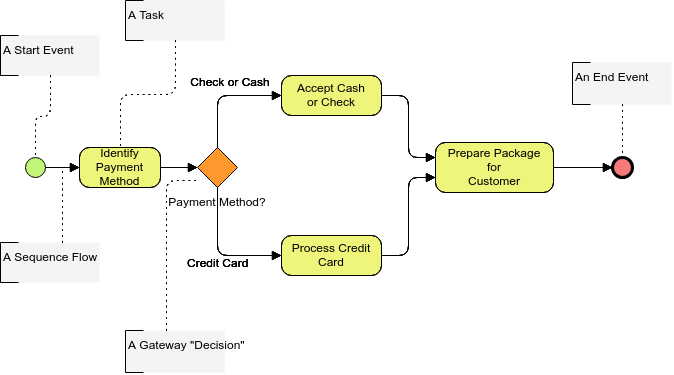 Mastering BPMN Basics: A Step-by-Step Guide to Process Modeling with Start Events, Gateways, and Tasks