In the complex world of Business Process Model and Notation (BPMN), handling repetitive tasks efficiently is crucial. Whether you are processing a list of invoices or testing a batch of physical components, the way a system handles these repetitions can determine the success of your workflow. This tutorial explores the Sequential Multi-Instance Marker, a powerful modeling tool used to define how activities are executed when dealing with collections of data.
The Visual Language of Batch Processing
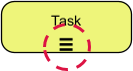
Every concept in BPMN has a specific visual representation to ensure clarity among stakeholders. The Sequential Multi-Instance Marker is distinct and easy to spot within your diagrams.
- Visual Symbol: Look for three horizontal parallel lines (≡) located at the bottom of an activity box.
- Function: This icon signals to the process engine that the associated activity needs to be executed multiple times.
- Context: It is specifically designed for scenarios where a task must be performed repeatedly for every item in a defined data collection.
Understanding the Execution Flow
The defining characteristic of the sequential marker is the word “Sequential.” Unlike parallel processing, where multiple instances might run simultaneously, this marker enforces a strict linear order.
When an activity is marked with the sequential multi-instance symbol, the execution flow adheres to the following logic:
- Instance A: The process begins by executing the activity for the first item in the collection.
- Completion Check: The system waits. Instance B cannot start until Instance A is fully complete.
- Iteration: Once Instance A finishes, the process moves to Instance B, and so on, until the entire data collection is exhausted.
This strict ordering is vital for processes that rely on a single resource or where the outcome of one step must be finalized before the next begins.
Data Handling: Processing One Item at a Time
In technical modeling terms, this marker handles data by iterating over a collection. The system takes a list of objects (such as a list of orders, a list of files, or a list of physical parts) and assigns one object to the activity for each iteration.
Because the execution is sequential, the system processes individual items consecutively. This means the memory footprint and resource usage are generally lower than parallel execution, as the system only needs to handle one instance at a time.
Real-World Application: Safety Equipment Inspection
To visualize this concept, consider a scenario in industrial safety. Imagine a safety inspector who must test a batch of ten pressure valves.
The Scenario:
- The inspector has 10 valves to test.
- Constraint: There is only one testing rig available.
In this context, attempting to test all valves simultaneously is impossible. The process must follow a sequential path:
- Test Valve 1.
- Finish the report for Valve 1.
- Move to Valve 2.
- Repeat until Valve 10 is complete.
Modeling this with the Sequential Multi-Instance Marker ensures that the workflow accurately reflects the physical limitations of the resource-constrained environment.
Technical Configuration in Visual Paradigm
For those implementing these models in software like Visual Paradigm, precise configuration is key to ensuring the simulation behaves as expected.
💡 Visual Paradigm Tip: When configuring the Multi-Instance properties for an activity, you must explicitly select “Sequential” rather than “Parallel.” This setting is crucial. If you select parallel execution in a resource-constrained environment (like the pressure valve example), the simulation might incorrectly assume that the testing rig can handle multiple valves at once, leading to bottlenecks and inaccurate process metrics.