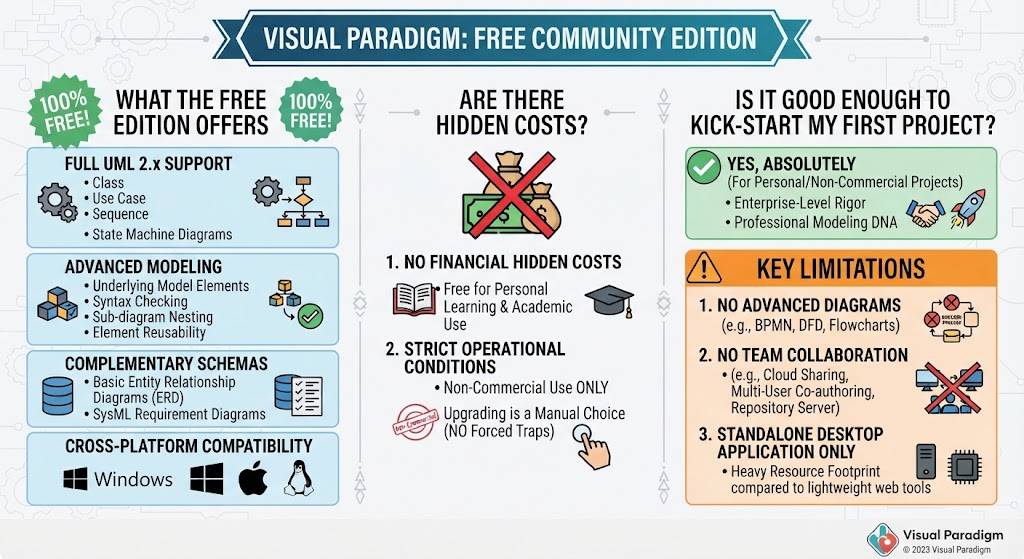
For aspiring software architects and computer science students, the barrier to entry for professional modeling tools has traditionally been high. However, the landscape of software engineering tools is shifting. Visual Paradigm’s Community Edition represents a significant milestone in democratizing enterprise-grade system design. This tutorial explores how you can leverage this robust, free tool to master UML (Unified Modeling Language) and system architecture without incurring financial costs.
Understanding the Core: Full UML 2.x Support
The foundation of any good software design is a clear understanding of the system’s structure and behavior. The Community Edition distinguishes itself immediately by offering Full UML 2.x Support. This is not merely a collection of shapes to drag and drop; it is a structured environment for defining software blueprints.
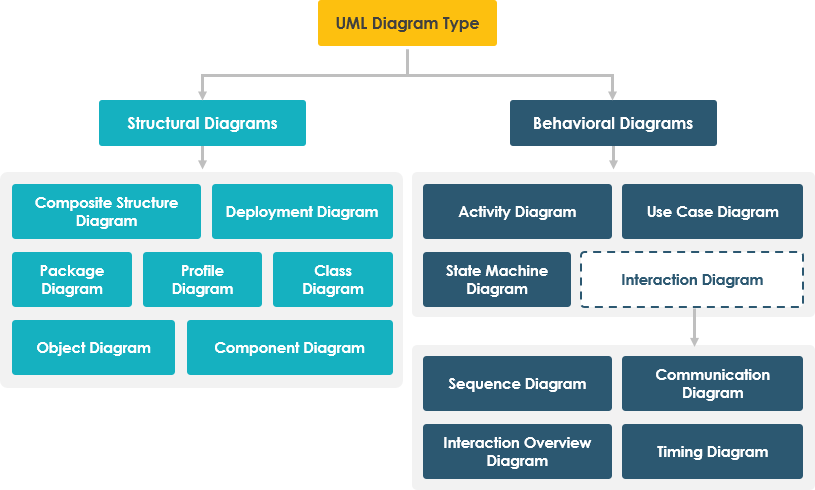
When working with this edition, you gain access to the standard suite of diagrams essential for object-oriented modeling:
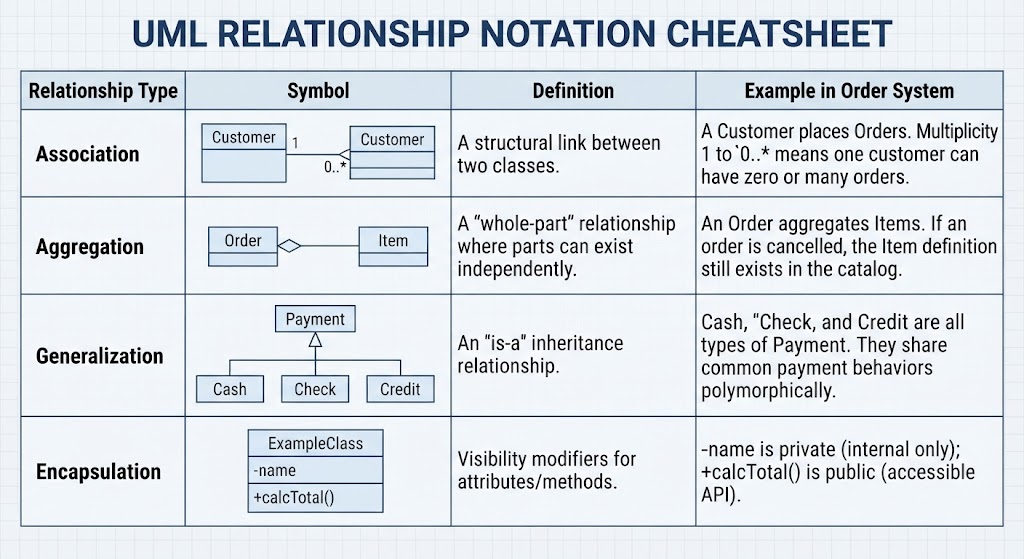
- Class Diagrams: The backbone of object-oriented design. You can build structurally sound hierarchies, define relationships (inheritance, association), and map out attributes and methods.
- Use Case Diagrams: Crucial for capturing functional requirements and understanding how actors interact with your system.
- Sequence Diagrams: Essential for modeling the dynamic behavior of a system. These diagrams visualize the flow of messages between objects over time, helping you debug logic before writing a single line of code.
- State Machine Diagrams: These are vital for modeling complex objects that change states based on events (e.g., an order changing from “Pending” to “Shipped”).
Advanced Modeling: Beyond the Canvas
One of the most critical technical distinctions of Visual Paradigm is its “Advanced Modeling Backbone.” Unlike simple vector drawing tools where a diagram is just an image, Visual Paradigm treats diagrams as data repositories.
Underlying Model Elements
In this environment, your diagram elements are reusable. If you define a “User” class in a Use Case diagram, it is linked to the “User” class in your Class diagram. This ensures consistency across your documentation. If you update the definition of the class in one place, the changes can propagate across different views of your system.
Syntax Checking and Nesting
The tool enforces rigor. It performs syntax checking to ensure your UML notation is valid. Furthermore, it supports sub-diagram nesting, allowing you to break down complex diagrams into manageable chunks without losing context. This hierarchical approach is essential for managing large-scale enterprise applications.
Complementary Schemas: Database and Systems
While UML is the primary focus, the Community Edition offers a holistic view of system design by including complementary schemas:
- Entity Relationship Diagrams (ERD): Essential for database design. You can model tables, columns, and keys to ensure your data layer supports your object model.
- SysML Requirement Diagrams: A step toward Systems Engineering, allowing you to trace requirements to specific system components.
The Critical Constraint: Understanding the License
Before beginning your project, it is vital to understand the operational conditions of the Community Edition. The “100% Free” tag comes with a strict legal architecture.
- Non-Commercial Use Only: This is the most crucial constraint. The software is strictly free for personal learning, academic studies, non-profit efforts, and hobbyist projects.
- Commercial Restriction: You cannot use this tool for revenue-generating projects, client work, or commercial business development. If you are building a startup product, you are legally required to upgrade to a paid tier.
Operational Reality: Costs and Limitations
From a technical perspective, Visual Paradigm avoids “forced traps.” They do not auto-bill you or transition you into a paid plan. You must manually opt into a commercial tier. However, there are functional trade-offs for the free tier:
Missing Advanced Diagrams
While the UML support is deep, the Community Edition excludes specific systems engineering and business analysis tools found in paid versions. You will not have access to:
- BPMN (Business Process Modeling Notation): Used for mapping complex business workflows.
- Data Flow Diagrams (DFD): Used for analyzing how data moves through a system.
- General Flowcharts: Basic process flow visualization is limited.
No Team Collaboration
The Community Edition functions strictly as a standalone desktop application. If you are working in a team, you cannot use cloud sharing, real-time multi-user co-authoring, or repository server integration. You must work offline on your local machine (Windows, macOS, or Linux).
Resource Footprint
Because the software inherits enterprise architecture codebases, it is resource-heavy. It requires more memory and CPU power compared to lightweight web-only diagramming tools. For a powerful modeling engine, this is a standard trade-off.
Conclusion: Is It Good Enough?
If you are a student, a hobbyist, or a solo developer working on open-source projects, the answer is Yes, absolutely. It provides enterprise-level rigor, allowing you to build structurally sound class hierarchies and sequence interactions safely. It removes the commercial overhead while keeping the professional modeling DNA intact.
However, if you are a commercial startup or working on a client project, you must respect the license agreement and upgrade to a paid tier (such as their entry commercial plans) to remain compliant and gain access to collaboration features.