


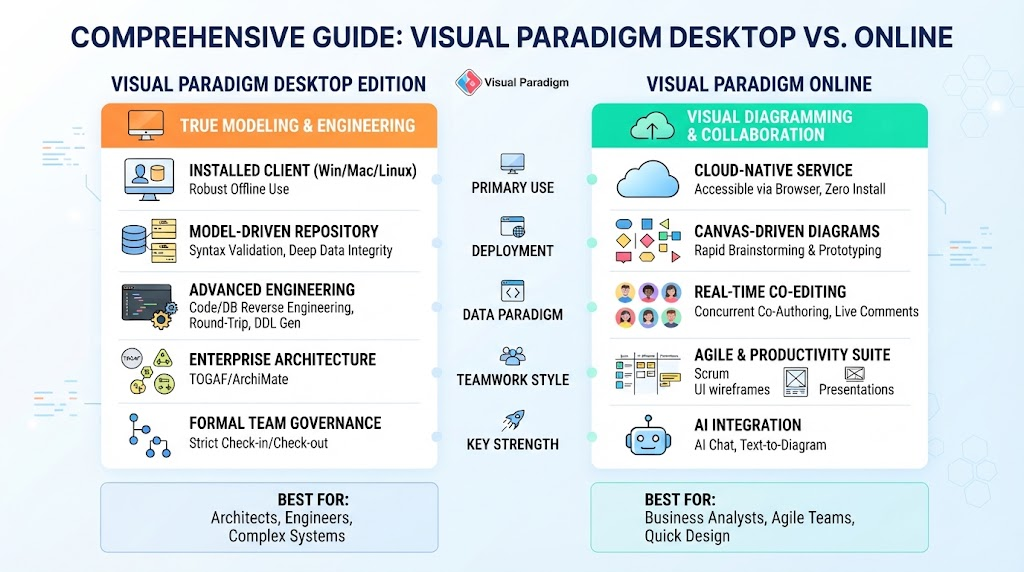
In the realm of systems engineering and software architecture, tools often serve a singular purpose: either deep technical modeling or quick visual communication. Visual Paradigm, however, stands out by offering a comprehensive ecosystem that bridges these two distinct worlds through two separate platforms: Visual Paradigm Desktop and Visual Paradigm Online.
This tutorial explores the architectural philosophy, technical capabilities, and strategic use cases of both platforms. By understanding the difference between “True Modeling” and “Visual Diagramming,” you can determine which tool—or combination of tools—is best for your specific project needs.
1. Core Philosophies: Model-Driven vs. Canvas-Driven
The fundamental difference between the two platforms lies in their underlying data architecture. Understanding this distinction is crucial for grasping how each tool handles information.
Visual Paradigm Desktop: The Model-Driven Approach
Desktop operates on a Model-Driven Architecture. In this paradigm, a diagram is merely a visual representation (a view) of an underlying repository of data. This means:
- Data Integrity: If you update a class name or an attribute in the underlying model, it automatically propagates to every diagram where that element appears.
- Syntax Validation: The system enforces strict rules, ensuring your models are technically sound before you generate code.
- Metadata Backbone: The tool stores deep metadata, enabling features like code generation and database mapping that rely on precise data relationships.
Visual Paradigm Online: The Canvas-Driven Approach
Online focuses on Canvas-Driven Visual Representations. While it supports standard notation, it prioritizes accessibility and ease of sharing over rigid backend code synchronization. In this environment:
- Speed and Agility: Shapes are designed for rapid layout iteration and brainstorming.
- Visual Focus: The primary goal is effective communication and visual design rather than deep engineering data linking.
- Zero-Configuration: It acts as a cloud service, requiring no installation or complex server setup.
2. Engineering Capabilities: Code & Database Integration
For software engineers and database architects, the distinction between the two platforms determines whether you are designing a system or merely drawing a picture of it.
Advanced Engineering in Desktop
Visual Paradigm Desktop is an indispensable tool for software engineers requiring Round-Trip Engineering. This allows for:
- Code Generation: Automatically generating source code in languages like Java, C#, Python, and C++ from your UML models.
- Reverse Engineering: Importing existing codebases to create visual models.
- Database Engineering: Generating DDL scripts for major relational databases (MySQL, PostgreSQL, Oracle, SQL Server) and managing Hibernate ORM mappings.
Visual Design in Online
Visual Paradigm Online is tailored for functional designers and business analysts. It focuses on visual design and quick prototyping. While it can map database relationships visually, it does not perform the heavy lifting of compilation cycles or direct IDE linkages found in the Desktop version.
3. Enterprise Architecture & Frameworks
When dealing with large-scale organizational structures, the tools required shift from simple coding to complex framework implementation.
Desktop: The Enterprise Standard
Desktop provides comprehensive framework tooling for rigorous architectural standards. It includes:
- TOGAF ADM: Step-by-step guidance wizards for the Architecture Development Method.
- ArchiMate 3.2: Deep support for enterprise architecture modeling.
- DoDAF & NAF: Support for defense and military architecture frameworks.
Online: Streamlined Visual Mapping
Online offers a streamlined approach to high-level architecture. It excels at creating visual mapping layouts, capability matrices, and high-level templates without the overhead of full framework compliance wizards.
4. Collaboration and Team Governance
How your team works together is a major factor in choosing the right platform.
Formal Governance (Desktop)
Desktop relies on structured team repository servers. It features formal version control, including branching, tagging, and model repository check-in/check-out workflows. This is ideal for enterprises requiring strict compliance and audit trails.
Real-Time Co-Editing (Online)
Online shines with frictionless, cloud-native collaboration. It supports:
- Concurrent Co-Authoring: Multiple users can edit the same diagram simultaneously.
- Live Comments: Stakeholders can drop comments and review changes instantly.
- Remote Brainstorming: No local file paths or server configurations are needed; access is via any modern browser.
5. The Hybrid Advantage
Many modern organizations do not choose one over the other but rather utilize a Hybrid Approach:
- Use Visual Paradigm Desktop for the heavy lifting: deep technical architecture, code engineering, and complex database mapping.
- Sync models into Visual Paradigm Online workspaces to give cross-functional stakeholders (like product managers or clients) immediate visibility into the project progress.
Conclusion: When to Choose Which?
To summarize, your choice depends on your role and the project requirements:
- Choose Visual Paradigm Desktop if: You are an Enterprise or Software Architect requiring code generation, database reverse-engineering, or round-trip synchronization. Your workflow demands rigorous model-driven integrity and offline capability.
- Choose Visual Paradigm Online if: You prioritize speed, zero installation, and cross-device accessibility. Your team relies heavily on real-time co-editing, instant feedback loops, and producing presentation-ready workflow charts.
Related posts:
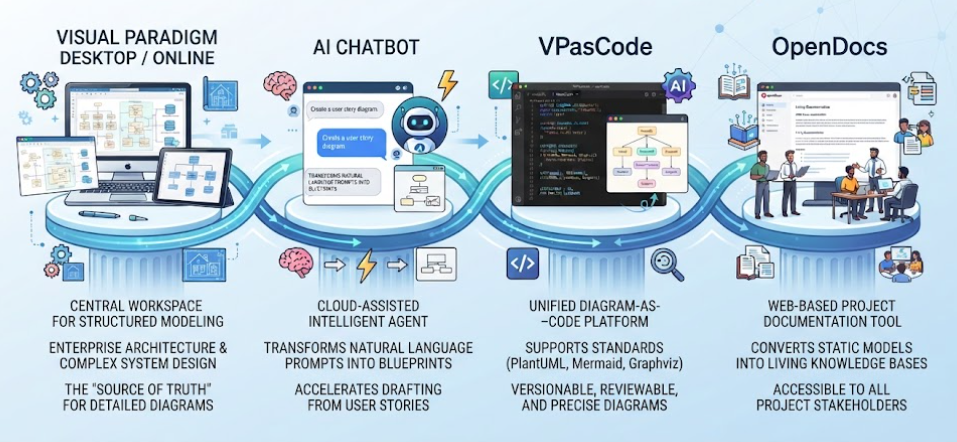 Mastering the Modern Software Design Workflow: From Ideation to Living Documentation with Visual Paradigm
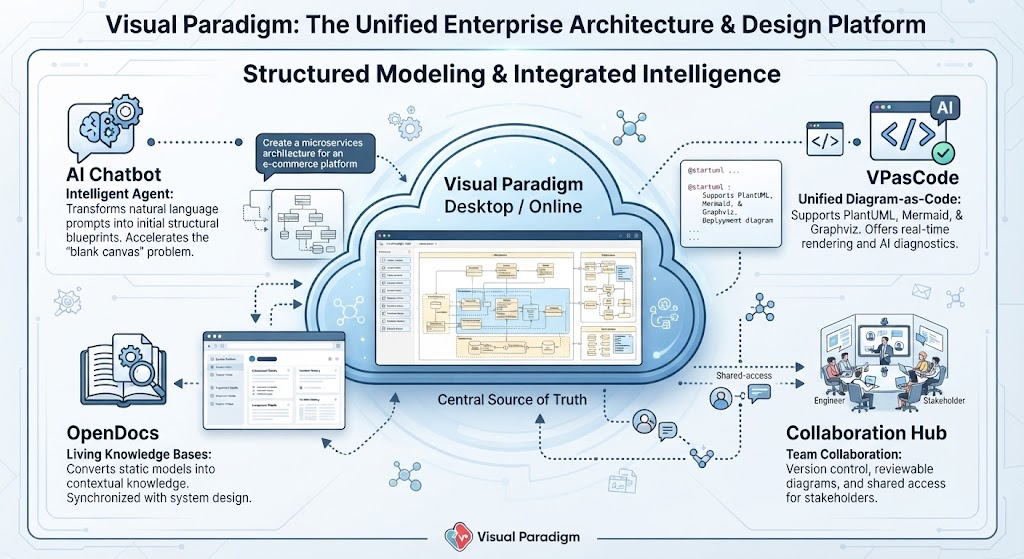 Mastering Enterprise Architecture with Visual Paradigm: A Unified Modeling Ecosystem
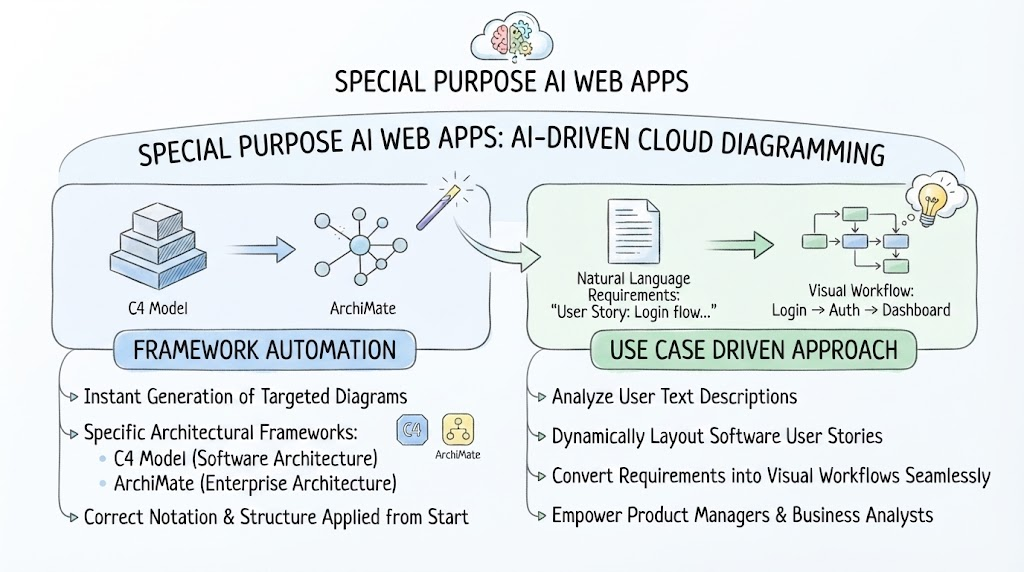 Mastering AI-Driven System Modeling: From Frameworks to Workflows
 Mastering System Architecture: How AI Chatbots Transform Visual Modeling