In the fast-paced world of Agile development, the gap between abstract requirements and executable workflows is often bridged by tedious manual modeling. Traditional Business Process Model and Notation (BPMN) tools require significant time to draft and validate diagrams, often slowing down the sprint cycle. However, a new paradigm is emerging: AI-Powered BPMN Mapping.
This tutorial explores the architecture behind modern AI-integrated platforms (such as Visual Paradigm’s AI features) that allow teams to generate mathematically correct, OMG-compliant diagrams directly from raw text or conversational prompts. We will walk through the system architecture, the modeling concepts involved, and practical strategies for implementation.
1. System Architecture: The “Text-to-Workflow” Pipeline
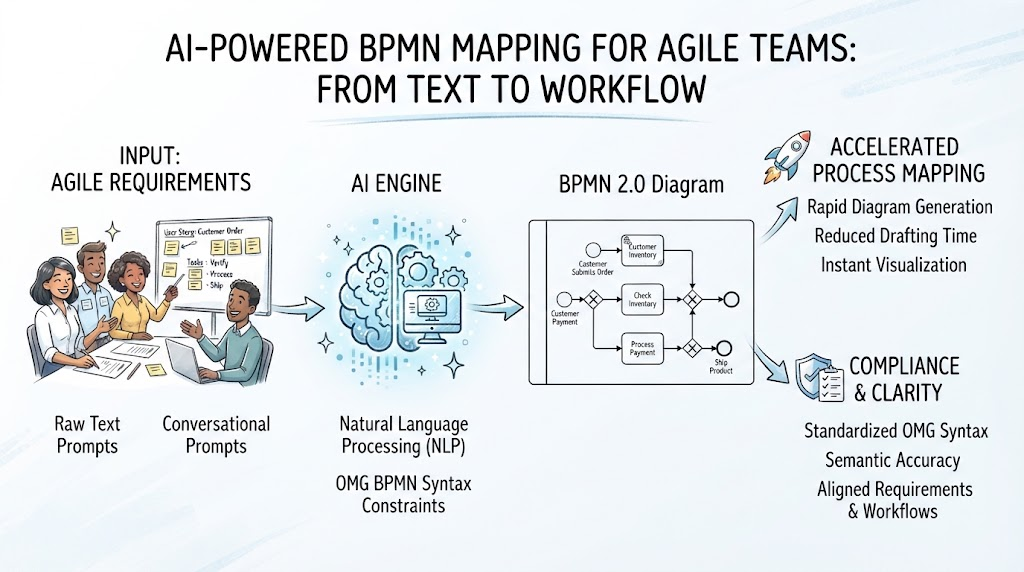
The core innovation lies in a three-stage pipeline that transforms unstructured data into structured process models. As illustrated in the architecture diagram, the process flows from input to an intelligent engine, and finally to a standardized output.
Stage 1: Input – Agile Requirements
The process begins with the “fuel” of the system: Agile artifacts. Instead of dragging and dropping shapes, the user provides input in a natural format. This includes:
- Raw Text Prompts: Descriptive sentences like “The customer places an order, the system checks inventory, and if stock is low, it triggers a backorder.”
- Conversational Prompts: Interactive dialogue with the AI, refining the process step-by-step.
- User Stories: Standard Agile format inputs (e.g., “As a user, I want to… so that…”).
Stage 2: The AI Engine
This is the “brain” of the operation. It is not merely a text generator but a logic engine constrained by strict standards. It performs two critical functions:
- Natural Language Processing (NLP): The AI parses the input to identify actors (who is doing the action), actions (what is being done), and objects (what is being acted upon). It infers the logical sequence of events.
- OMG BPMN Syntax Constraints: Unlike generic LLMs, this engine is bound by the Object Management Group (OMG) standards. It ensures that the generated diagram is syntactically valid—meaning it uses the correct gateways, event types, and connectors according to the BPMN 2.0 specification.
Stage 3: Output – BPMN 2.0 Diagram
The result is a fully realized process map. This output provides two distinct advantages:
- Accelerated Process Mapping: Rapid generation allows for instant visualization, reducing drafting time from hours to seconds.
- Compliance & Clarity: Because the diagram adheres to strict OMG syntax, it guarantees semantic accuracy. Stakeholders can read the diagram knowing it represents a valid, executable workflow.
2. Modeling Concepts: How the AI Understands Process
To leverage this technology effectively, it is important to understand how the AI maps language to visual symbols.
Event-Driven Logic
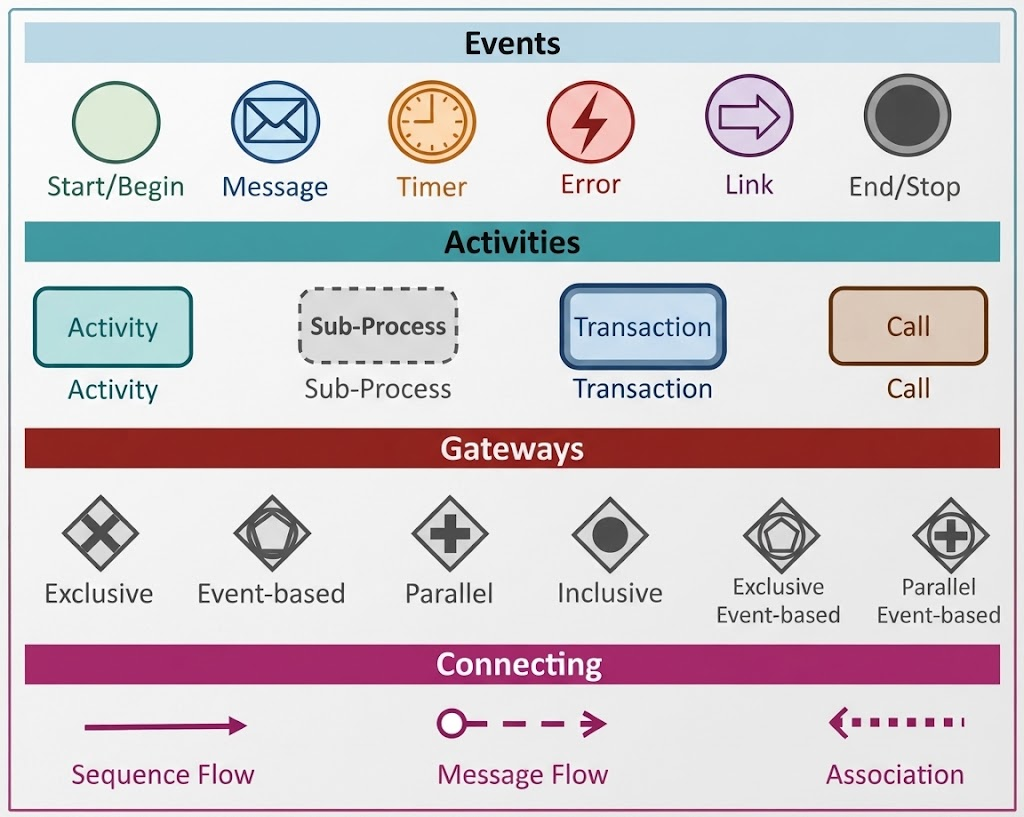
In the example of a “Customer Order,” the AI identifies specific trigger points. It recognizes that “Customer Submits Order” is a Start Event (represented by a circle) and “Ship Product” is an End Event. The AI automatically places the appropriate boundary events to ensure the lifecycle of the process is clear.
Gateway Logic
One of the most complex parts of BPMN is the decision logic (Gateways). The AI uses NLP to detect conditional statements (If/Else). For example, if the prompt mentions “Check Inventory,” the AI inserts a Exclusive Gateway (the diamond shape) to branch the path: one path for “Stock Available” and another for “Stock Unavailable.”
3. Usage Cases for AI-Driven BPMN
How can Agile teams integrate this into their daily workflow?
- Sprint Planning & Refinement: During backlog refinement, Product Owners can paste a user story into the AI tool to instantly visualize the “Happy Path” and potential exceptions. This helps the team identify missing requirements before coding begins.
- Legacy System Migration: When moving from a legacy system to a new microservices architecture, teams can input existing documentation as raw text to rapidly generate baseline diagrams that can then be refined.
- Onboarding & Knowledge Transfer: New team members can ask conversational questions like, “How does the payment refund process work?” and instantly receive a visual diagram, speeding up their ramp-up time.
- Gap Analysis: Teams can compare a “Current State” text description against a “Future State” prompt to visually highlight process improvements.
4. Best Practices for Prompt Engineering
While AI is powerful, the quality of the output depends on the quality of the input. Follow these best practices to ensure high-fidelity diagrams.
- Define Clear Roles: Explicitly state who performs the action. Instead of “Process Payment,” use “Finance Team processes payment.”
- Be Explicit About Exceptions: Don’t just describe the success flow. If an order fails, specify the error handling. “If payment fails, notify the customer and stop the process.”
- Iterate on the Prompt: Treat the AI as a junior developer. If the first diagram is missing a gateway, refine your prompt: “Add a decision point to check if the user is a VIP member.”
5. Tips and Tricks for Agile Teams
Here are some specific tips to maximize efficiency when using AI-integrated modeling tools.
- Use the “User Story” Template: The AI is often trained on standard Agile formats. Providing inputs in the format “As a [Role], I want [Action], so that [Benefit]” yields higher accuracy.
- Review, Don’t Just Accept: While the syntax is mathematically correct, the logic might be flawed. Always review the generated diagram for business logic errors. The AI ensures the rules are followed, but you must ensure the business rules are correct.
- Combine with Collaboration: Use the generated diagram as a whiteboarding session starter. Have the team annotate the AI-generated draft to correct misunderstandings immediately.
- Leverage Templates: If your organization has a standard BPMN template (e.g., specific colors for swimlanes), apply that template to the AI output to ensure brand consistency across all documentation.