In the realm of business process management (BPM), clarity is currency. A process that is poorly documented is a process that is difficult to improve. This tutorial guides you through the foundational building blocks of Business Process Model and Notation (BPMN), specifically focusing on the mechanics of flow and organizational responsibility.
Using the visual logic of a standard application approval process, we will deconstruct how systems communicate order, structure, and ownership. Whether you are a business analyst, a developer, or a process owner, understanding these elements is essential for creating systems that are robust and human-readable.
The Backbone of Logic: Sequence Flows
At the most fundamental level, a process is a story of time and action. How do we tell that story? We use Sequence Flows. In technical diagrams, these are represented by arrows that connect various objects, dictating the exact order of operations.
Defining the Path
A sequence flow is the “connective tissue” of a diagram. Without it, a collection of shapes is merely a list of tasks. With it, it becomes a dynamic workflow. The arrows serve a singular, critical purpose: they show the direction of the process.
Consider the logical progression of an application review. The system must know that one action is impossible until another is complete. The sequence flow enforces this logic:
- Start: The trigger event occurs.
- Receive: The system moves to the intake phase.
- Verify: The data must be checked before action is taken.
- Approve: The final decision is made.
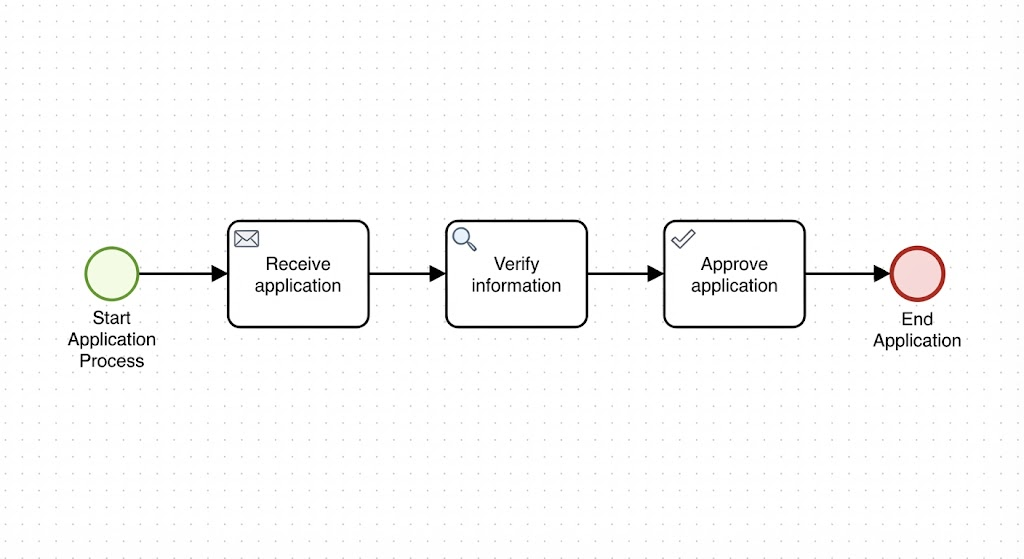
As illustrated in the diagram below, the flow is linear. The arrow pointing from the green circle (Start) to the first task (Receive application) indicates that the process cannot begin its substantive work until the trigger is pulled. Similarly, the arrow leading into the red circle (End Application) signifies that the “Approve application” task is the final step before the process terminates.
If a reader looks at a diagram without sequence flows, they are left guessing: “Does verification happen before or after the application is received?” Sequence flows eliminate ambiguity, ensuring that the “what happens next” is always clear.
Adding Context: Pools and Lanes
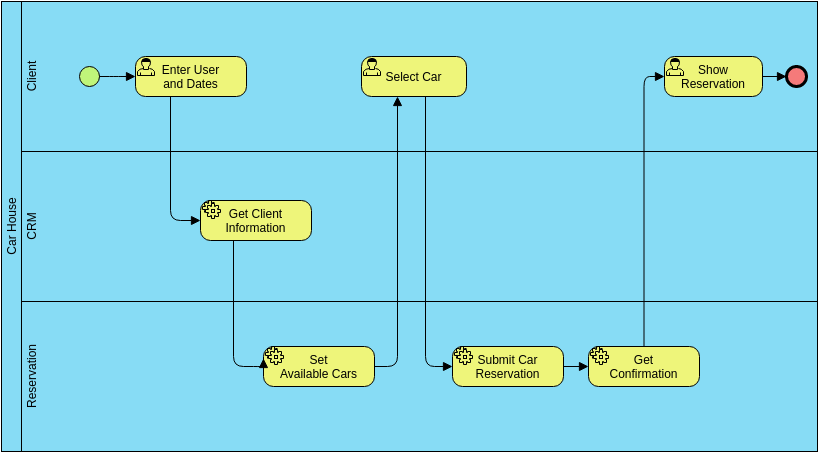
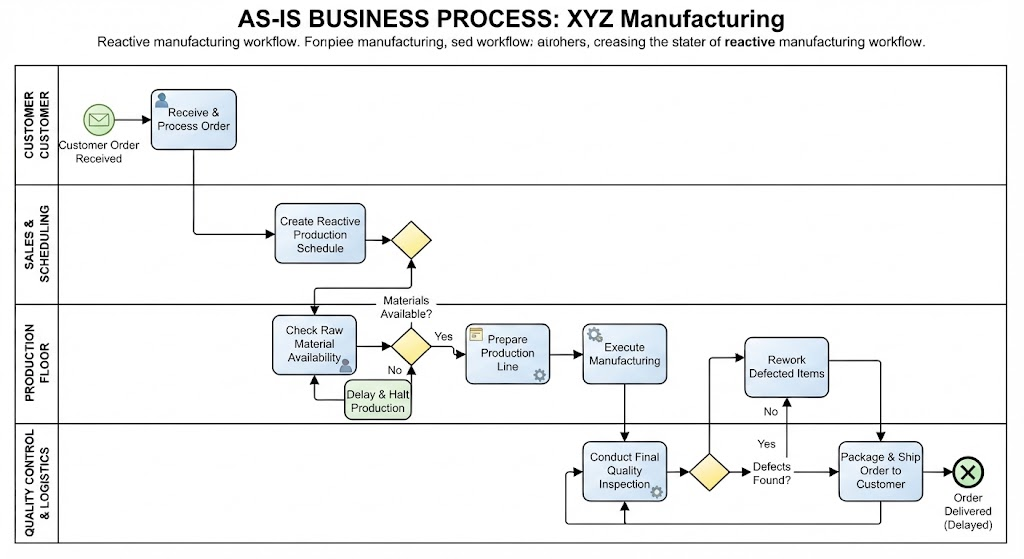
While sequence flows tell us when things happen, Pools and Lanes tell us who is doing it. In complex enterprise environments, processes rarely happen in a vacuum. They involve interactions between different entities and departments. BPMN uses these containers to visualize responsibility.
The Pool: The Participant
A Pool represents a major participant in the process. Think of a pool as a container or a “black box” that encapsulates a specific business entity. This entity could be:
- A specific company or organization.
- A customer or external partner.
- A supplier or government agency.
- A specific, isolated business process.
In the context of the diagram provided, the entire linear flow exists within a single pool. This implies that the “Start Application Process” to “End Application” workflow is contained within a single organizational boundary or a unified system.
The Lane: The Role and Responsibility
Once you have a Pool, you can divide it into Lanes. A lane is a visual subdivision that represents a specific role, department, team, or persona. This is crucial for identifying ownership and handoffs.
Let’s expand our example. Imagine the “Loan Request” pool mentioned in the context. We could divide this pool into three distinct lanes:
- Bank Branch: The front-facing role that interacts with the client.
- Credit Department: The analytical role that assesses risk.
- Back Office: The administrative role that handles final processing.
By placing the “Receive application” task in the “Bank Branch” lane and the “Verify information” task in the “Credit Department” lane, the diagram instantly communicates a handoff. The arrow crossing from one lane to another represents the physical or digital transfer of work from one team to another.
Visualizing the Application Process
Let’s apply these concepts to the specific workflow shown in the image: Start Application Process → Receive Application → Verify Information → Approve Application → End Application.
This diagram is a classic example of a Task Flow. It demonstrates the simplest form of BPMN execution:
- Start Event (Green Circle): The process is triggered. This is the entry point.
- Receive Application (Task with Envelope Icon): A manual or automated task where the input is received. The envelope icon typically denotes a message or document receipt.
- Verify Information (Task with Magnifying Glass): A distinct step requiring scrutiny. The magnifying glass icon universally signifies analysis or search.
- Approve Application (Task with Checkmark): The decision-making task. The checkmark implies a successful validation or final sign-off.
- End Application (Red Circle): The termination of the process flow.
The black arrows connecting these shapes are the sequence flows. They dictate that you cannot verify information until the application is received, and you cannot approve it until verification is complete. This strict ordering is what makes the process predictable and auditable.
Conclusion
Understanding BPMN is not just about drawing shapes; it is about modeling reality. By utilizing Sequence Flows, you define the logic and timing of operations. By utilizing Pools and Lanes, you define the structure, participants, and responsibilities within that logic. Together, they transform a chaotic list of tasks into a streamlined, transparent blueprint for success.
To effectively implement these diagrams and bring them to life in your organization, it is recommended to utilize professional tooling. For comprehensive modeling, Visual Paradigm BPMN Tool is a highly recommended solution. It offers robust features for creating these sequence flows, managing complex pool structures, and facilitating team collaboration on process architecture.