


In the world of software development and business process management, clarity is king. When defining complex workflows like a Refund Approval Process, relying solely on hand-drawn diagrams can lead to ambiguity, version control nightmares, and maintenance headaches. This is where VPasCode (Visual Paradigm as Code) shines. By treating diagrams as text, developers and analysts can leverage version control systems, automated validation, and collaborative editing.
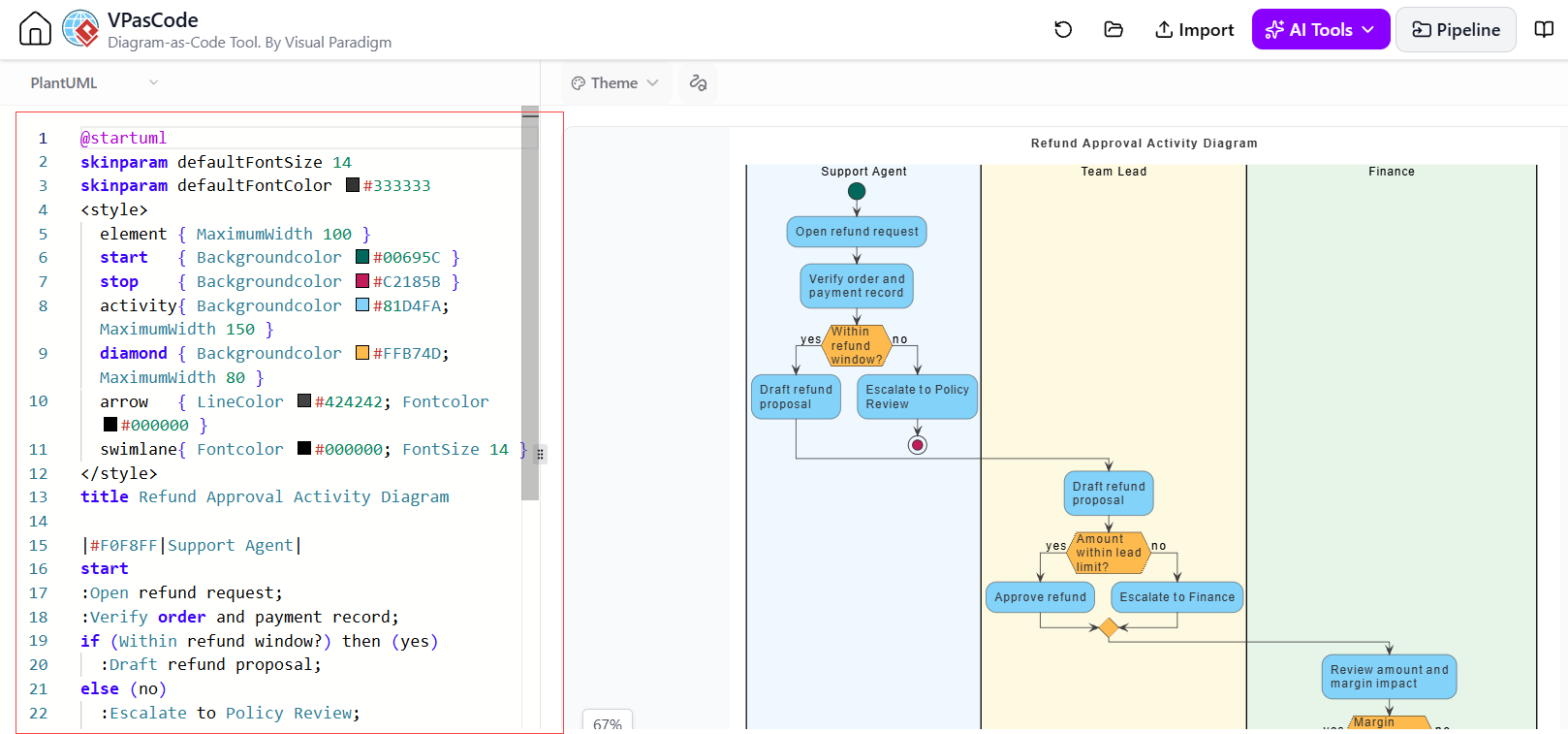
This tutorial walks you through the architecture and logic of the Refund Approval Activity Diagram shown in the provided context. We will break down the PlantUML syntax, the flow of logic between the Support Agent, Team Lead, and Finance departments, and how to use the tool effectively.
Understanding the System Architecture
The diagram visualizes a business process where a customer requests a refund. The process is divided into three distinct swimlanes (or partitions), representing the different roles involved:
- Support Agent: The first point of contact. They verify the initial request and check if the request falls within a valid policy window.
- Team Lead: Handles approvals for standard refunds and manages escalations to higher authorities.
- Finance: The final authority responsible for reviewing the financial impact (margin) before a refund is processed.
Using VPasCode allows us to define this structure in code, ensuring that the logic is precise and that the “source of truth” is stored alongside the application code.
Deconstructing the VPasCode Syntax
The source code on the left side of the interface is written in PlantUML, a scripting language for generating diagrams. Let’s analyze the key components of this specific activity diagram.
1. Skinparam and Styling
Before defining the logic, the code sets the visual theme using the @skinparam directive. This ensures the diagram looks professional and consistent with the organization’s branding.
@startuml
skinparam defaultFontSize 14
skinparam defaultFontColor #333333
title Refund Approval Activity Diagram2. Defining Swimlanes
Swimlanes are defined using the |#Color|Role Name syntax. This visually separates the responsibilities in the final output.
|#F0F8FF|Support Agent|
|#FFF8DC|Team Lead|
|#E8F5E9|Finance|
3. Logic Flow and Conditional Branching
The core of the diagram is the logic flow. The code uses standard PlantUML activity diagram syntax:
startandstop: Define the entry and exit points.:Activity Name;: Defines a process step.if (Condition) then (yes) ... else (no): Creates decision diamonds (hexagons) that direct the flow based on true/false outcomes.
Here is the logic for the Support Agent lane, which handles the initial validation:
Support Agent
start
:Open refund request;
:Verify order and payment record;
if (Within refund window?) then (yes)
  :Draft refund proposal;
else (no)
  :Escalate to Policy Review;
endif
Step-by-Step Walkthrough of the Workflow
Let’s trace the path of a single refund request through the diagram to understand the business logic.
- Initiation (Support Agent): The process begins when the Support Agent opens a refund request and verifies the order details. This is a critical gatekeeping step.
- The First Decision (Support Agent): The system checks: “Is this within the refund window?”
- No: The request is immediately flagged. The flow moves to “Escalate to Policy Review” (handled by the Team Lead).
- Yes: The agent proceeds to “Draft refund proposal.”
- Approval (Team Lead): Once the proposal is drafted (either directly or after policy review), it goes to the Team Lead. The lead checks: “Is the amount within the lead limit?”
- Yes: The lead “Approves refund,” and the process ends.
- No: The request is escalated to the Finance department.
- Final Review (Finance): The Finance team reviews the amount and margin impact. If approved, the process concludes; if rejected, it likely loops back or terminates (depending on further business rules not fully visible in this snippet).
Validation: The “Gate, Not Formality”
As noted in the context, validation in VPasCode is not just about syntax. It is a gatekeeper for semantic correctness. When you write this code, the tool checks two things:
- Syntactic Validity: Are there unclosed
ifstatements? Are the syntax rules for PlantUML followed? These are “cheap” errors to catch and easy to fix in the editor. - Semantic Validity: Does the diagram make sense? For example, does the “Finance” lane have an exit point? Are there any unreachable branches? The “reader’s question” from the design phase is crucial here: “Does this diagram answer the question it was commissioned for?”
Conclusion
By mastering VPasCode, you move away from static, static images that rot over time. You embrace a workflow where your diagrams are code, versioned, validated, and ready for automated pipelines. The Refund Approval diagram serves as a perfect example of how code can model complex, multi-party business logic with precision and clarity.