


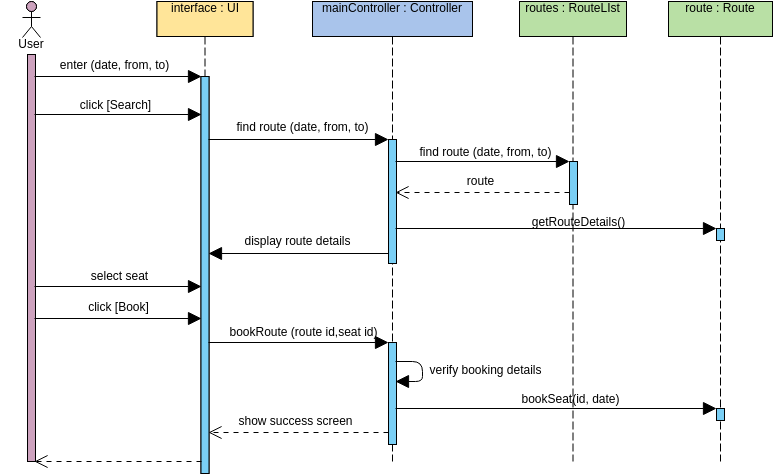
In the world of software engineering, understanding how different components of a system interact is crucial. A Sequence Diagram is one of the most powerful tools in the Unified Modeling Language (UML) arsenal for visualizing these interactions over time. It provides a snapshot of the dynamic behavior of a system, showing how objects exchange messages to achieve a specific goal.
In this tutorial, we will dissect a classic example: the Book a Seat process. This diagram illustrates the flow of events from a user’s initial request to the final confirmation of a booking. We will explore the roles of the User, the User Interface, the Controller, and the underlying Route services to understand how the architecture supports this functionality.
Understanding the Participants (Lifelines)
Before diving into the flow, let’s identify the key actors and objects involved in this sequence. In UML, these are represented as vertical rectangles called lifelines.
- User (Actor): Represented by the stick figure on the far left. This is the external entity initiating the process.
- interface : UI: The User Interface component responsible for capturing user input and displaying information.
- mainController : Controller: The brain of the operation. It handles the business logic, orchestrating the flow between the UI and the data services.
- routes : RouteList: A service or object responsible for managing a collection of routes.
- route : Route: A specific route entity that holds detailed information about a path (e.g., from/to cities).
Step-by-Step Flow Analysis
The sequence diagram reads from top to bottom, representing the passage of time. Here is the breakdown of the interaction:
1. Initiation and Search
The process begins when the User interacts with the UI. They enter search parameters (date, from, to) and click the [Search] button. This triggers a message to the mainController.
2. Route Discovery
The mainController acts as a mediator. It requests a list of routes by calling find route (date, from, to) on the routes object. The routes object returns the list of available routes back to the controller.
3. Displaying Details
Once the controller has the list, it may need specific details for a selected route. The diagram shows the controller calling getRouteDetails() on a specific route object. The route returns the details, which the controller then sends back to the UI via display route details.
4. Booking Execution
The user selects a seat and clicks [Book]. The UI passes this request to the mainController using the bookRoute (route id, seat id) message. The controller performs a self-loop (or internal logic check) to verify booking details. Finally, it invokes the bookSeat (id, date) method on the specific route object to finalize the transaction.
5. Completion
Once the seat is booked, the controller sends a final confirmation message, show success screen, back to the UI, which then notifies the user.
sequenceDiagram
    actor User
    participant UI as interface : UI
    participant Controller as mainController : Controller
    participant RouteList as routes : RouteList
    participant Route as route : Route

    User->>UI: enter (date, from, to)
    User->>UI: click [Search]
    UI->>Controller: find route (date, from, to)
    Controller->>RouteList: find route (date, from, to)
    RouteList-->>Controller: route
    Controller->>Route: getRouteDetails()
    Route-->>Controller: display route details
    User->>UI: select seat
    User->>UI: click [Book]
    UI->>Controller: bookRoute (route id,seat id)
    Controller->>Controller: verify booking details
    Controller->>Route: bookSeat(id, date)
    Route-->>Controller: show success screen
Tooling: Visual Paradigm
To create professional, industry-standard UML diagrams like the one above, you need robust modeling software. Visual Paradigm is a leading solution for this purpose. It offers a comprehensive suite of features that allow architects and developers to design, simulate, and document system behavior efficiently.
When using Visual Paradigm to create sequence diagrams, you benefit from:
- Drag-and-Drop Interface: Easily place actors, lifelines, and message arrows without writing code.
- Auto-Layout: The tool automatically arranges elements to ensure the diagram is readable and professional.
- Code Generation: Visual Paradigm can generate source code skeletons from your sequence diagrams, bridging the gap between design and implementation.
Conclusion
By breaking down the Book a Seat sequence diagram, we have seen how a complex user request is translated into a series of coordinated messages between system components. Mastering these diagrams is essential for anyone looking to design scalable and maintainable software architectures.