


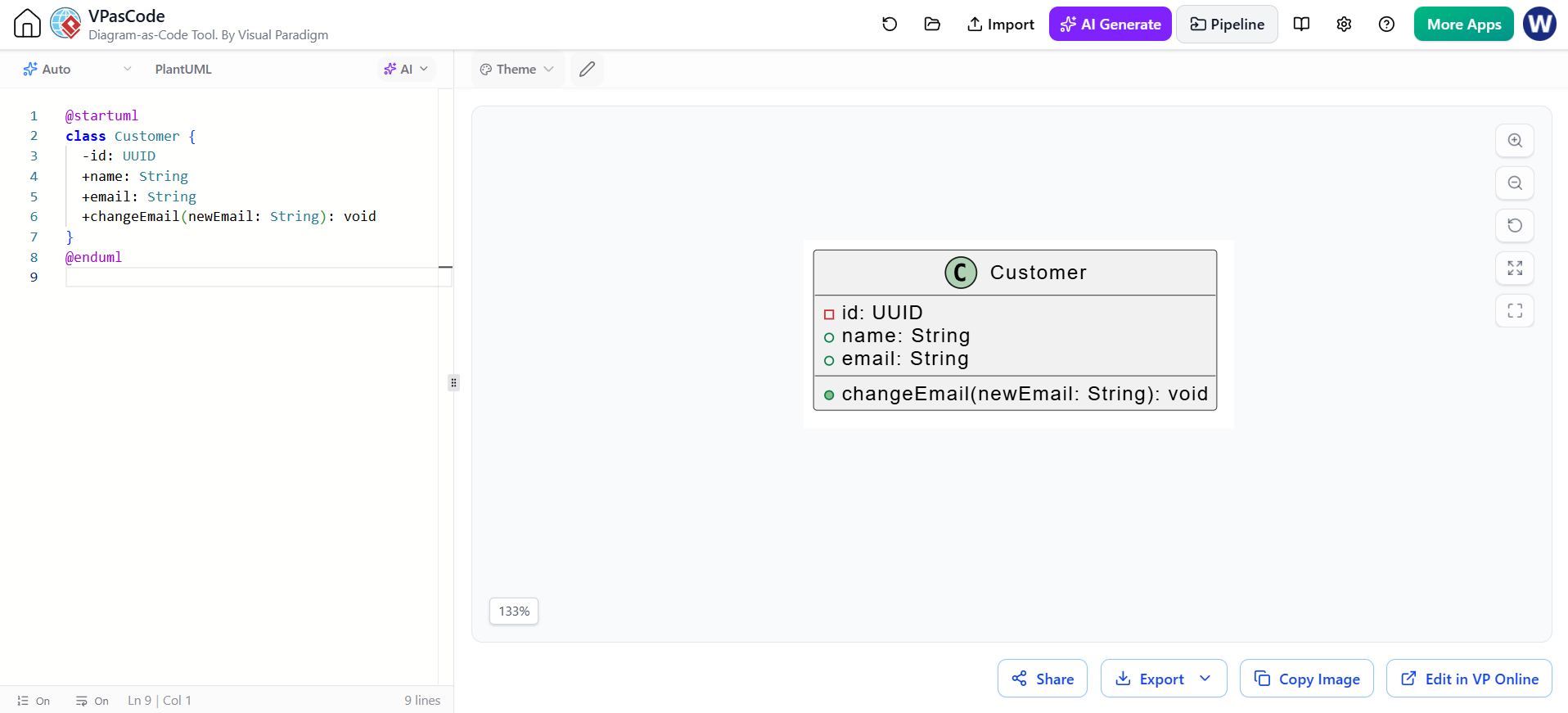
Welcome to this comprehensive guide on modeling object-oriented systems using Visual Paradigm’s VPasCode and the PlantUML syntax. In modern software architecture, the ability to rapidly prototype class structures and visualize relationships is crucial. This tutorial will walk you through the anatomy of a UML Class Diagram, demonstrating how a simple text definition transforms into a professional visual model.
The Power of Diagram-as-Code
Traditionally, creating UML diagrams involved dragging and dropping shapes onto a canvas. While intuitive, this approach can become tedious when making rapid changes or version-controlling diagrams. VPasCode flips the script by allowing you to define your system architecture using plain text code. This “Diagram-as-Code” approach ensures that your models remain synchronized with your actual source code and are easily readable in text editors.
In the context of the provided example, we are defining a Customer class. This is the fundamental building block of our object-oriented design, representing an entity with specific data and behaviors.
Anatomy of a PlantUML Class
Let’s break down the structure of the code snippet provided. A standard class definition in PlantUML consists of a header, a list of members (attributes and operations), and a closing delimiter.
The syntax follows a specific pattern:
- Header: Defines the class name and scope.
- Attributes: Represents the state or data fields of the class.
- Operations: Represents the methods or functions the class can perform.
1. The Class Declaration
Every class diagram block must start with the
@startuml</code> directive and end with <code>@enduml. Inside, the class keyword initiates the definition. The name Customer is immediately visible in the generated diagram.
@startuml
class Customer {
    -id: UUID
    +name: String
    +email: String
    +changeEmail(newEmail: String): void
}
@enduml
2. Visibility Modifiers
One of the most critical aspects of UML is encapsulation, which is represented in the syntax by specific symbols preceding the attribute or method name. These symbols dictate the visibility scope of the member.
- Minus (-): Represents Private visibility. Only the class itself can access this member. In our example,
-id: UUIDis private, protecting the unique identifier from external direct modification. - Plus (+): Represents Public visibility. This member is accessible from any other class. Attributes like
+nameand+emailare public, meaning they are part of the class’s interface.
3. Data Typing
PlantUML allows you to specify the data type of your attributes and parameters using a colon separator (:). This helps in understanding the expected value format.
    -id: UUID
    +name: String
    +changeEmail(newEmail: String): void
In the code above, we see UUID (Universally Unique Identifier) for the ID, String for text data, and a return type of void for the method, indicating it performs an action but returns no data.
Visualizing the Result
When VPasCode renders this code, it produces a standard UML Class diagram. The visual representation includes:
- The Class Box: Divided into compartments. The top holds the name, the middle holds attributes, and the bottom holds operations.
- Icons: Visual cues such as the square icon for private members and the circle icon for public members appear in the diagram, reinforcing the text-based syntax.
- Layout: The tool automatically arranges the elements to ensure readability, spacing out the attributes and operations logically.
For example, the method changeEmail(newEmail: String): void is rendered as an operation that accepts a String argument named newEmail and performs an action. This directly maps to a method signature in a programming language like Java or C#.
Best Practices for Modeling
When using VPasCode to model your architecture, keep the following principles in mind:
- Be Explicit: Always define the data type. It prevents ambiguity during the design phase.
- Consistent Naming: Use camelCase for attributes and operations, and PascalCase for class names, as shown in the
Customerexample. - Keep it Simple: Start with the core classes. You can expand the diagram by adding relationships (associations, inheritance) later.
Conclusion
By leveraging VPasCode, you transform the tedious task of drawing UML diagrams into a streamlined coding experience. The ability to define a Customer class with its attributes and operations in a few lines of text allows for rapid iteration and better collaboration. Whether you are a student learning OOP principles or a professional architect designing a new system, mastering this syntax is a valuable skill.