


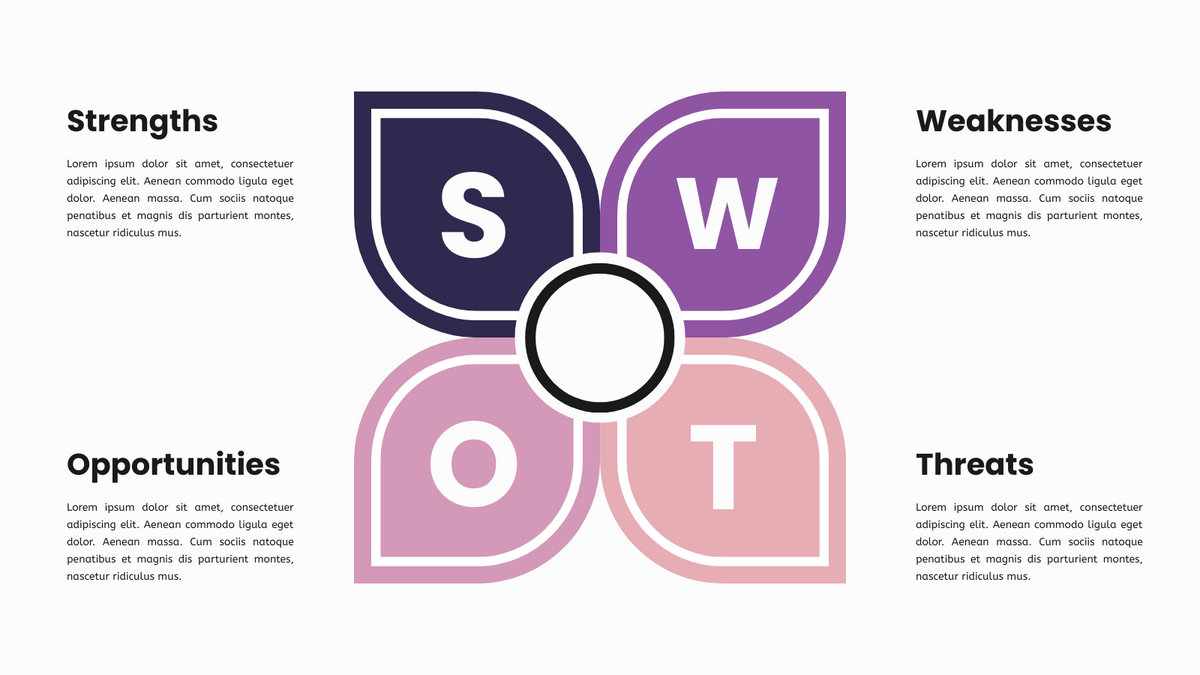
Strategic planning is the backbone of organizational success, yet it often fails due to a lack of structured analysis. The SWOT Analysis Model remains one of the most enduring frameworks for business strategy, allowing organizations to evaluate their internal Strengths and Weaknesses, alongside external Opportunities and Threats.
In this tutorial, we will deconstruct the visual and conceptual architecture of the Petal-Style SWOT Analysis. This specific diagrammatic representation—often generated by tools like Visual Paradigm—uses a central circular hub surrounded by four distinct, petal-shaped quadrants. This layout is not merely aesthetic; it is a deliberate design choice that visualizes the interconnectivity of strategic factors.
The Architecture of the Petal-Style Diagram
Unlike the traditional grid-based SWOT matrix, which treats the four quadrants as independent silos, the petal style emphasizes a holistic view. The visual structure guides the analyst’s eye through the following components:
- The Central Hub: The white circle in the center represents the core subject of the analysis—be it a specific product, a business unit, or the organization as a whole. It acts as the anchor point from which all strategies radiate.
- The Quadrants (The Petals): The four colored shapes (Strengths, Weaknesses, Opportunities, Threats) surround the center. Their curved, organic shapes suggest fluidity and the dynamic nature of business environments.
- The Color Coding:
- Dark Blue (Strengths): Often associated with stability and trust, representing internal capabilities.
- Purple (Weaknesses): Used to highlight areas requiring attention or improvement.
- Pink (Opportunities): Suggesting potential growth and external favorable conditions.
- Light Red/Orange (Threats): Signaling risk and the need for defensive measures.
Step-by-Step: Conducting the Analysis
To effectively utilize this model, you must populate each “petal” with actionable data. Below is the systematic approach to generating the content for your diagram.
1. Identifying Strengths (Internal)
This quadrant focuses on what you do better than anyone else. These are your internal assets.
- Capabilities: What skills does your team possess that rivals lack?
- Resources: Do you have proprietary technology, strong cash flow, or a skilled workforce?
- Brand: Is your reputation a key differentiator in the market?
2. Identifying Weaknesses (Internal)
This quadrant requires brutal honesty. It focuses on areas where you are underperforming compared to the competition.
- Deficiencies: What processes are slow or prone to error?
- Customer Feedback: What generates the most complaints?
- Resource Gaps: Are you lacking the capital or technology to compete?
3. Identifying Opportunities (External)
Opportunities are external factors that you can exploit. These are trends or changes in the market that align with your strengths.
- Market Shifts: How are customer needs changing?
- Technology: Are there new tools that can revolutionize your production?
- Competitor Weaknesses: Are rival customers dissatisfied and looking for a better option?
4. Identifying Threats (External)
Threats are external challenges that could harm your business. These require mitigation strategies.
- Substitutes: Are customers using alternative products to meet their needs?
- Competition: Is new competition entering the market?
- Obsolescence: Is new technology making your current product outdated?
- Financial Health: Is your debt position healthy relative to the industry?
Applying the Model: A Structured Approach
When using the Petal-Style template, the goal is not just to list items but to create a dialogue between the quadrants. For example, you might use a Strength to capitalize on an Opportunity, or use a defensive strategy to protect against a Threat by plugging a Weakness.
This model is fully customizable. In professional modeling software, you can:
- Insert Branding: Replace the generic colors with your corporate color palette.
- Add Images: Include logos or data visualizations directly within the petals.
- Link to Content: Connect the text in the diagram to detailed strategic documents or external URLs.
Conclusion
The Petal-Style SWOT Analysis is more than a checklist; it is a strategic visual aid. By organizing your thoughts into this specific architecture, you create a clear roadmap for decision-making, ensuring that internal capabilities are perfectly aligned with external market realities.