


From Visual Diagrams to Code: VPasCode AI Ecosystem Workflow
Transform Visual Paradigm Desktop diagrams into PlantUML or Mermaid code via Pipeline and VPasCode to bridge visual modeling with code-centric workflows.
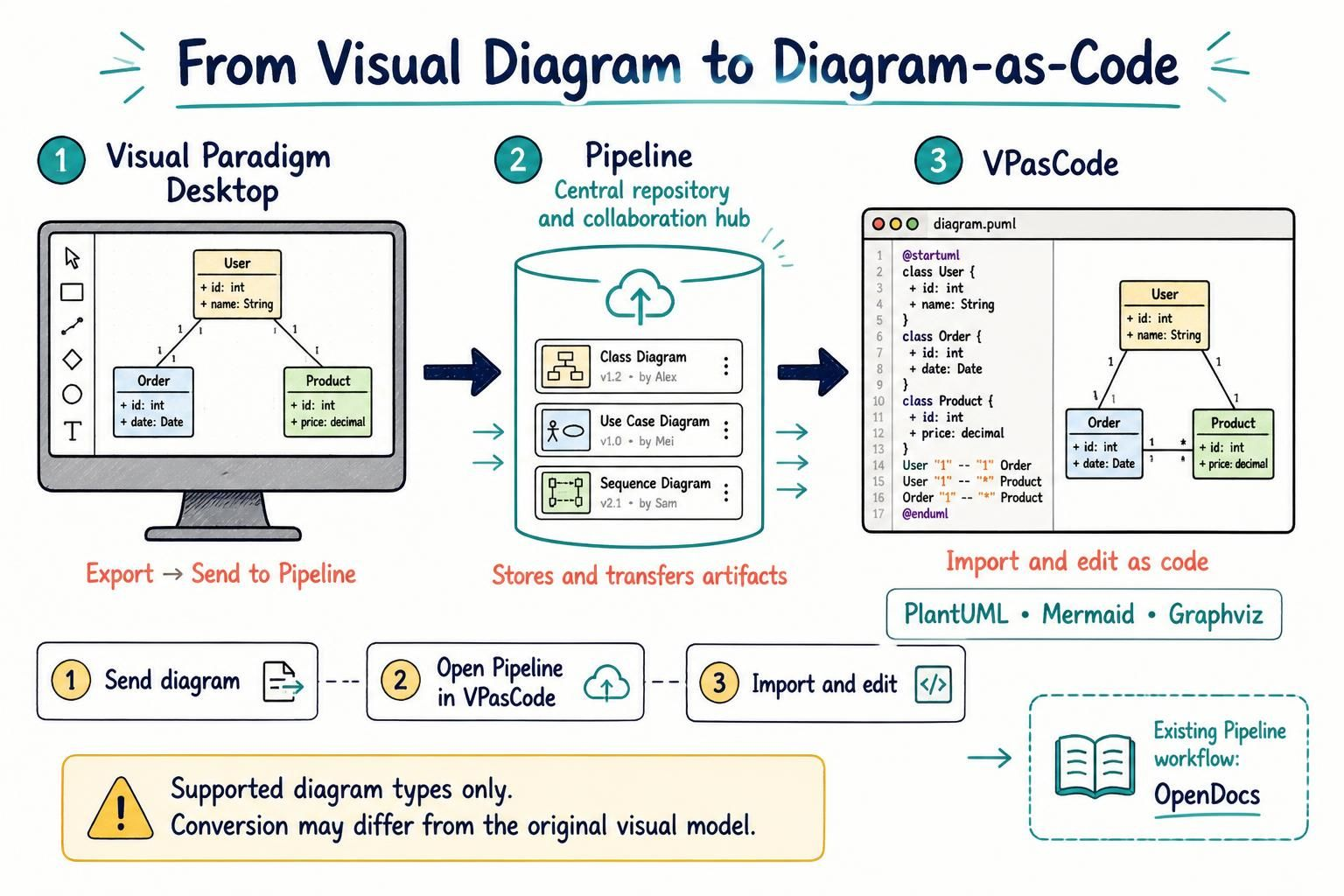
Transform Visual Paradigm Desktop diagrams into PlantUML or Mermaid code via Pipeline and VPasCode to bridge visual modeling with code-centric workflows.
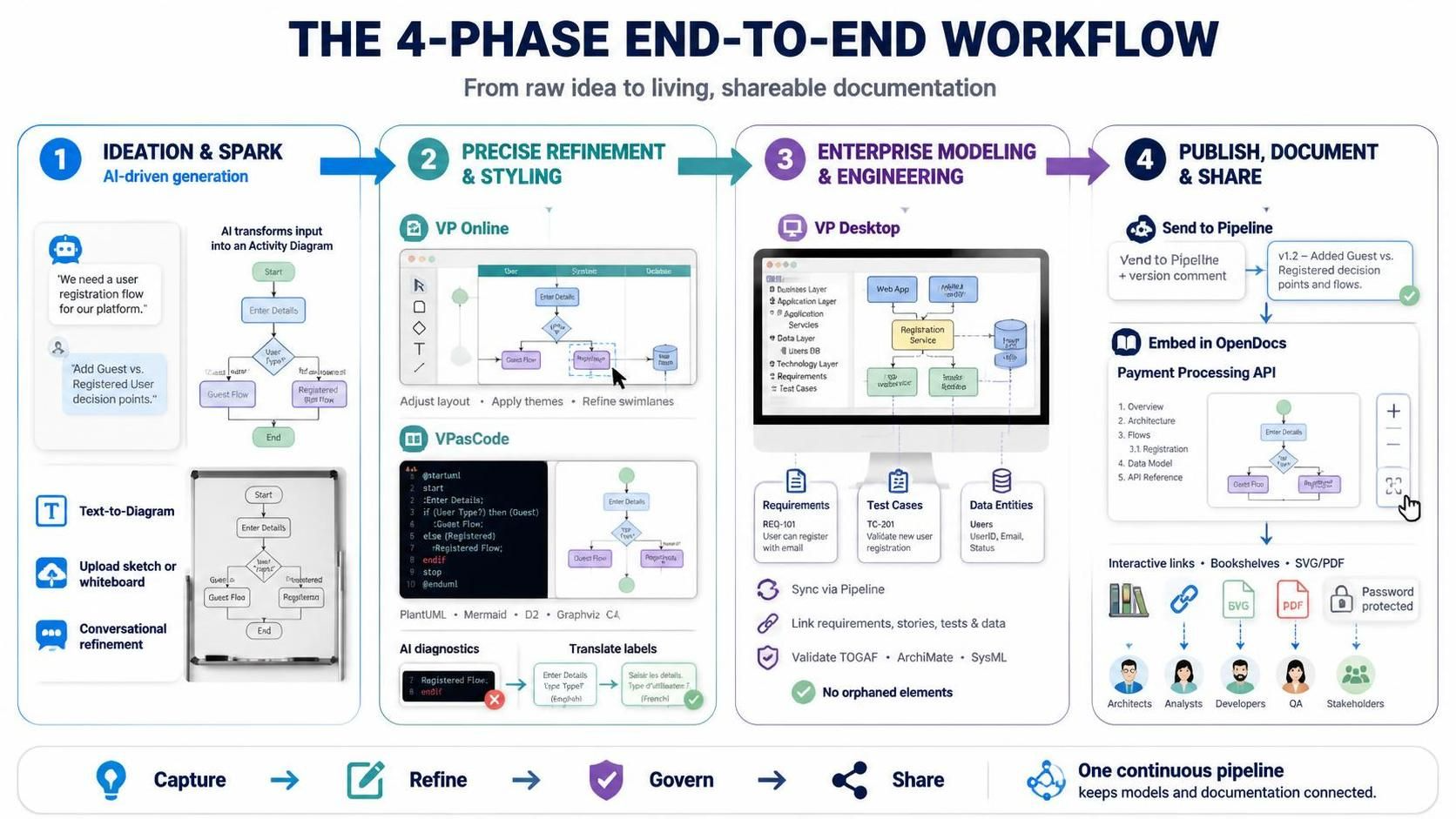
Learn how Visual Paradigm’s 4-Phase workflow transforms raw ideas into governed models using AI-driven BPMN and UML generation, code-based editing, and automated publishing for a single source of truth.
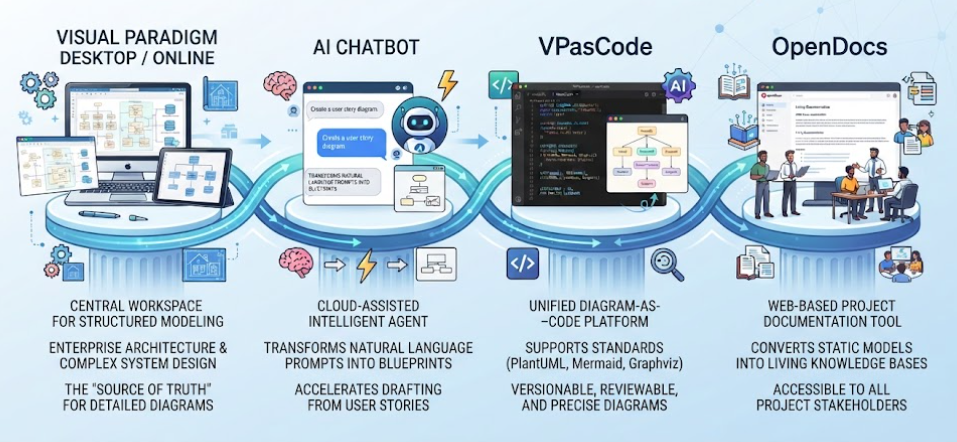
Master the modern software design workflow by learning how Visual Paradigm unifies Conversational AI, Diagram-as-Code, and Living Documentation to bridge ideation and implementation.
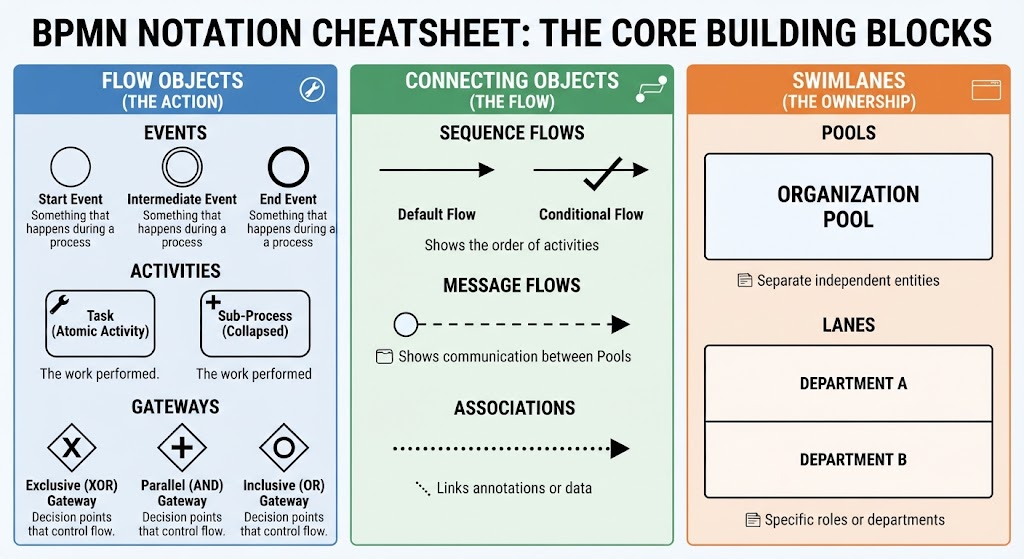
Master the core building blocks of BPMN to visualize business processes, identify bottlenecks, and drive digital transformation with precision.
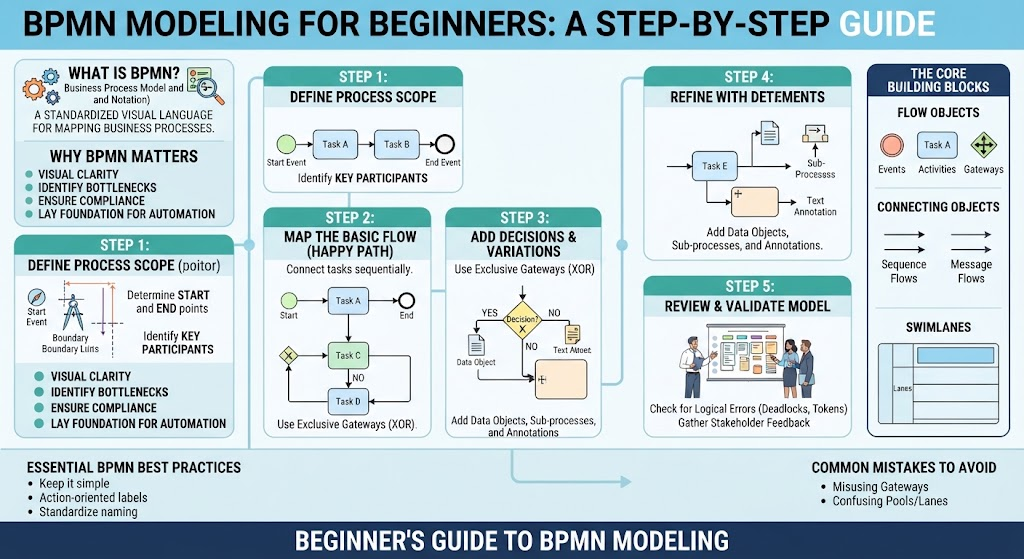
Master BPMN to transform vague processes into actionable diagrams. Learn the core building blocks, identify bottlenecks, and automate workflows with confidence.
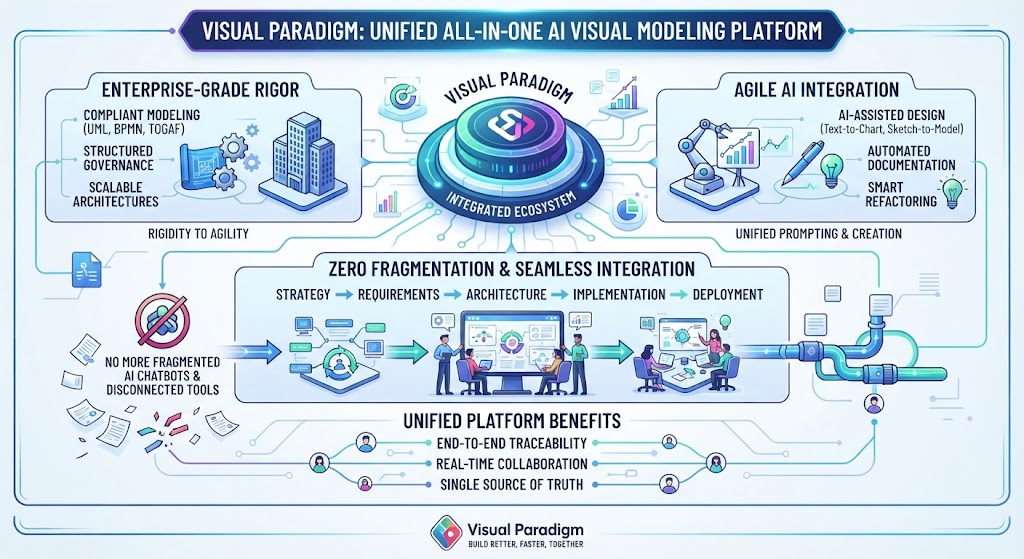
Learn how Visual Paradigm unifies UML, BPMN, and TOGAF with AI to transform fragmented architecture into a compliant, agile enterprise ecosystem.
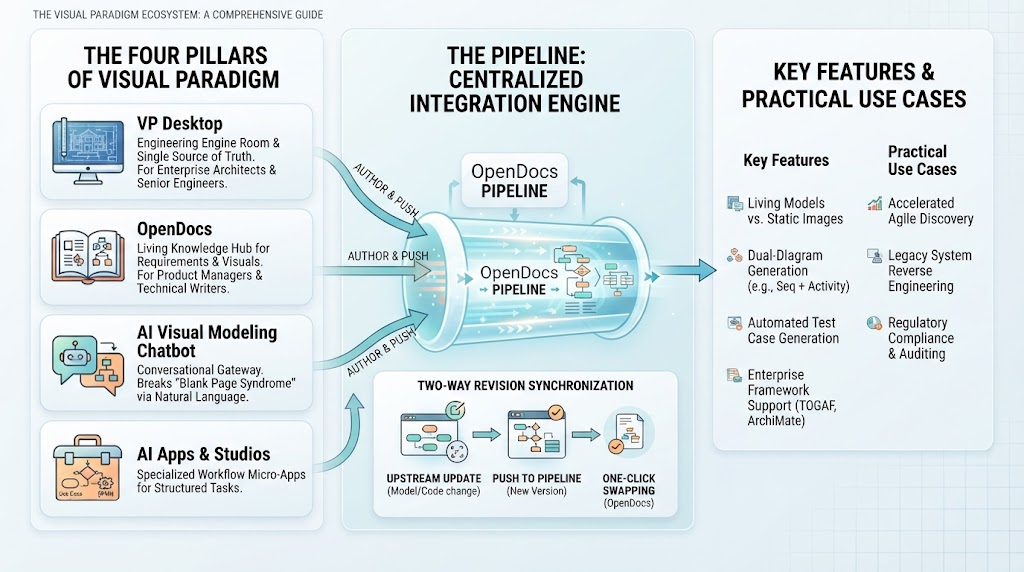
Master the Visual Paradigm ecosystem to bridge design and code using The Pipeline, AI, and four pillars for automated, living model creation.
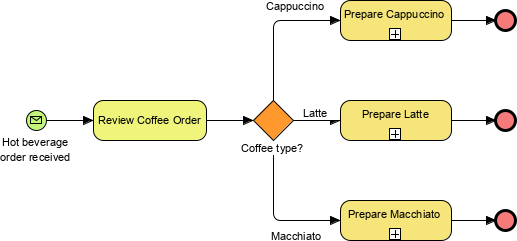
Gateway
A Gateway is represented by the familiar diamond shape
and is used to control the divergence and convergence of Sequence Flow. Thus, it will determine traditional decisions, as well as the forking, merging, and joining of paths. Internal Markers will indicate the type of behavior control.
Exclusive Gateway
Follow only one path
Inclusive
Follow one or more paths
Parallel
Follow all paths
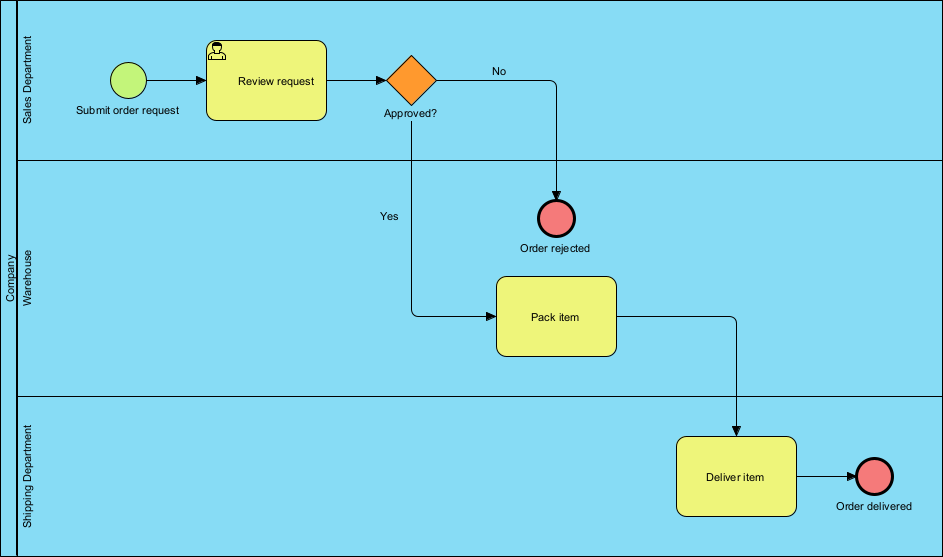
Example 2: Order Fulfillment Process
Prompt: The customer submits an order request. The Sales Department reviews the request. If approved, the Warehouse packs the item, and the Shipping Department delivers it.
Generated Workflow:
Start: “Submit order request” (Customer).
Sales: “Review request” leads to a decision gateway “Approved?”.
No: “Order rejected.”
Yes: Proceeds to Warehouse.
Warehouse: “Pack item.”
Shipping: “Deliver item” leads to “Order delivered.”
This example demonstrates the AI’s ability to handle conditional logic (Exclusive Gateways) and cross-departmental handoffs (Message Flows) automatically.
Diagram Example: A three-lane BPMN diagram showing the flow from Customer request through Sales approval, Warehouse packing, and Shipping delivery, with a clear “Approved?” decision diamond controlling the path.
ntroduction to BPMN and the Visual Paradigm Ecosystem
BPMN (Business Process Model and Notation) 2.0 is the global standard for visualizing, documenting, and analyzing business processes. It serves as a universal language that bridges the gap between business strategy and technical implementation.
Visual Paradigm offers a comprehensive ecosystem that integrates BPMN with advanced AI capabilities, allowing users to move from text descriptions to production-ready models instantly. This ecosystem is not just a diagramming tool but a collaborative platform for end-to-end process engineering.
The Four Pillars of the Visual Paradigm AI Ecosystem
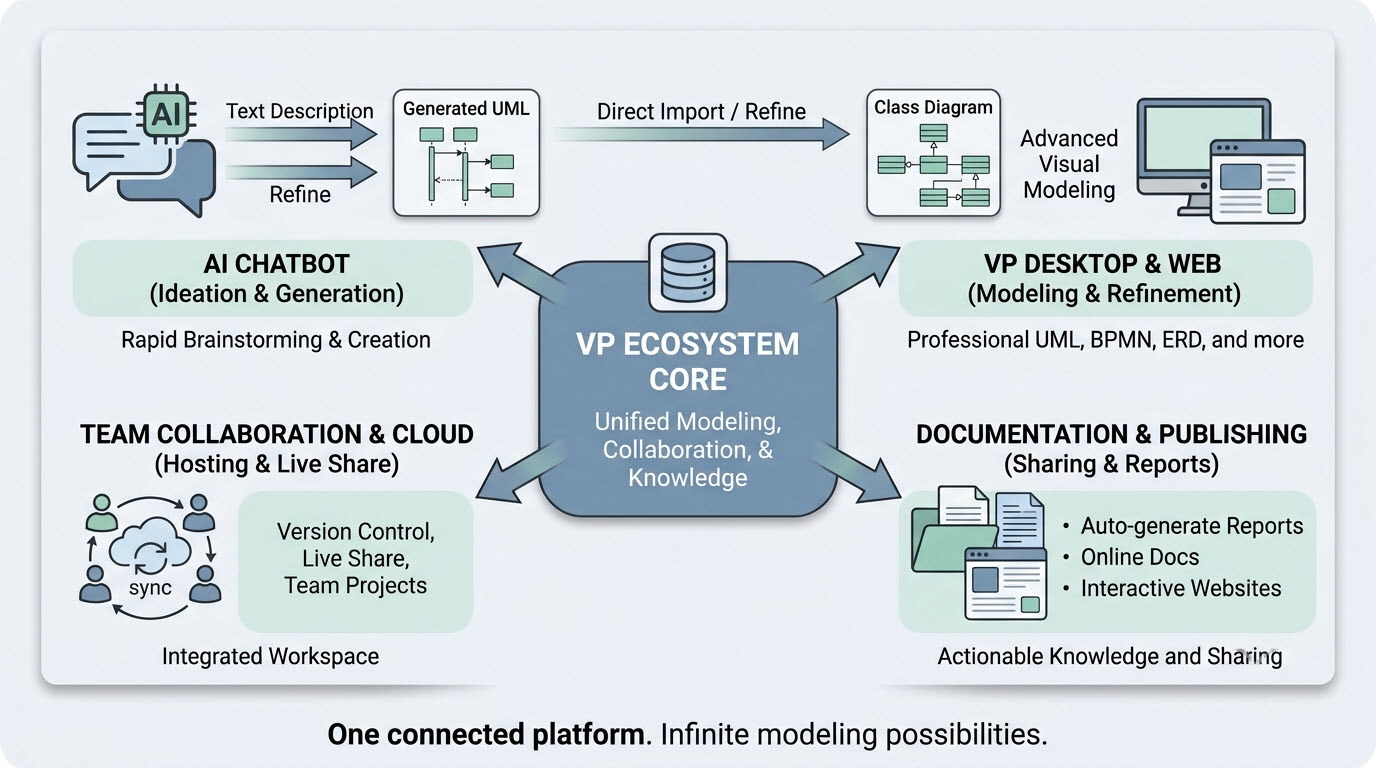
The platform unifies four key modeling environments:
VP Desktop (Visual Model): The flagship application for deep, offline modeling of complex projects, integrating AI generation with advanced editing and version control.
OpenDocs: A knowledge management platform that embeds live, AI-assisted diagrams directly into documents.
Conversational Co-Pilot (AI Chatbot): An interactive tool for rapid ideation, allowing users to generate and refine diagrams through natural language conversation.
Web Apps (Guided Tools): Browser-based tools for step-by-step modeling and collaboration without desktop installation.
Diagram Example: The Visual Paradigm AI Ecosystem connects an “AI Chatbot” for rapid ideation, “VP Desktop & Web” for advanced modeling, “Documentation & Publishing” for reports, and “Team Collaboration & Cloud” for live sharing, all unified under a “VP Ecosystem Core.”
2. Key Concepts in BPMN and AI Integration
2.1 The Challenge of Traditional BPMN Modeling
Traditional BPMN diagramming requires manual effort to drag and drop elements, align swimlanes, and connect sequence flows. This process is often slow, prone to inconsistencies, and requires significant expertise to ensure compliance with BPMN 2.0 standards. Standard text-to-diagram tools (like Mermaid) often fail with BPMN because they cannot handle the complex geometric constraints of swimlanes and the strict matrix routing required for enterprise-grade processes.
2.2 AI-Powered Text-to-BPMN Generation
Visual Paradigm’s AI engine uses Natural Language Processing (NLP) to overcome these barriers. Instead of learning a complex declarative syntax, users provide plain-English procedural descriptions. The AI then:
Extracts Semantics: Identifies organizational entities (pools/lanes), actions (tasks), and decisions (gateways).
Generates Objects: Instantiates explicit modeling objects within the editor rather than drawing flat shapes.
Optimizes Layout: Applies smart routing rules to minimize line crossings and ensure swimlanes are geometrically contained.
Creates Interactive Models: The output is a fully editable BPMN 2.0 diagram, not just a static image.