


Artificial Intelligence has revolutionized the initial stages of business process modeling, allowing teams to generate complex diagrams from simple text descriptions. However, an AI-generated diagram is merely a starting point. To transform a rough draft into a production-grade model suitable for execution and stakeholder review, rigorous refinement is required.
This tutorial walks you through the critical workflow of moving from an AI-generated draft to a polished, executable BPMN diagram using Visual Paradigm.
1. The AI Generation Phase
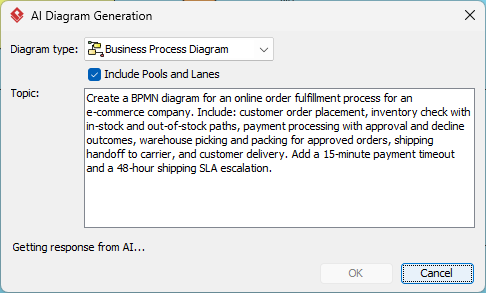
The journey begins with the “AI Diagram Generation” interface. As seen in the screenshot, the user defines the scope through a specific prompt. This prompt typically includes:
- Diagram Type: Specifying “Business Process Diagram” with “Include Pools and Lanes”.
- The Topic: A natural language description of the scenario (e.g., “Create a BPMN diagram for an online order fulfillment process…”).
The Prompt Strategy: Notice how the prompt includes specific constraints like “15-minute payment timeout” and “48-hour shipping SLA escalation.” AI tools are excellent at ingesting these constraints and placing the initial gateways and timers on the canvas.
2. Validating Logic: The Simulator Walkthrough
Once the AI generates the model, the first step for a human expert is logical validation. AI models often hallucinate logic or create infinite loops that a human eye might miss initially.
To ensure the process is sound, utilize the Process Simulator within Visual Paradigm:
- Load the Model: Open the generated diagram in the editor.
- Start Simulation: Launch the simulation tool and define input data (e.g., a test order with a valid credit card).
- Trace Paths: Watch the execution animation. Does the process terminate correctly for both “Approved” and “Declined” outcomes?
- Check for Deadlocks: Ensure there are no paths where the process gets stuck (a “dead end” or “headless road”).
3. Filling in the Missing Details
An AI draft often provides the “Happy Path” but lacks the granular details required for IT implementation. You must enrich the model by adding specific artifacts:
- Input/Output Data Objects: Explicitly define what data enters the process (e.g., CustomerOrderRequest) and what leaves it (e.g., ShippingConfirmation).
- IT System Associations: Map specific tasks to backend systems. For example, link the “Payment Processing” task to the specific API endpoint or database table that handles the transaction.
- Performance Metrics (KPIs): Attach properties to tasks to define Service Level Agreements (SLAs). For instance, set the “Picking” task to have a maximum duration of 2 hours.
4. Standardizing Symbols and Layout
For a diagram to be professional, it must adhere to BPMN standards and be visually readable. AI generation often results in cluttered layouts where elements overlap or lines are jagged.
- Automatic Layout: Use the “Auto Layout” feature in Visual Paradigm. This algorithm recalculates the position of elements to minimize line crossings and ensure a clean, top-down flow.
- Complex Sub-Processes: If the diagram becomes too large, encapsulate complex logic into collapsed sub-processes (Pools or Lanes) to maintain high-level clarity.
- Business Rule Annotations: Add text annotations to explain complex decision gateways (e.g., “If Order Value > $1000, require Manager Approval”).
5. Collaborative Iteration
The final phase involves moving the model from a local draft to a shared resource. Visual Paradigm’s cloud workspaces allow for real-time collaboration.
- Feedback Collection: Share the diagram link with stakeholders (business analysts, developers) to gather feedback.
- Version History: Use the built-in version control to manage changes. If a stakeholder requests a change to the “Shipping Handoff” logic, you can revert to previous versions if the new logic proves flawed.
Conclusion
By combining the speed of AI generation with the precision of human validation, simulation, and layout optimization, you create robust business process models. This workflow ensures that the transition from a concept to an executable system is seamless and error-free.