


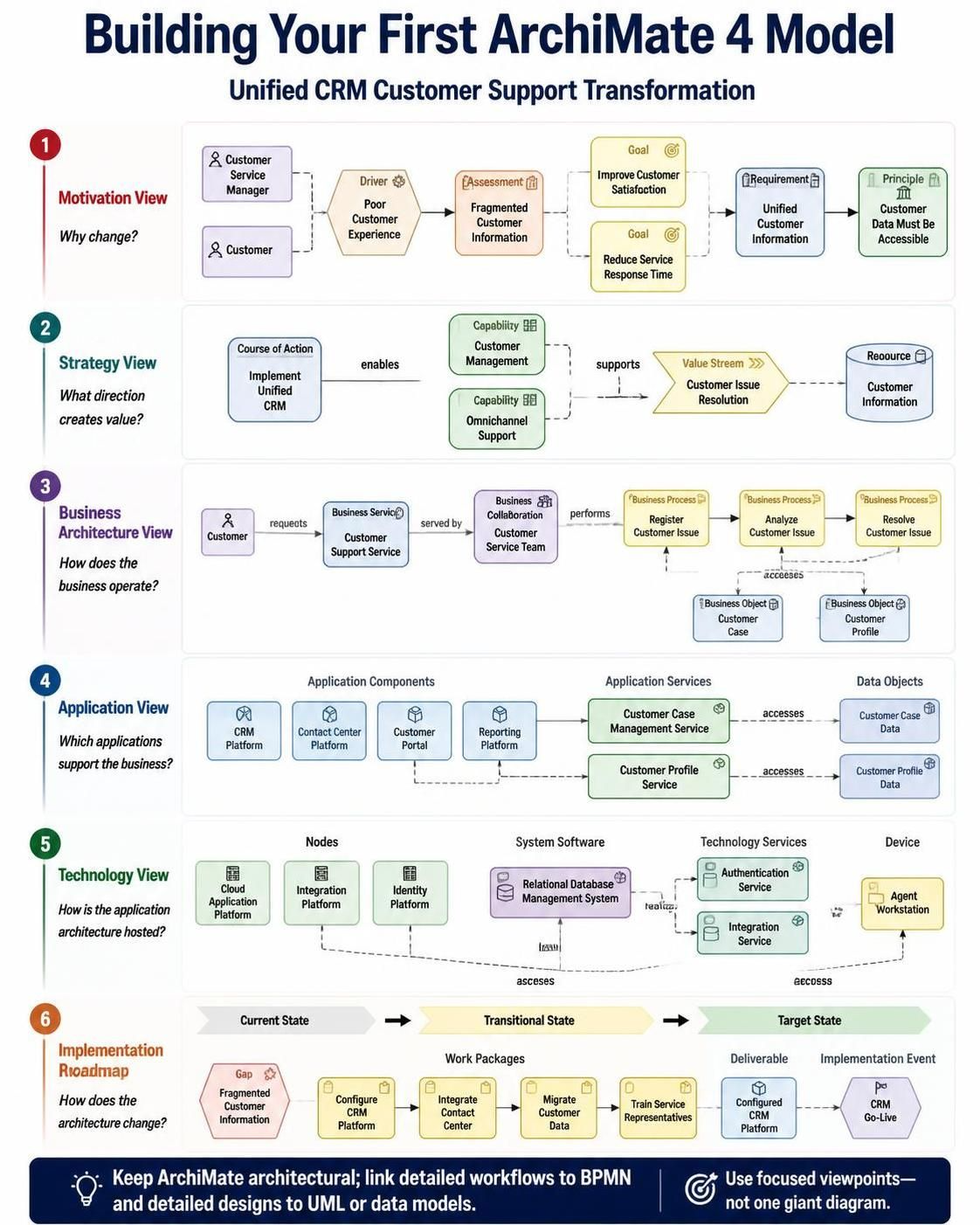
Welcome to this comprehensive tutorial on building your first ArchiMate 4 model. In the world of Enterprise Architecture (EA), the ability to translate abstract business goals into concrete technical specifications is the most critical skill you can possess. Today, we will deconstruct a complex transformation scenario: improving customer support by introducing a unified CRM platform.
We will walk through the standard ArchiMate methodology, moving from the Motivation View to the Implementation Roadmap. This guide uses the Visual Paradigm [ArchiMate] tooling context to help you understand how to structure your models effectively.
1. The Motivation View: Defining “Why”
The foundation of any successful architecture is understanding the driving forces behind the change. In this scenario, the organization recognizes a Driver: “Poor Customer Experience” caused by “Fragmented Customer Information”.
In ArchiMate, we use specific elements to structure this narrative:
- Actors: The Customer Service Manager and the Customer are the stakeholders involved.
- Goals: We must define success. The goals are to Improve Customer Satisfaction and Reduce Service Response Time.
- Principles: We set the rules. The guiding principle is that Customer Data Must Be Accessible.
The diagram illustrates how the “Driver” influences the “Assessment,” which triggers the “Goals,” and ultimately leads to a “Requirement” for a Unified Customer Information system.
2. The Strategy View: Defining “What Direction”
Once the motivation is clear, we define the strategic direction. How do we turn a goal into a plan? We use the Value Stream concept.
Here, we introduce a “Course of Action”: Implement Unified CRM. This course of action enables specific Capabilities such as “Customer Management” and “Omnichannel Support”. These capabilities are not just buzzwords; they are the structural abilities the organization needs to build. They support the Value Stream of “Customer Issue Resolution,” ensuring that the strategy directly contributes to the business value of helping a customer.
3. The Business Architecture View: Defining “How the Business Operates”
This layer connects the strategy to the daily operations. We must map out who does what.
- Flow of Service: The Customer requests a service. The Business Service is “Customer Support Service”.
- Organization: This service is served by the Business Collaboration of the “Customer Service Team”.
- Process: The team performs three specific Business Processes:
- Register Customer Issue
- Analyze Customer Issue
- Resolve Customer Issue
- Business Objects: Crucially, notice the link to Customer Case and Customer Profile. These are the data entities being manipulated during the process.
4. The Application View: Defining “Which Applications Support the Business”
This is the core of your digital transformation. We map the Business processes to the Application architecture.
- Application Components: We deploy the CRM Platform, Contact Center Platform, Customer Portal, and Reporting Platform.
- Application Services: These components expose services to the business. The Customer Case Management Service and Customer Profile Service are the specific capabilities the business consumes.
- Data Objects: The applications access Customer Case Data and Customer Profile Data. This is where the “Unified” aspect of the CRM comes into play—ensuring that the data objects are accessible across these different services.
5. The Technology View: Defining “How the Application Architecture is Hosted”
Every application needs a home. The Technology View maps the software to the hardware and infrastructure.
- Nodes: We utilize a Cloud Application Platform, an Integration Platform, and an Identity Platform.
- System Software: The Relational Database Management System is the logical container for the data.
- Technology Services: We see the Authentication Service and Integration Service providing the underlying connectivity.
- Device: The Agent Workstation is the physical endpoint where the support agent interacts with the system.
6. The Implementation Roadmap: Defining “How the Architecture Changes”
Finally, we translate the static model into a dynamic plan. This is where the Gap Analysis becomes actionable.
- Current State: We have a Gap due to “Fragmented Customer Information”.
- Transitional State (Work Packages): We break the project into manageable chunks:
- Configure CRM Platform
- Integrate Contact Center
- Migrate Customer Data
- Train Service Representatives
- Target State (Deliverables): The result is a Configured CRM Platform leading to the final Implementation Event of “CRM Go-Live”.
Key Takeaways for Your First Model
Building this model requires discipline. Here are the golden rules for your architectural journey:
- Keep it Architectural: Do not try to model every single click or line of code. Focus on the high-level capabilities and services. Link detailed workflows to BPMN models and detailed designs to UML diagrams.
- Use Focused Viewpoints: Do not create one giant diagram. Use separate views (Motivation, Strategy, Business, Application, etc.) to address different stakeholder concerns.
- Traceability: Ensure every element in the Application view is supported by a Business process, and every Business process is driven by a Goal.
By following this structured approach, you transform a vague requirement (“improve support”) into a precise, actionable architectural blueprint.