


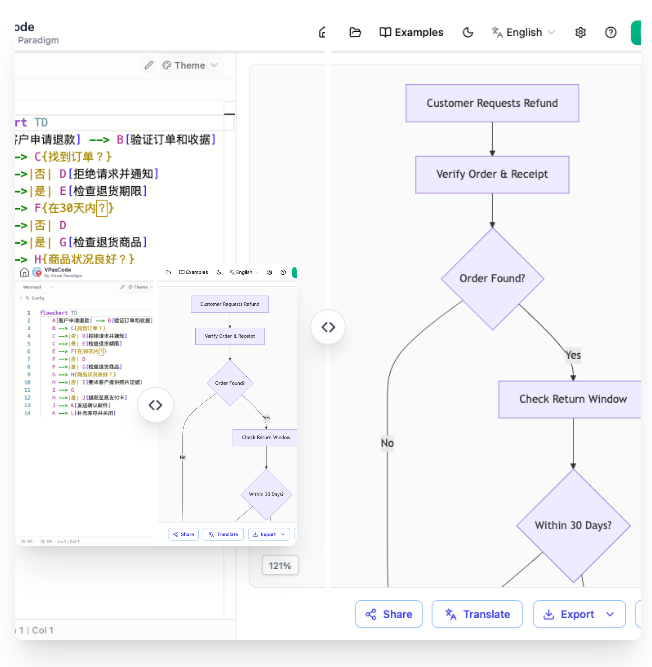
In the modern landscape of software development, the gap between textual requirements and visual architectural diagrams is often bridged by tools that automate the translation of logic into structure. One of the most powerful features found in advanced modeling environments like Visual Paradigm is the VPasCode tool. This feature allows developers to define complex system behaviors using simple, plain-text syntax, which is then instantly rendered into professional-grade diagrams.
This tutorial explores the architecture behind this technology, specifically focusing on the Flowchart diagram. We will analyze the specific scenario of processing a customer refund request, demonstrating how a developer can write code to define decision logic, loops, and process flows, and how the system interprets that text to build a dynamic, interactive model.
The Architecture of VPasCode
VPasCode represents a shift from “diagram-first” to “code-first” modeling. In traditional modeling, you drag and drop shapes onto a canvas, which can be time-consuming and prone to manual alignment errors. VPasCode utilizes a parser engine that reads a structured text file (similar to scripting languages) and compiles it into a visual representation.
The core concept relies on a specific syntax where:
- Nodes represent actions, decisions, or start/end points.
- Edges represent the flow of control between nodes.
- Labels define the conditions under which flow moves from one node to another.
When you type code into the VPasCode editor, the tool does not just display text; it creates a data model of the diagram. This allows for advanced features like real-time validation, automated translation (as seen in the interface), and version control compatibility.
Step-by-Step: Modeling a Refund Request Process
Let’s walk through the specific scenario shown in the reference diagram: Customer Requests Refund. This process involves verifying order details, checking for the order’s existence, validating the return window, and inspecting the physical goods.
1. Defining the Entry Point
Every flowchart begins with a starting point. In VPasCode, this is often defined implicitly by the first statement or explicitly with a specific node type. The process starts when a customer initiates a refund request.
2. The Verification Logic
Once the request is received, the system must verify the order. This is modeled as a decision node. The logic dictates that if the order is found, we proceed; if not, the process terminates or redirects. In the code syntax, this is typically represented by an arrow pointing to the next step, often with a conditional check.
3. The Return Window Check
Assuming the order is found, the next critical step is checking the “Return Window.” Most e-commerce platforms have a policy (e.g., within 30 days). This is a classic if-else structure in programming, which maps directly to a diamond shape in a flowchart.
4. The Inspection Phase
If the request is within the time limit, the system moves to the physical inspection of the returned goods. If it is outside the limit, the request is likely rejected. This sequential flow ensures that checks are performed in a logical order to optimize the user experience.
Translating Logic into VPasCode Syntax
To recreate this diagram using VPasCode, you would write the logic in the editor. The syntax allows for concise representation of complex flows. Below is the code snippet that generates the diagram shown in the interface, followed by an explanation of how the text maps to the visual elements.
@startuml
title Customer Refund Process Flow

start
:Customer Requests Refund;

node:Verify Order & Receipt;
node:Order Found?;

if (Order Found?) then (Yes)
  node:Check Return Window;
  if (Within 30 Days?) then (Yes)
    node:Check Returned Goods;
    node:Inspection Status Good?;
    if (Good?) then (Yes)
      node:Approve Refund;
    else (No)
      node:Reject Refund;
  else (No)
    node:Reject Refund (Expired);
else (No)
  node:Reject Refund (Not Found);
endif
endif
stop
@enduml
Note: While the actual VPasCode syntax may vary slightly depending on the specific implementation version, the logic remains consistent with standard flowcharting rules. The example above illustrates the structural logic.
Interpreting the Code
The code snippet above demonstrates a hierarchical structure. The if statements act as branching points. In the visual diagram, these correspond to the diamond shapes. The arrows connecting these nodes represent the flow of execution. For example, the Yes branch from the Order Found? decision leads to the Check Return Window node, mirroring the logic that only valid orders proceed to further checks.
The Power of Instant Translation
One of the standout features of the VPasCode environment is its ability to handle internationalization. As shown in the interface, the text within the diagram can be instantly translated. This is particularly useful for global teams where requirements might be documented in one language (e.g., English) but presented to stakeholders in another (e.g., Japanese or German).
The translation engine works by parsing the text strings within the code nodes. When you trigger a translation, the tool identifies the text content, sends it to an AI translation service, and updates the visual labels in real-time. This ensures that your diagrams are always accessible to your entire team without the need for manual editing.
Conclusion
By leveraging VPasCode, developers can move away from the manual drag-and-drop workflow and embrace a more efficient, code-centric approach to diagramming. The ability to define logic in text and have it instantly rendered into a professional diagram, complete with features like AI translation, makes it an invaluable tool for system architects and software engineers.
Whether you are documenting a simple refund process or designing a complex enterprise architecture, mastering the syntax of VPasCode will streamline your documentation workflow and ensure your diagrams are always up-to-date with your code.