


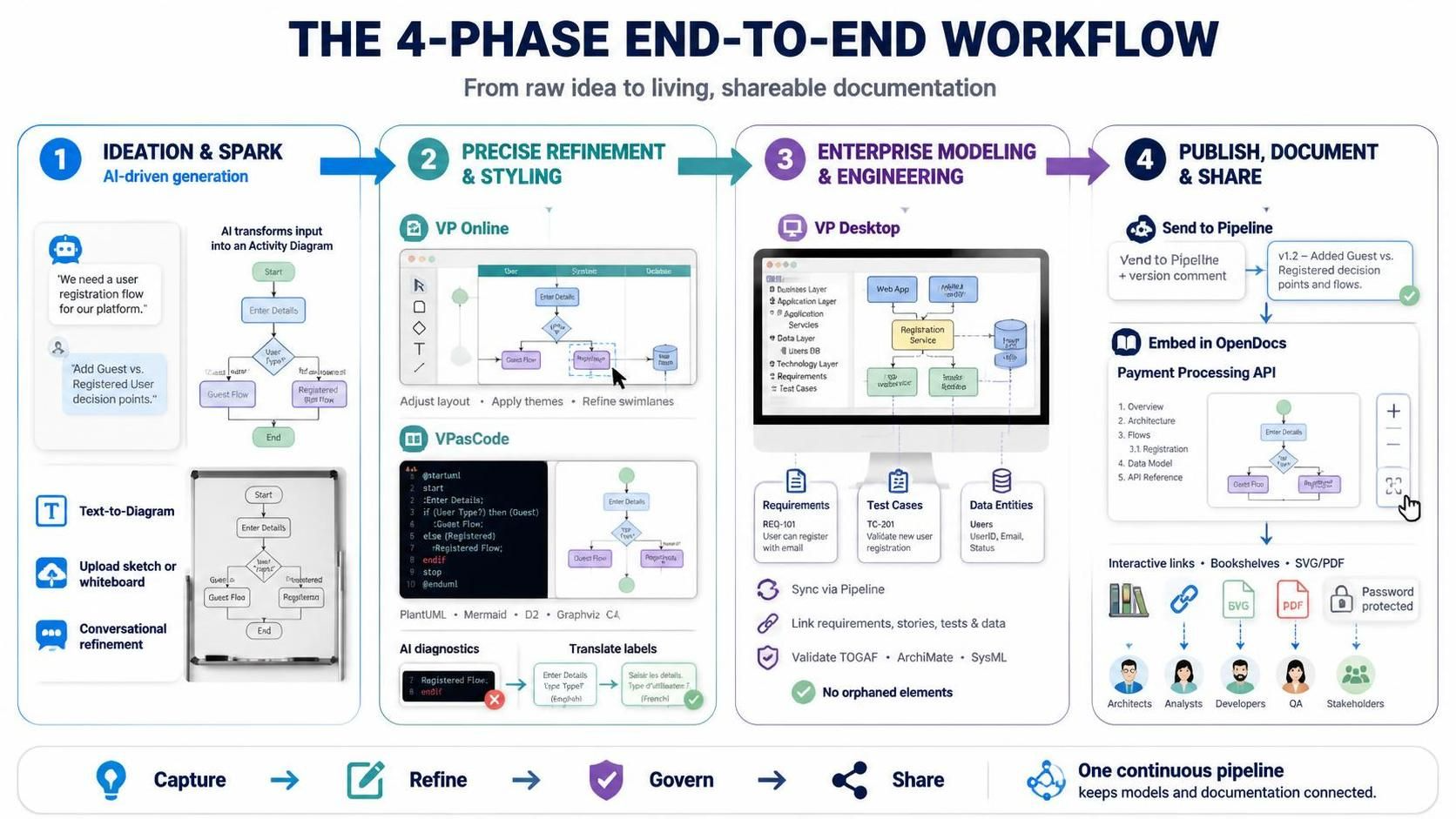
In modern software engineering and business analysis, the gap between a raw idea and a formal, governed system model has historically been significant. Traditional workflows often required manual translation of sketches into diagrams, followed by separate documentation efforts. Visual Paradigm addresses this fragmentation through a comprehensive 4-Phase End-to-End Workflow. This tutorial breaks down how to leverage AI-driven generation, code-based editing, enterprise modeling, and automated publishing to create a “single source of truth” for your systems.
Phase 1: Ideation & Spark (AI-Driven Generation)
The journey begins not with a blank canvas, but with the capture of raw, unstructured inputs. The goal of Phase 1 is to rapidly transform abstract thoughts into a structured baseline diagram using artificial intelligence.
Converting Natural Language and Sketches
Instead of manually placing shapes, you can leverage the AI Chatbot to generate diagrams from simple text descriptions or visual uploads.
- Text-to-Diagram: Describe your system in natural language. For example, prompt the AI with: “Create a BPMN diagram for an e-commerce return process, including customer initiation, warehouse inspection, and refund processing.”
- Image/Whiteboard Upload: Snap a photo of a whiteboard session or a napkin sketch. Upload it to the Chatbot and ask it to “Convert this sketch into a formal UML Sequence Diagram.”
Conversational Refinement
Once the initial diagram is generated, treat the AI as a collaborative partner. You can iterate on the design by asking for specific logic changes. For instance, you might say, “Add a timeout exception if the payment gateway doesn’t respond within 5 seconds,” or “Split the ‘Order Processing’ step into two sub-processes.”
Example: A product manager sketches a user journey on a whiteboard during a brainstorming session. They upload the photo to the Visual Paradigm AI Chatbot, which instantly generates a clean Activity Diagram. The PM then refines it by asking the AI to add decision points for “Guest vs. Registered User.”
Phase 2: Precise Refinement & Styling (Web & Code Editors)
Once the AI provides a solid foundation, the workflow transitions to detailed editing. This phase offers flexibility based on the user’s role and preference, supporting both visual and code-based approaches.
Option A: Drag-and-Drop (VP Online)
For business analysts and stakeholders who prefer visual manipulation, the web-based editor allows for intuitive layout adjustments. You can click “Edit” in VP Online directly from the Chatbot viewer to:
- Adjust layout and apply corporate theme styles.
- Re-align swimlanes and add missing elements.
- Refine the visual hierarchy without touching code.
Option B: Diagram-as-Code (VPasCode)
For software architects and developers, the VPasCode environment treats diagrams as code. This supports languages like PlantUML, Mermaid, D2, Graphviz, and C4.
This approach offers unique technical advantages:
- AI Code Diagnostics: Automatically fix syntax errors (e.g., missing brackets) to ensure the model renders correctly.
- AI Diagram Translation: Localize labels for global teams instantly (e.g., translate English labels to Spanish or Japanese).
Example: A software architect takes the AI-generated component diagram and opens it in VPasCode. They refine the Mermaid code to ensure proper nesting of microservices and use AI diagnostics to correct a missing bracket error. They then translate all labels into French for their Paris-based development team.
Phase 3: Enterprise Modeling & Engineering (VP Desktop)
For large-scale systems requiring strict governance, traceability, and compliance, the model moves into the robust Visual Paradigm Desktop environment. This phase ensures the diagram is not just a drawing, but an engineering asset.
Establishing Traceability and Validation
The transition to Desktop is seamless via the Pipeline, requiring no manual export/import. Once inside, you can:
- Import via Pipeline: Sync the refined diagram from VP Online or VPasCode directly into your project.
- Establish Traceability: Link diagram elements to existing requirements, user stories, test cases, or data dictionary entries. This creates a single source of truth where a change in requirements automatically flags the relevant design element.
- Model Validation: Run integrity checks to ensure compliance with industry standards like TOGAF, ArchiMate, or SysML. Perform matrix analysis or simulation to validate logic.
Example: An enterprise architect imports a high-level ArchiMate diagram created in Phase 2. In VP Desktop, they link each application component to specific business capabilities and regulatory requirements. They run a model validation check to ensure no orphaned elements exist and that all relationships comply with ArchiMate rules.
Phase 4: Publishing, Documenting & Sharing (OpenDocs Pipeline)
The final phase transforms static models into living, accessible documentation. Using the OpenDocs pipeline, diagrams become interactive assets for stakeholders, developers, and executives.
The Publishing Workflow
From any tool in the ecosystem (Chatbot, VP Online, VPasCode, or Desktop), you can Send to Pipeline with a version comment (e.g., “Updated payment flow for Q3 release”).
- Embed in OpenDocs: Access the Pipeline side-panel in OpenDocs and drag the diagram directly onto your documentation page.
- Publish & Share: Generate shareable URLs with pan, zoom, and fit-to-screen controls. Set passwords for sensitive content.
- Bookshelves: Organize multiple pages into structured Bookshelves for easy navigation (e.g., “Onboarding Guide,” “API Reference”).
- High-Res Exports: Export SVG or PDF assets for presentations or offline reports.
Example: A technical writer embeds the finalized sequence diagram into an OpenDocs page titled “Payment Processing API.” They publish the page to a public Bookshelf shared with external partners. Partners can interact with the diagram online, zooming into specific message flows, while the internal team retains the ability to update the source model, which automatically reflects in the published docs.
Conclusion
By adopting this 4-phase workflow, organizations can maintain a continuous pipeline from “Capture” to “Refine,” “Govern,” and finally “Share.” This ensures that models remain accurate, traceable, and accessible throughout the entire software development lifecycle.