


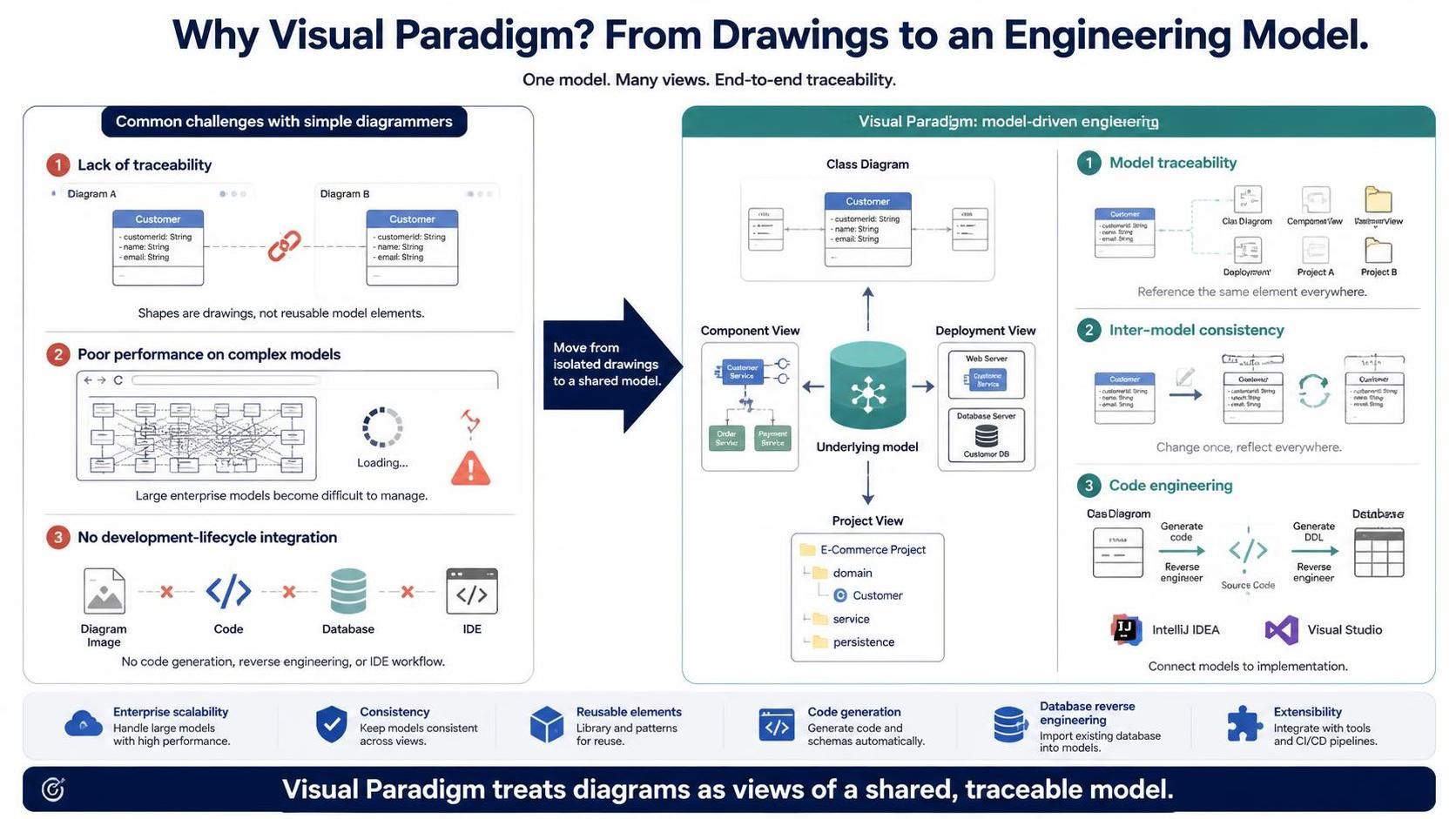
When organizations embark on complex software development or enterprise architecture projects, the choice of modeling tool is often dictated by convenience rather than technical capability. Teams frequently gravitate toward web-based diagrammers or general-purpose tools like Microsoft Visio because they offer a “zero configuration” start. However, as the complexity of the system grows, the limitations of these tools become apparent. They are designed for visualization, not engineering.
This tutorial explores the architectural shift required to move from simple diagramming to Model-Driven Engineering (MDE) using Visual Paradigm. We will examine why treating diagrams as static drawings leads to technical debt and how a unified model architecture solves the most common challenges in software development.
The “Static Drawing” Problem
Traditional diagramming tools operate on a canvas-based philosophy. When you draw a box representing a “Customer” entity in one diagram, the tool treats it as a unique graphical object. It has no memory of what that object represents outside of that specific canvas.
1. The Lack of Traceability
In simple tools, creating a “Customer” class in a Use Case diagram and then creating a “Customer” class in a Class diagram results in two entirely separate entities. If the requirements change, you must manually update the class in the Use Case diagram and then find and update it in the Class diagram.
- The Consequence: This leads to inconsistency. The diagram no longer matches the requirements, and duplicated effort increases the risk of human error.
2. Poor Performance on Complex Models
Web-based or lightweight tools often struggle when the model size increases. When dealing with enterprise-scale architecture, where hundreds of components interact, the browser or the application may freeze while attempting to render the layout.
- The Consequence: Large, complex diagrams become difficult to manage, effectively halting the design process.
3. No Integration with the Development Lifecycle
Tools like Visio produce static images (PNG, JPG, or PDF). They are dead ends in the software lifecycle. They do not understand code, database schemas, or Integrated Development Environments (IDEs) like IntelliJ or Visual Studio.
- The Consequence: There is no code generation or reverse engineering. The diagram remains a document, not a blueprint for the actual application.
The Visual Paradigm Solution: The Underlying Model
Visual Paradigm fundamentally changes the architecture of the tool. Instead of treating diagrams as collections of shapes, it treats them as views of an underlying, shared data model. This is the core concept of Model-Driven Engineering.
1. Model Traceability
In Visual Paradigm, the “Customer” class you draw is actually a reference to a single data object in the project database. This single object can be viewed in a Class Diagram, a Component View, a Deployment View, or a Project View.
This architecture allows for true traceability. You can link the “Customer” entity to specific business requirements or database tables, ensuring that every part of the system speaks the same language.
2. Inter-Model Consistency
Because all diagrams are simply different windows into the same data, they are automatically synchronized.
- If you change the name of a class in the Class Diagram, the change is instantly reflected in the Component View, the Deployment View, and the Database Schema.
- The Rule: Change once, reflect everywhere.
3. Code Engineering and Integration
Perhaps the most powerful feature is the bridge between design and implementation. Because the model understands the logic of programming languages, Visual Paradigm can perform:
- Forward Engineering: Generating Java, C#, or Python code directly from Class Diagrams.
- Reverse Engineering: Importing existing code or Database schemas (DDL) to generate diagrams automatically.
- IDE Integration: Direct synchronization with IntelliJ IDEA and Visual Studio, allowing developers to pull the latest model changes into their codebase.
Conclusion: Enterprise Scalability
The shift from “Drawings” to “Models” is not just a feature update; it is an architectural necessity for modern software engineering. By treating diagrams as views of a shared model, Visual Paradigm ensures that your documentation remains consistent, your architecture is scalable, and your design is directly executable as code.