Understanding the Basics of Process Organization
When you first start modeling a business process, it is easy to get overwhelmed by the sheer number of activities and decisions involved. Imagine trying to explain a complicated recipe where three different chefs are working simultaneously without telling the reader who is doing what. It would be chaotic. This is exactly why we need structure when designing diagrams, particularly in Business Process Model and Notation (BPMN).
In our journey today, we will look at one of the most fundamental tools for bringing order to this chaos: the Pool Lane. While the diagram might look simple—a blue rectangle with text running vertically along the side—it represents a powerful concept for defining ownership and scope.
Diving into the Diagram Structure
Let’s take a closer look at the visual element we have before us. You see a large, rectangular container filled with a soft blue color. Along the left edge, there is a vertical strip labeled “Pool Lane.” This specific layout isn’t just an aesthetic choice; it serves a distinct functional purpose in Visual Paradigm.
The Role of the Container
In BPMN terminology, that large box acts as a “Pool.” Think of a pool as the boundary of a process. It defines the extent of the model. If you were modeling a complete customer order fulfillment process, this entire box would represent that single end-to-end flow. Everything happening inside belongs to that specific business entity or system.
The Significance of the Vertical Label
The text “Pool Lane” running 90 degrees up the side is crucial. In many modeling tools, labels can be placed anywhere, but here, the orientation signifies a header. This label identifies the name of the participant responsible for the activities contained within the box. By rotating the text, we maximize the available space for drawing the actual process steps while keeping the identity of the lane clear and accessible.
How to Apply This Concept in Your Models
Now that we understand what the shape represents, let’s discuss how to use it practically in Visual Paradigm.
- Defining Responsibility: When you draw a process, never leave a task floating in void. Every activity needs an owner. By creating a Pool Lane, you are essentially assigning a department, a role, or a specific system to that section of the workflow.
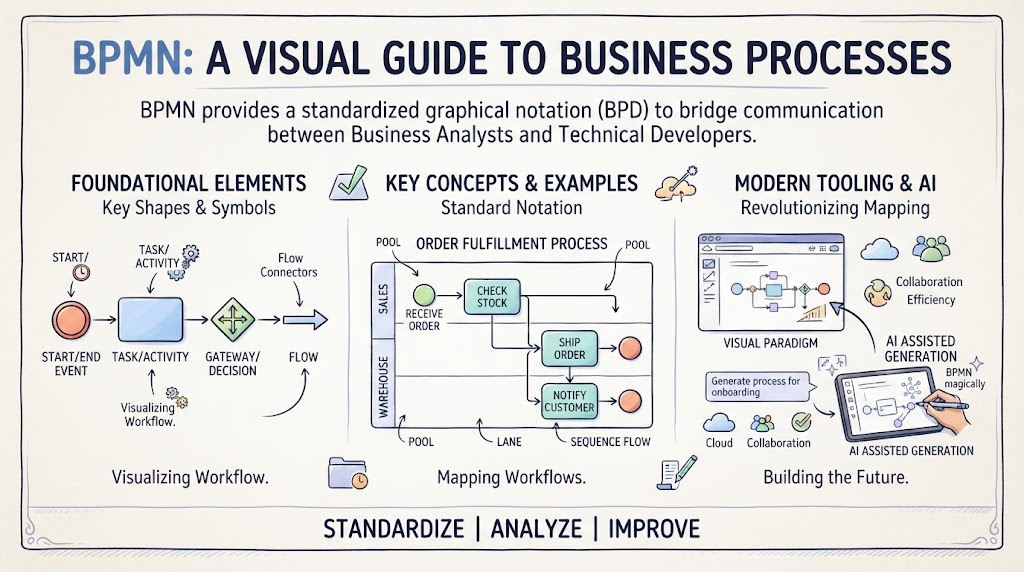
- Organizing Complexity: As your diagrams grow, they can become spaghetti-like webs of lines. Using multiple pools or lanes allows you to break down these web-like structures into logical segments. For example, you might have one lane for “Sales,” another for “Inventory,” and a third for “Shipping.”
- Facilitating Communication: The ultimate goal of any diagram is communication. A well-structured swim lane diagram allows stakeholders to instantly see not just what happens, but who does it. It prevents ambiguity about hand-offs between different groups.
Summary of Key Learnings
To wrap up our session, remember that the blue rectangle labeled “Pool Lane” is more than just a shape; it is a framework for clarity. It teaches us that good modeling requires not only mapping out actions but also assigning ownership.
By utilizing the Pool Lane feature in Visual Paradigm, you transform a static list of tasks into a dynamic map of organizational responsibility. Whether you are managing a simple approval flow or a complex supply chain, ensuring every step has a designated lane is the key to effective process management.