Understanding the Building Blocks of BPMN: Activities
Welcome to this tutorial session on Business Process Model and Notation (BPMN). If you are new to process modeling, you might wonder what actually happens inside a flowchart. The answer lies in the activities. Activities are the critical components of any BPMN diagram. They represent the actual work being performed within a business process. Without activities, a diagram is just a collection of events and gateways; with them, you have a living, breathing representation of how a business operates.
In this guide, we will explore the different kinds of BPMN 2.0 activities you can use to model complex scenarios. We will also look at how tools like Visual Paradigm facilitate the design and implementation of these concepts, allowing you to build robust process models with ease.
The Task: The Most Basic Unit of Work
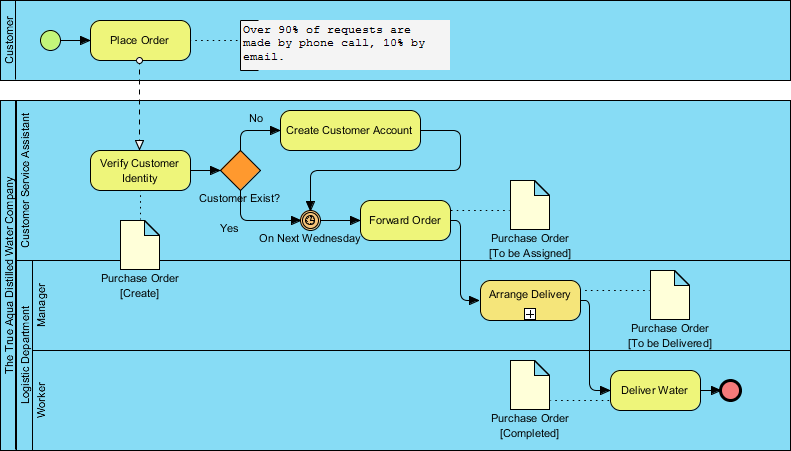
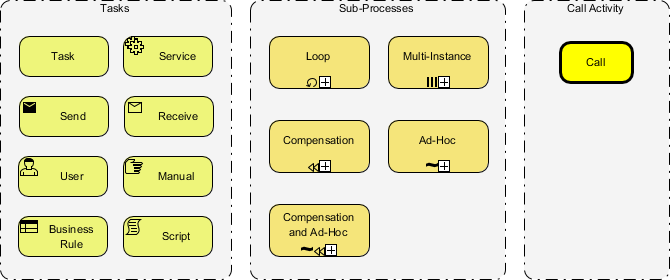
The foundation of almost every business process is the Task. In BPMN terminology, a task is an atomic unit of work—an activity that cannot be broken down further without losing its meaning. However, not all tasks are created equal. Visual Paradigm provides a rich palette of task types to represent the diverse nature of real-world work.
- Task: The standard representation of work performed by a human or system.
- Service: Used when the work is performed by a system or a software service, often representing an API call or a database update.
- Send Task: Represents the transmission of information from the process to an external participant.
- Receive Task: Represents the waiting for information from an external participant to be received by the process.
- User Task: Specifically indicates work that must be done by a human user interacting with a system.
- Manual Task: Represents work done by a human without the support of a system, such as a physical inspection or a handwritten form.
- Business Rule Task: Indicates that the work is performed by a rule engine, applying specific business logic to data.
- Script Task: Used when the work is performed by executing a script or program code.
When using Visual Paradigm, you can simply drag and drop these specific task icons onto your canvas. The tool automatically handles the underlying XML structure, ensuring your model remains compliant with the BPMN 2.0 standard.
Sub-Processes: Managing Complexity
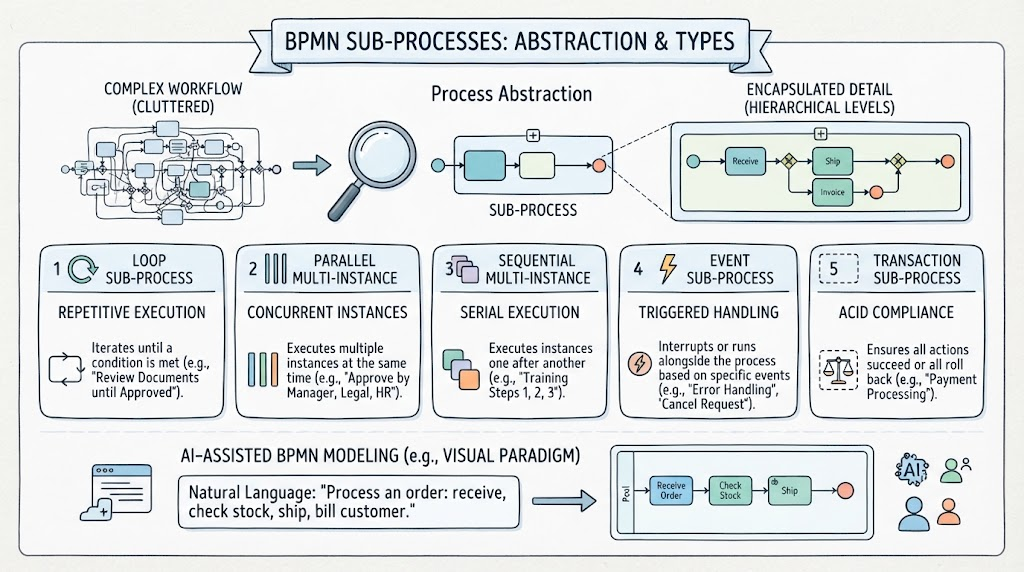
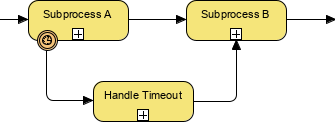
As processes grow, a single task might become too complex to manage on one level. This is where Sub-Processes come into play. A sub-process allows you to group a set of activities together to hide complexity or to create a reusable component. Visual Paradigm makes it easy to toggle between the high-level view and the detailed view of these complex tasks.
Beyond the standard sub-process, BPMN 2.0 introduces specific behaviors for sub-processes that are crucial for dynamic modeling:
- Loop Sub-Process: This indicates that the sub-process will execute repeatedly until a specific condition is met. It is ideal for modeling iterative workflows.
- Multi-Instance Sub-Process: This is used when a sub-process needs to be executed multiple times, often in parallel. For example, processing a batch of 100 invoices simultaneously.
- Compensation Sub-Process: This defines the logic that should be executed if the main process is aborted or rolled back. It essentially models the “undo” functionality of a business transaction.
- Ad-Hoc Sub-Process: This is a highly flexible type where the sequence of activities is not predefined. It allows for a “follow your nose” approach where the order of execution is determined by the participants in real-time.
- Compensation and Ad-Hoc: A combination of the two above, offering maximum flexibility with built-in rollback capabilities.
Visual Paradigm’s intuitive interface allows you to configure these behaviors effortlessly. You can set iteration conditions for loops or define the logic for compensation handlers directly within the properties panel of the sub-process.
Call Activity: Reusability and Modularity
Finally, we have the Call Activity. This is a powerful feature that promotes modularity in your modeling. A Call Activity allows you to invoke a process that is defined elsewhere in your model or in a different model entirely. Think of it as a function call in programming—you don’t need to rewrite the logic every time; you just call the existing process.
This is particularly useful in large organizations where a “Customer Onboarding” process might be used by multiple different departments. Instead of duplicating the diagram, you create one “Customer Onboarding” process and call it from wherever it is needed. Visual Paradigm supports this by allowing you to link to external diagrams, ensuring that your process models remain consistent and up-to-date across the entire organization.
Conclusion
Mastering the various types of BPMN activities is the key to effective business process modeling. Whether you are defining a simple user task or orchestrating a complex, multi-instance sub-process, understanding these building blocks empowers you to create accurate and actionable diagrams. With Visual Paradigm, the complexity of these features is hidden behind a user-friendly interface, allowing you to focus on what matters most: optimizing your business processes.