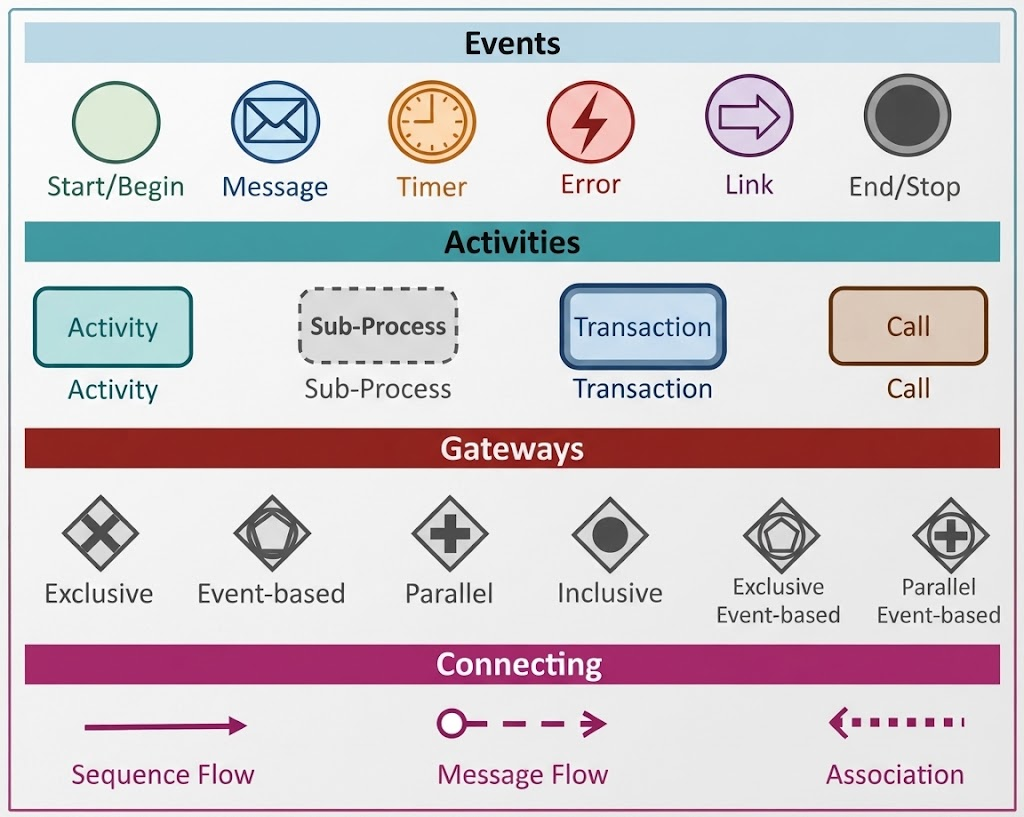
Understanding the Language of Business Processes
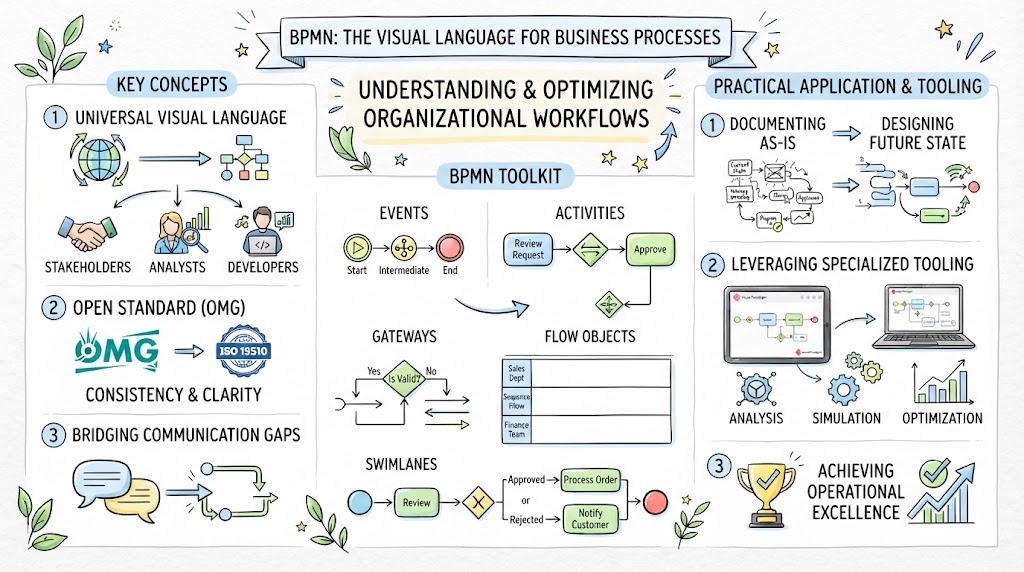
If you have ever looked at a complex flowchart or a process map and felt overwhelmed by the jargon, you are not alone. Business Process Model and Notation (BPMN) is essentially the universal grammar used to describe how work gets done in an organization. It allows everyone from business analysts to IT developers to speak the same language.
To truly master this notation, we need to break it down into its four fundamental building blocks: Events, Activities, Gateways, and Connecting Objects. Think of these as the alphabet of your process diagram. Let’s walk through them together, step by step.
The Pulse of Your Process: Events
Every story needs a beginning, a middle, and an end. In BPMN, Events represent something that happens during the process. They are the triggers and the outcomes.
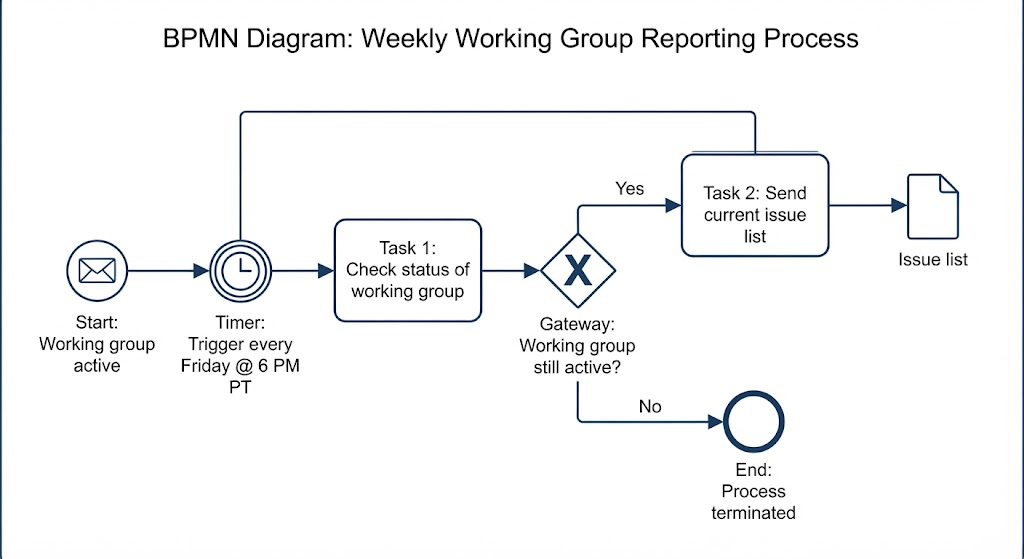
Imagine you are designing a “Loan Approval” process. You start with a green circle, known as the Start Event. This signifies the moment a customer submits their application. As the process moves along, things might happen in the background—like a timer ticking down on a decision deadline (the Timer Event) or an error occurring if the system fails (the Error Event). Finally, the process concludes with a thick black circle, the End Event.
In Visual Paradigm, selecting the right event type is crucial because it dictates how the process flows. For instance, a Message event (represented by an envelope) indicates communication between different participants, such as sending an email to a client.
The Work Itself: Activities
Once an event triggers the process, work must be done. These are called Activities. Visually, they look like rounded rectangles.
At its simplest, a standard Activity represents a single task, like “Verify Credit Score.” However, real-world processes can get complicated quickly. That is why BPMN offers specialized activity types:
- Sub-Process: If a task is too complex to draw on one page, you can nest it inside a dashed box. This keeps your main diagram clean while allowing you to drill down into details later.
- Transaction: Sometimes tasks are critical and must succeed completely. A transaction ensures that if part of the process fails, everything rolls back safely.
- Call Activity: This is like referencing a library function in coding; it allows you to call upon a pre-defined process elsewhere in your model without rewriting it.
Decisions and Forks: Gateways
This is where the logic comes in. Gateways control the flow of the process based on conditions. They look like diamonds, but the symbol inside tells you exactly what kind of decision is being made.
Consider the most common gateway, the Exclusive Gateway (a diamond with an X). This represents a strict choice: “Either/Or.” If the credit score is above 700, take path A; otherwise, take path B. You cannot go both ways.
On the other hand, a Parallel Gateway (diamond with a plus sign) means “Both/And.” Imagine a scenario where, after approval, you need to send a welcome letter AND update the database simultaneously. The parallel gateway splits the flow so both happen at once.
For more advanced scenarios involving waiting for external signals, you will see Event-based Gateways, which allow the process to wait for whichever event occurs first.
Connecting the Dots
Finally, we need lines to connect all these shapes. These are the Connecting Objects, and using them correctly defines the nature of the relationship.
The solid arrow is your Sequence Flow. It shows the order of steps—what happens next. But if you are modeling interactions between two different people or systems (like a bank and a customer), you use a dashed line with an open circle, known as a Message Flow. This is vital for showing cross-channel communication.
Summary of Key Learnings
By now, you should feel comfortable identifying the core components of a BPMN diagram. Remember these key takeaways:
- Events mark the start, interruptions, and ends of a process.
- Activities represent the actual work performed, ranging from simple tasks to complex sub-processes.
- Gateways act as traffic controllers, deciding whether to split paths, merge them, or make logical choices.
- Connecting Objects define the direction and type of flow, ensuring your audience understands the sequence versus the communication.
Whether you are using Visual Paradigm or another tool, mastering these symbols is the first step toward creating professional, easy-to-understand process maps.