Understanding the Pulse of Your Process: BPMN Events
Welcome to this tutorial on Business Process Model and Notation (BPMN). If you think of a business process as a story, events are the punctuation marks that define when a chapter begins, what happens in the middle, and when it concludes. In the BPMN standard, events are the specific moments that change the state of a process. However, a common point of confusion for beginners is understanding the directionality of these events—specifically, the difference between Catching and Throwing.
In this guide, we will break down these concepts, explore the three main categories of events, and see how tools like Visual Paradigm can make modeling these complex interactions intuitive and error-free.
The Core Concept: Catching vs. Throwing
To understand BPMN events, you must first understand the flow of information and control. Events are not just static icons; they represent action and reaction. We categorize them based on their relationship to the process flow:
- Catching Events: These are passive in nature. A catching event is a trigger that waits for something to happen. The process pauses here until the condition is met. Think of it as catching a ball; the process waits for the ball (the trigger) to arrive before moving forward.
- Throwing Events: These are active. A throwing event is the process initiating an action or sending a signal. It “throws” a trigger that might be caught by another process or another part of the same process. Think of it as throwing a ball; the process initiates the action to send a signal out.
Every event in BPMN can technically be viewed through this lens, depending on where it sits in the flow. Let’s look at how this applies to the three main types of events.
Start Events: The Gateway (Catching)
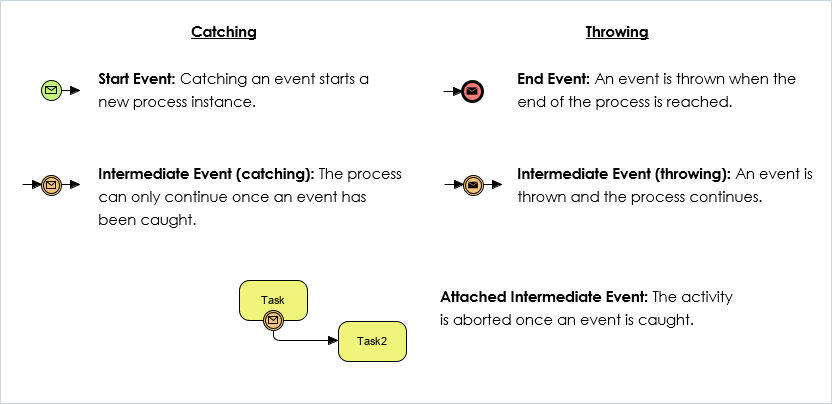
The most fundamental event in any BPMN diagram is the Start Event. By definition, a Start Event is always a Catching Event.
Why? Because the process instance cannot exist until it is “caught” or triggered by something external. A process doesn’t just start on its own; it starts when a user submits a form, a timer hits a specific time, or a message arrives from a system.
In Visual Paradigm, creating a Start Event is designed to be visually distinct to prevent confusion. When you drag a Start Event onto your canvas, you will see a green circle. This green color is a universal indicator in the BPMN world that signifies “Go” or “Start.” Visual Paradigm ensures that this event can only be placed at the very beginning of a sequence flow, preventing logical errors where a process might appear to start in the middle of nowhere.
End Events: The Conclusion (Throwing)
At the opposite end of the spectrum is the End Event. An End Event is a Throwing Event. This represents the moment the process has finished its work and the result is “thrown” out, typically to the outside world or to a system that consumes the final output.
For example, when an employee submits their expense report and the system sends a confirmation email, that email sending is a throwing action. Once the End Event is reached, the process instance is destroyed, and no further activities can occur.
When using Visual Paradigm, End Events are marked with a red circle. This visual cue serves as a warning light, indicating the termination of the flow. The tool helps you validate your diagram by ensuring that all paths lead logically to an End Event, preventing “orphaned” process flows that run forever without a conclusion.
Intermediate Events: The Bridge in the Middle
Intermediate Events are the most versatile and often the most complex part of BPMN because they can be either Catching or Throwing, depending on the context. They sit between the Start and End events.
Intermediate Catching Events
An Intermediate Catching Event is exactly what it sounds like: the process is waiting. The flow moves from a task to this event, pauses, and waits for a trigger to occur. Once the trigger is caught, the process continues.
Imagine a task where an order is placed. After the order is placed, the system enters an Intermediate Catching Timer Event. It waits for 3 days. If the customer hasn’t paid by then, the process continues to a cancellation task. In Visual Paradigm, you can easily configure these timers or message triggers using the properties pane, allowing you to define exactly what the process is “catching.”
Intermediate Throwing Events
Conversely, an Intermediate Throwing Event occurs when the process generates a signal that needs to be sent to another process or system, but the current process continues immediately after sending it. It does not wait.
For instance, a task might be “Send Invoice.” Immediately after the invoice is sent (thrown), the process might continue to “Wait for Payment.” Here, the sending of the invoice is the throwing event.
Special Case: Attached Intermediate Events
There is a specific and powerful variation of Intermediate Events known as Attached Intermediate Events. Unlike standard events that sit on a sequence flow, attached events sit directly on top of a Task (Activity).
The behavior here is unique. If an Attached Intermediate Event is a Catching event (which is the standard usage), it acts as an interrupter. The activity is aborted once the event is caught. This is often used for cancellation or timeout scenarios.
For example, consider a task “Wait for Customer Response.” If you attach an Intermediate Timer Event (catching) to this task, it means: “Perform this wait, but if 5 minutes pass, abort the wait and move on to the next step.” The original task is interrupted.
Visual Paradigm excels here by providing visual handles that allow you to drag and drop these events onto existing tasks. The tool automatically handles the logic, drawing the correct “interrupting” symbols (often a cross or a specific border style) to indicate that the activity is being cut short. This visual feedback is crucial for ensuring that your stakeholders understand that the process is being interrupted, not just paused.
Summary: Why This Distinction Matters
Understanding the difference between catching and throwing is not just academic; it is critical for process execution. If you model a Start Event as a Throwing Event, you are essentially saying the process starts itself without a trigger, which is impossible. If you model a Catching event as a Throwing event, you might create a process that sends a signal but never waits for the result, leading to logical gaps.
By utilizing a robust modeling tool like Visual Paradigm, you can ensure that your diagrams are not only visually appealing but logically sound. The tool enforces the rules of BPMN, helping you distinguish clearly between the moments your process waits (catches) and the moments it acts (throws), resulting in cleaner, more accurate business process models.