


Welcome to Your Diagramming Journey
Hello! Today, we are going to explore a specific entry point into the world of professional software modeling. If you have ever felt intimidated by complex system architecture or wanted to learn how to design software but didn’t want to invest money right away, there is a solution that fits perfectly. We are looking at the Desktop Community Edition of Visual Paradigm.
This version of the software is designed to be your gateway. It allows you to access high-end modeling tools without the barrier of cost, provided you understand what it offers and where its boundaries lie. Let’s walk through the details together.
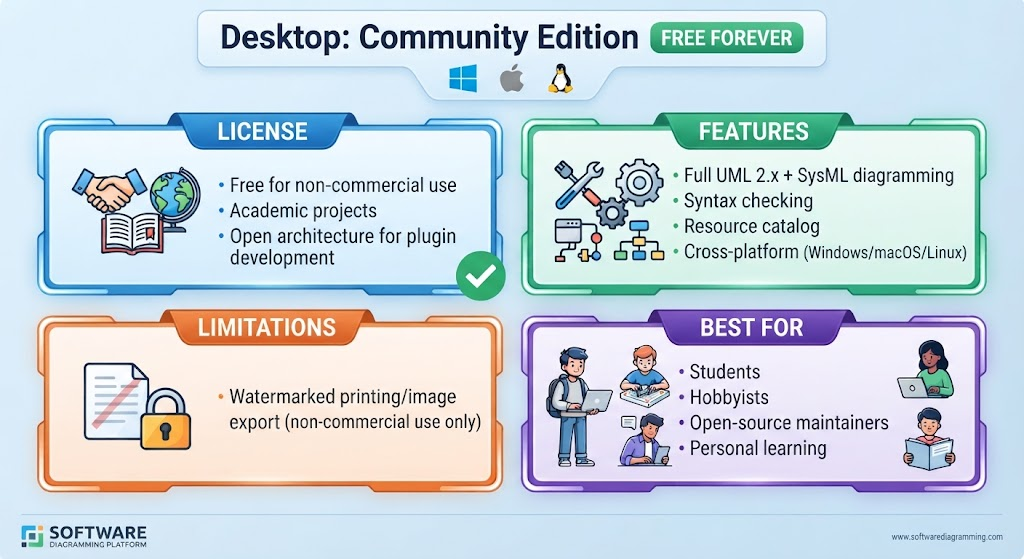
The License: Free for Learning and Exploration
First and foremost, let’s talk about the most attractive feature: the license. The Community Edition is offered as free forever. However, like many educational tools, this comes with a specific condition.
- Non-Commercial Use: This license is strictly intended for personal learning, academic projects, and open-source initiatives. You cannot use this version to generate revenue or work on proprietary commercial products.
- Academic Freedom: Whether you are a student working on a thesis or a teacher explaining concepts in a classroom, this license supports those activities.
- Open Architecture: For those interested in tinkering, the platform supports plugin development, allowing you to customize your workflow.
Core Capabilities: What Can You Actually Build?
You might assume that “free” means “limited,” but in terms of features, this edition is surprisingly robust. It brings the full power of the industry-standard modeling language support to your desktop.
Here is what you can do with this toolkit:
- Full UML 2.x Support: Unified Modeling Language (UML) is the standard language for visualizing, specifying, constructing, and documenting the artifacts of software systems. You get full support for all diagrams, from Class diagrams to Sequence diagrams.
- SysML Integration: Beyond just software, if you are interested in Systems Engineering, you can utilize Systems Modeling Language (SysML) capabilities.
- Syntax Checking: As you draw, the software helps ensure your models are syntactically correct, which is crucial for learning best practices.
- Cross-Platform: It doesn’t matter if you prefer Windows, macOS, or Linux; the engine runs natively on all three operating systems.
Understanding the Limitations
To make an informed decision, we must also look at the constraints. In the spirit of transparency, the Community Edition has one distinct limitation regarding how you share your work.
If you export your diagrams as images or print them out, they will carry a watermark. This watermark serves two purposes: it protects the intellectual property of the software developers and clearly identifies the file as being created with the Community Edition. While this is fine for internal study or sharing with classmates, it prevents the output from being used in formal, public, or commercial documentation.
Who Is This Tool For?
So, who should download this? Based on the usage patterns, this edition is ideal for:
- Students: Perfect for coursework and understanding system design.
- Hobbyists: Great for side projects and prototyping ideas.
- Open-Source Maintainers: Excellent for creating documentation for community-driven projects.
- Personal Learners: Anyone wanting to learn the skill of modeling before committing to a professional license.
Summary of Key Learnings
In this tutorial, we’ve broken down the Visual Paradigm Desktop Community Edition. We learned that while it is restricted to non-commercial use and includes watermarks on exports, it provides a comprehensive environment for learning UML and SysML across Windows, Mac, and Linux. It is the perfect starting point for anyone looking to master the art of diagramming without financial risk.