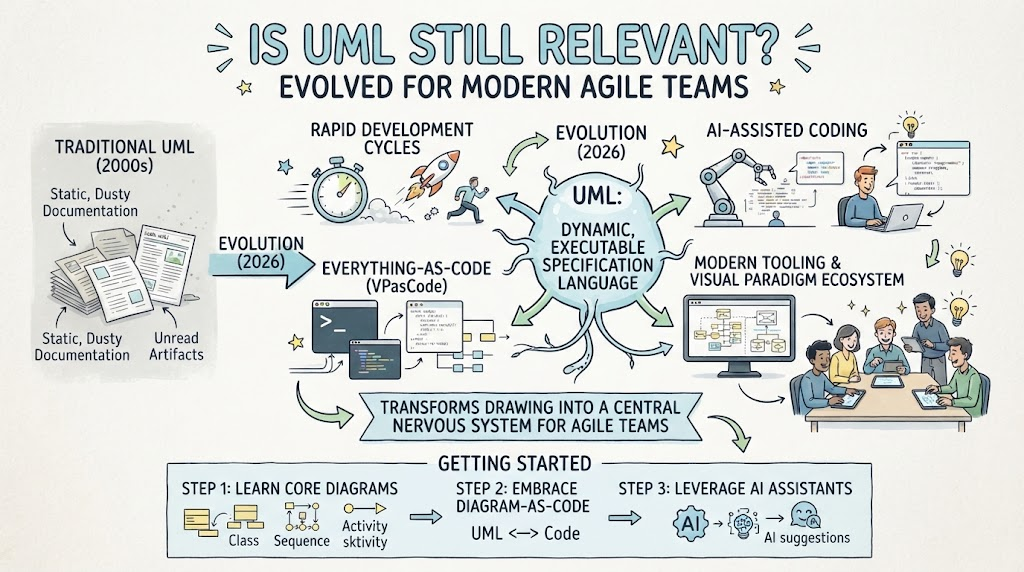
Welcome to today’s tutorial session. We are going to tackle a question that has been buzzing through the software engineering community for years: Is UML (Unified Modeling Language) still relevant? If you are an agile developer or a modern architect, you might have heard whispers that UML is outdated, buried under layers of static documentation that no one reads. But here is the truth: UML hasn’t disappeared; it has simply evolved. Today, we are going to explore how UML has transformed into a dynamic, executable specification language designed specifically for modern agile teams.
The Shift from Static to Dynamic
Let’s start by looking at the past. In the early 2000s, traditional UML was often synonymous with “static, dusty documentation.” We created diagrams that sat in repositories, becoming unread artifacts that quickly became disconnected from the actual code. This approach struggled to keep up with the pace of modern software development.
However, the landscape has shifted dramatically. We are now in an era defined by rapid development cycles and the need for speed. To survive, UML had to evolve. It is no longer just about drawing pictures; it is about creating a “central nervous system” for agile teams. This new paradigm treats modeling as a dynamic, executable specification language. Instead of static drawings, we are moving toward an ecosystem where diagrams are alive, linked to code, and ready to execute.
The Drivers of Modern Modeling
What is powering this renaissance of UML? It is a convergence of three major trends visible in the current tech landscape.
1. Everything-As-Code (VPasCode)
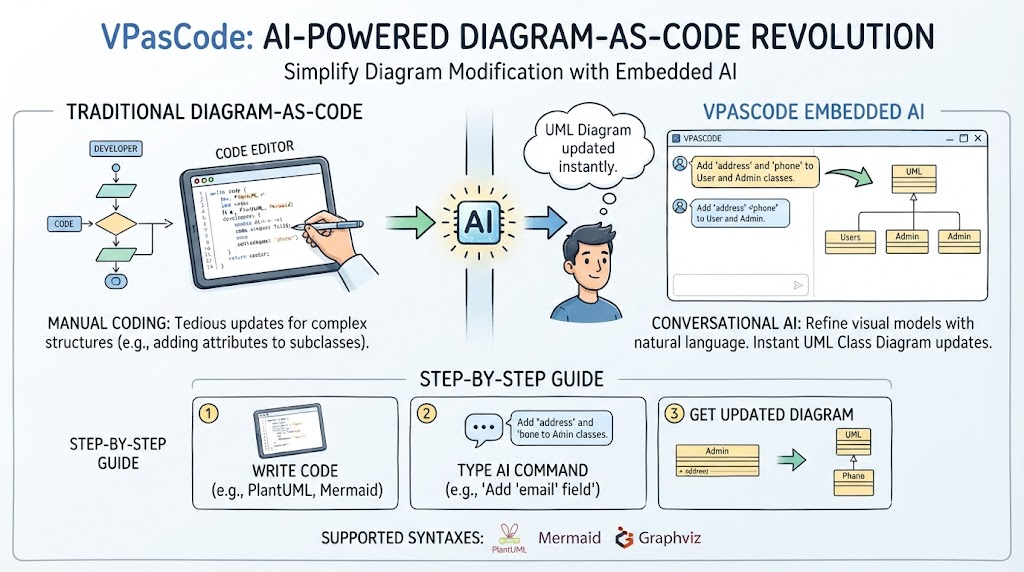
Just as we manage infrastructure as code, we are now managing diagrams as code. This approach, often referred to as “Everything-As-Code,” ensures that your visual models stay in sync with your actual software. It bridges the gap between the visual representation and the underlying logic, ensuring that your documentation is never “out of date” because it is generated directly from the codebase.
2. AI-Assisted Coding
Artificial Intelligence has entered the chat, and it is changing how we interact with diagrams. Modern tooling allows AI to assist in generating diagrams, suggesting improvements, and even writing code based on your visual models. This symbiotic relationship means you don’t have to draw every single line manually; the AI helps you visualize the architecture while you focus on the logic.
3. Modern Tooling & Visual Paradigm Ecosystems
The tools we use have evolved. We are seeing a move away from isolated drawing tools toward integrated visual paradigm ecosystems. These platforms allow teams to collaborate in real-time, turning the diagram into a living document that supports the entire development lifecycle.
Getting Started: A 3-Step Roadmap
If you are ready to adopt this modern approach to UML, where do you begin? Here is a practical, three-step guide to getting started with evolved UML practices.
Step 1: Learn Core Diagrams
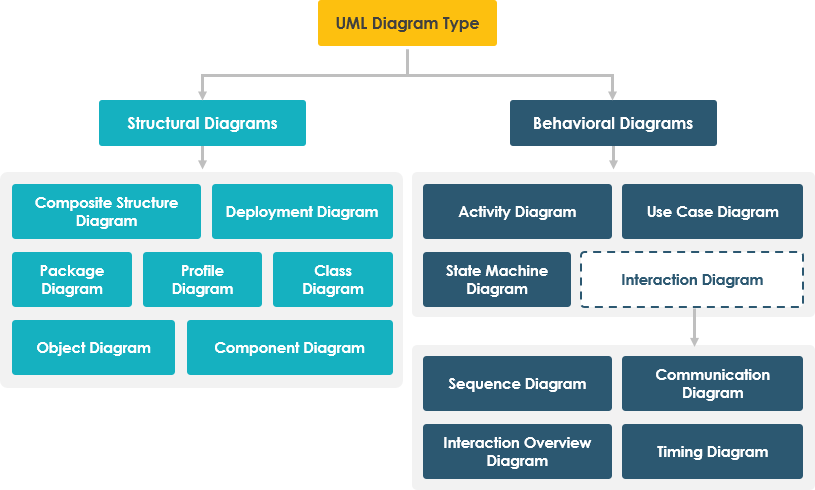
Before you can leverage advanced tools, you need to master the fundamentals. You don’t need to learn every single type of diagram ever created. Focus on the core trio that drives most agile discussions:
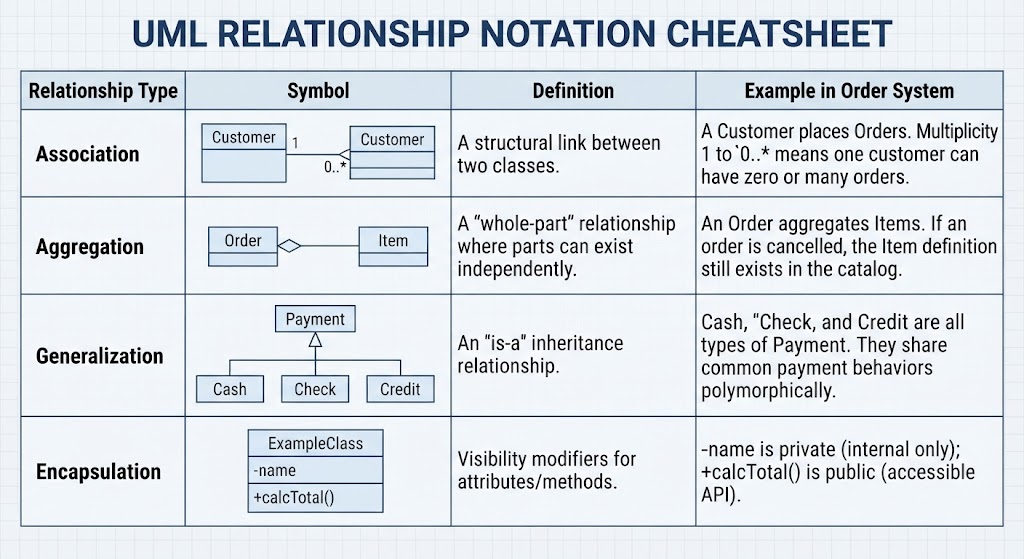
- Class Diagrams: Essential for understanding the structure of your system.
- Sequence Diagrams: Crucial for visualizing interactions and data flow over time.
- Activity Diagrams: Perfect for mapping out workflows and logic flows.
Step 2: Embrace Diagram-As-Code
This is the heart of the evolution. Stop treating your diagrams as static images. Embrace the concept of “Diagram-As-Code.” This means your UML models are written in a text format that can be version-controlled, diffed, and compiled into code. This ensures a tight feedback loop where changes in your code automatically update your diagrams, and vice versa. It turns the model into a source of truth rather than just a pretty picture.
Step 3: Leverage AI Assistants
Finally, don’t go it alone. Integrate AI assistants into your workflow. Modern tools can generate UML suggestions based on your code comments, help you refactor complex logic into cleaner visual flows, and even predict potential architectural bottlenecks. By letting AI handle the repetitive drawing tasks, you free up your cognitive load to focus on high-level system design.
By following this path, you transform UML from a burdensome requirement into a powerful asset. You are building a central nervous system for your team, one that supports rapid cycles, integrates seamlessly with code, and leverages the power of AI. Welcome to the future of software modeling.