In the world of Business Process Management (BPM), visualizing complex workflows is essential, yet often time-consuming. Traditionally, creating a Business Process Model and Notation (BPMN) diagram required dragging and dropping shapes, manually connecting sequence flows, and rigorously adhering to strict syntax rules. Today, however, the integration of Artificial Intelligence has revolutionized this workflow. This tutorial explores how to leverage AI-powered diagram generation to transform plain-English narratives into professional, standard-compliant BPMN 2.0 layouts.
The Shift from Manual to Generative Modeling
The core value proposition of AI diagram generation lies in removing the “syntax barrier.” Instead of worrying about whether a specific shape represents a gateway or a task, the user focuses on the logic and story of the process. The AI acts as an intelligent translator, converting your narrative intent into a technical representation.
Step 1: Defining the Scope via Natural Language
The process begins with a simple text prompt. In the example shown, the user inputs a specific scenario:
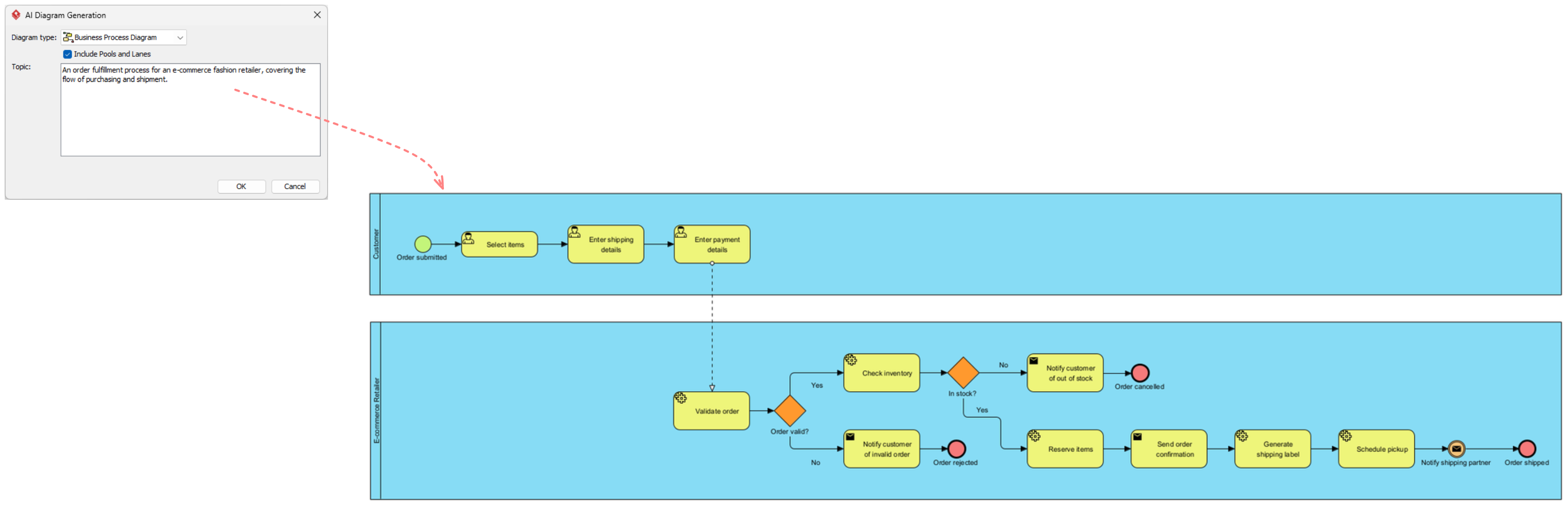
An order fulfillment process for an e-commerce fashion retailer, covering the flow of purchasing and shipment.
This single sentence provides the AI with three critical pieces of information:
- The Domain: E-commerce and fashion retail.
- The Process Type: Order fulfillment (a specific subset of business processes).
- The Scope: It covers purchasing and shipment, implying a start point (order submission) and an end point (delivery or cancellation).
Anatomy of the Generated Diagram
Once the AI processes the prompt, it generates a structured diagram. Let’s break down the technical elements visible in the generated output to understand what the AI has actually constructed.
1. Pools and Lanes (Collaboration)
The diagram is divided into two distinct blue areas known as Pools. In BPMN, a Pool represents a participant in a business process. The AI has correctly identified the two primary actors involved in the narrative:
- Customer Pool: The top lane representing the external actor initiating the process.
- E-commerce Retailer Pool: The bottom lane representing the internal system and logistics team fulfilling the request.
This separation is crucial for understanding Collaboration—how different entities interact. The AI has automatically inferred that “Select items” belongs to the Customer, while “Validate order” belongs to the Retailer.
2. Sequence of Events and Tasks
The yellow rounded rectangles represent Tasks (activities), and the circles represent Events. The AI has logically ordered these steps:
- Start Event: The green circle labeled “Order submitted” triggers the entire workflow.
- Customer Activities: The sequence
Select items→Enter shipping details→Enter payment detailsrepresents the data gathering phase. - Retailer Activities: Once the order is received, the process enters the retailer’s domain with
Validate order.
3. Decision Gateways (XOR Logic)
The orange diamonds are Exclusive Gateways (XOR), representing decision points where the path splits based on a condition. The AI has intelligently placed these at critical junctures:
- Order Valid? After validation, the process splits into “Yes” (continue) or “No” (notify invalid order).
- In Stock? This is a pivotal business logic check. If the inventory is insufficient, the flow diverts to “Notify customer of out of stock.”
Leveraging AI for Speed and Efficiency
Why should a technical tutor or process analyst use this generative approach? The efficiency gains are substantial when compared to manual modeling.
Rapid Prototyping and Visualization
Instead of spending hours configuring shape properties and connecting lines, you can generate a “draft” model in seconds. This allows stakeholders to review the high-level logic immediately. If the AI misses a nuance—for example, if the prompt didn’t specify payment—you can easily edit the diagram manually to add it, rather than building from scratch.
Standard Compliance Assurance
One of the hidden benefits of AI modeling is adherence to standards. The generated diagram is described as “standard-compliant BPMN 2.0.” This means the AI ensures that:
- Sequence flows only go from top to bottom or left to right (unless manually bent).
- Gateways have both an incoming and outgoing flow.
- Start and End events are correctly placed.
This eliminates common syntax errors that often plague manually drawn diagrams, ensuring the model is executable by BPM software engines.
Iterative Refinement
The most efficient workflow is iterative. You generate the base model using AI, then refine it. For instance, you might add complex error handling, attach data objects to the tasks, or define roles more granularly. The AI provides the skeleton; you provide the muscle and detail.