Introduction to BPMN Markers
In the world of Business Process Model and Notation (BPMN), precision is key. While the basic shapes like tasks and gateways tell us what happens, markers add the crucial layer of how it happens. These small icons placed inside activity shapes provide context, control flow, and flexibility to your diagrams. Today, we will walk through the five most critical markers defined in the BPMN 2.0.2 standard, helping you move from basic modeling to advanced process design.
The Loop Marker: Managing Repetition
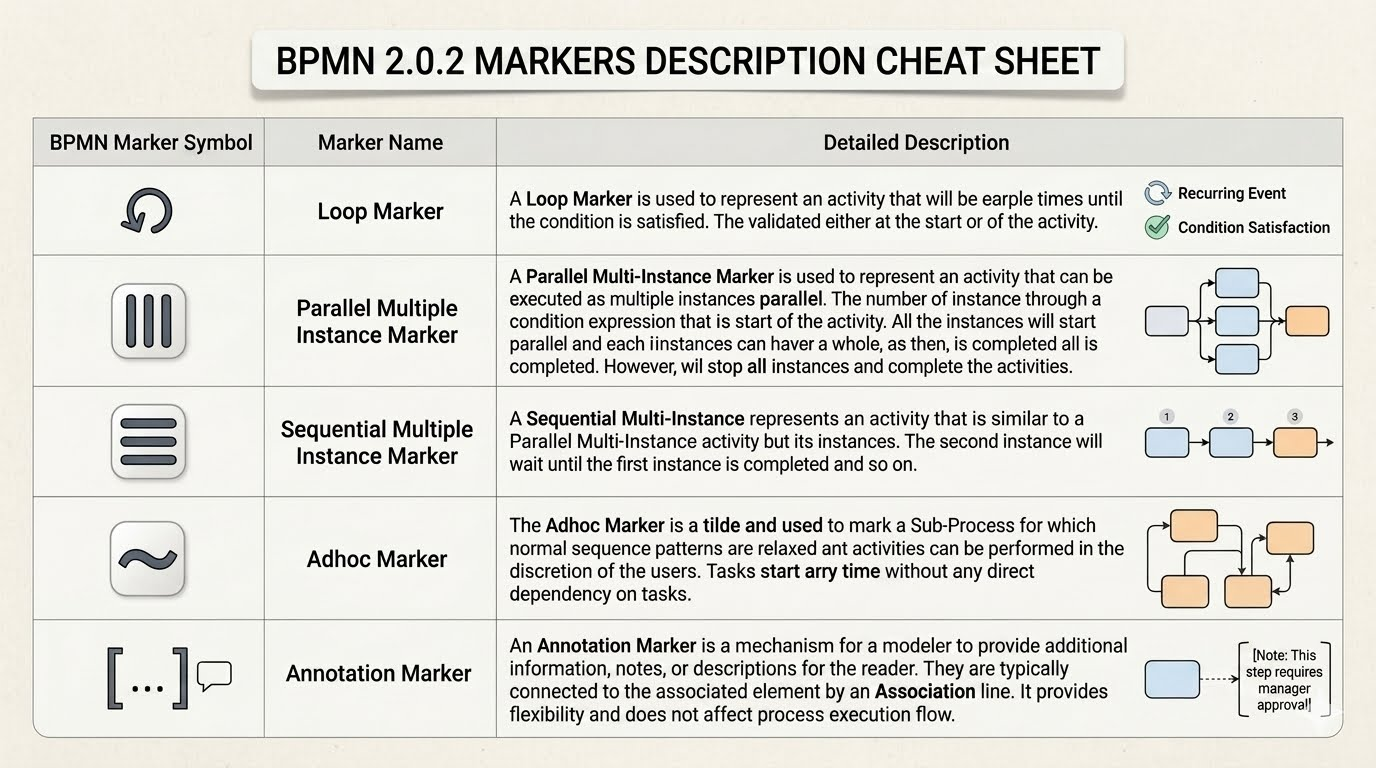
One of the most common challenges in process modeling is handling repetition. The Loop Marker is your solution for activities that must be performed multiple times. Visually, it looks like a circular arrow. This marker indicates that an activity will repeat until a specific condition is satisfied. You have the flexibility to validate this condition either at the start of the activity or at the end. This is essential for scenarios like retrying a failed transaction or iterating through a list of items until a specific goal is reached.
Parallel vs. Sequential: Understanding Multi-Instance Markers
When a task needs to happen more than once, you have two distinct options: running them in parallel or one after another. These are distinguished by the Multi-Instance Markers.
The Parallel Multi-Instance Marker, represented by three vertical bars, is used when instances of an activity are executed simultaneously. Imagine a scenario where you need to process ten invoices at once. The process spawns multiple instances in parallel. The system waits for all instances to complete before moving forward. It’s a “fork” mechanism where everything happens at the same time.
In contrast, the Sequential Multi-Instance Marker, shown as three horizontal bars, represents a task that runs one instance after another. This is similar to the parallel version but with a strict order. The second instance will not start until the first one is completed, the third waits for the second, and so on. This is ideal for tasks that require a hand-off or depend on the output of the previous step, such as a step-by-step approval chain.
The Adhoc Marker: Freedom Within Boundaries
Sometimes, processes are too complex to define a strict linear order. This is where the Adhoc Marker comes in. Represented by a tilde (~), this marker is used on a Sub-Process to indicate that normal sequence patterns are relaxed. Within an adhoc sub-process, activities can be performed in any order or at any time, at the discretion of the users. There are no direct dependencies forcing a specific flow. It essentially says, “Do these things, but you decide how and when to do them,” making it perfect for flexible, unstructured work groups.
The Annotation Marker: Adding Context Without Flow
Finally, not every element in a diagram is meant to change the flow of execution. The Annotation Marker is a mechanism for modelers to provide additional information, notes, or descriptions for the reader. Visually, it looks like a bracket with an ellipsis or a speech bubble. It is typically connected to an associated element by an Association line. Crucially, this marker provides flexibility and clarity for human readers without affecting the technical execution of the process. It is the digital equivalent of a sticky note on a whiteboard.
Conclusion
By mastering these markers, you transform your BPMN diagrams from simple flowcharts into robust, executable process models. Whether you are managing loops, handling parallel workloads, or simply adding necessary notes, these markers ensure your process logic is as clear as your visual design.