Introduction to Process Modeling
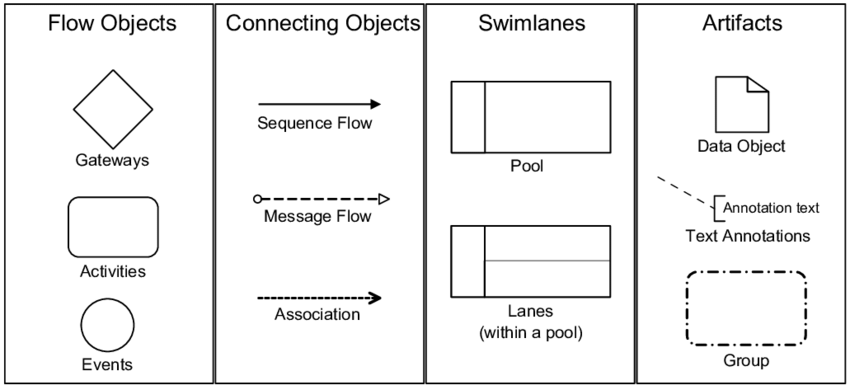
Welcome to our tutorial session on Business Process Model and Notation, commonly known as BPMN. If you have ever looked at a complex workflow diagram and felt lost, you are not alone. BPMN is the industry standard for visualizing business processes, acting as a universal language for business analysts, developers, and stakeholders. Today, we are going to decode the four fundamental categories of symbols used to build these diagrams: Flow Objects, Connecting Objects, Swimlanes, and Artifacts.
Flow Objects: The Heart of the Process
Let’s start with the most critical elements: the Flow Objects. These are the primary building blocks that define what is happening in your process. You can think of them as the actors and actions on a stage.
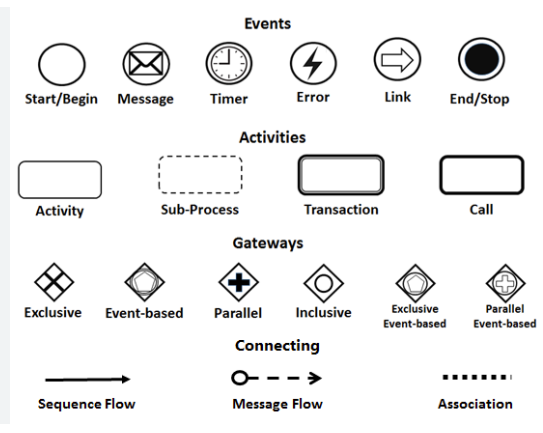
First, we have Events. Represented by a circle, events mark the beginning, middle, or end of a process. They are the triggers and outcomes, such as “Order Received” or “Payment Failed.” They don’t do anything themselves but rather signify that something has happened or will happen.
Next up are Activities. These are the actual work being performed, represented by a rounded rectangle. Whether it is a single task like “Review Document” or a complex sub-process, activities are where the value is created. They sit between events and keep the process moving.
Finally, we have Gateways. Shown as a diamond shape, these are the decision points. They determine the flow of the process. For example, a gateway might ask, “Is the credit score high enough?” If yes, the flow goes one way; if no, it goes another. They are crucial for modeling logic and branching paths.
Connecting Objects: Keeping the Flow Moving
Once you have your events, activities, and gateways, you need a way to link them together. This is where Connecting Objects come into play. They define the order and relationship between your flow objects.
The most common connector is the Sequence Flow. Depicted as a solid line with a classic arrowhead, this shows the order of activities. It answers the question, “What happens next?” It dictates the temporal order of the process.
When processes involve multiple parties or systems, we use Message Flows. This is represented by a dashed line with a hollow circle on the start and a classic arrow on the end. It indicates communication between two separate pools, such as a message sent from a customer to a company.
Lastly, there are Associations. These are simple dashed lines without arrowheads on both ends (or just one, depending on the context) used to link artifacts to the main process flow. They help clarify relationships without implying a direct sequence of execution.
Swimlanes: Organizing Responsibility
Complex processes often involve different departments or roles. To visualize who is responsible for what, we use Swimlanes. This structural element adds a layer of organizational context to your diagram.
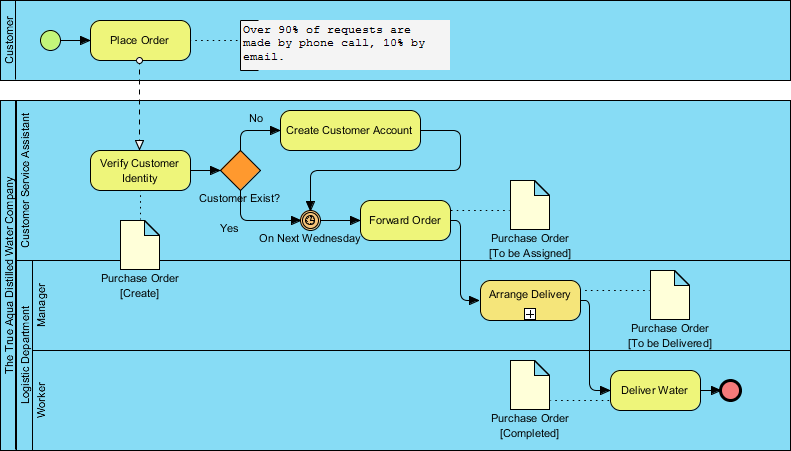
The container for a process is called a Pool. Think of a pool as a specific organization or a distinct participant in the process, like “The Customer” or “The Bank.” A pool represents a complete lifecycle of a process.
Inside a pool, you can divide the space into Lanes. These horizontal or vertical strips represent specific roles or departments within that organization. For instance, a “Loan Application” pool might have lanes for “Sales Team,” “Underwriter,” and “Accountant.” This visual separation makes it incredibly easy to see hand-offs and responsibilities at a glance.
Artifacts: Adding Context and Detail
Finally, sometimes the standard flow objects aren’t enough to convey the full picture. We need extra context, data, or grouping. This is where Artifacts come in.
If your process involves specific information being passed around, you use a Data Object. It looks like a piece of paper with a folded corner. It represents the information required or produced by an activity, such as a “Purchase Order” or a “Invoice.” It is not part of the control flow but is essential context.
To add explanatory notes without cluttering the flow, use Text Annotations. These are simple text boxes connected to a process element by a dashed line. They allow you to add rules, comments, or specific instructions directly on the diagram.
Lastly, you might want to group a set of activities together to show they belong to a specific category or phase. A Group is represented by a dashed rectangle. It visually clusters items together without changing the flow logic of the process.
Conclusion
By mastering these four categories—Flow Objects, Connecting Objects, Swimlanes, and Artifacts—you gain the ability to create clear, professional, and unambiguous process maps. Whether you are streamlining an internal workflow or designing a customer journey, these symbols provide the foundation for effective communication and optimization.