


In the rapidly evolving landscape of enterprise software development, the integration of Artificial Intelligence into modeling workflows has shifted from a novelty to a necessity. However, as organizations adopt these powerful tools, they face a critical challenge: balancing the speed of AI-assisted generation with the strict security, compliance, and governance requirements of the enterprise.
This tutorial explores the architecture of Custom AI Endpoint Support within Visual Paradigm’s VPasCode. We will dissect the configuration interface shown in the system diagnostics, explaining how organizations can move beyond generic cloud APIs to build a secure, high-performance, and fully governed AI modeling ecosystem.
The Enterprise Architecture: Why Custom Endpoints?
Traditional AI integration in diagramming tools often relies on the software vendor’s default infrastructure. While convenient, this approach creates a “data black box” where sensitive organizational data might traverse public clouds that do not meet specific compliance standards (such as GDPR or HIPAA). The architecture of Custom AI Endpoint Support is designed to solve this by shifting the control plane back to the organization.
By enabling custom endpoints, VPasCode acts as a sophisticated orchestration layer rather than just a client. It allows you to:
- Maintain Data Policy Compliance: Ensure that the data used to generate diagrams never leaves your approved infrastructure.
- Leverage Existing Relationships: Utilize enterprise-grade contracts with providers like OpenAI, Anthropic, or Google without needing new accounts.
- Optimize Performance: Select specific models tailored to complex tasks, such as high-throughput coding or deep architectural reasoning.
Deconstructing the Configuration Interface
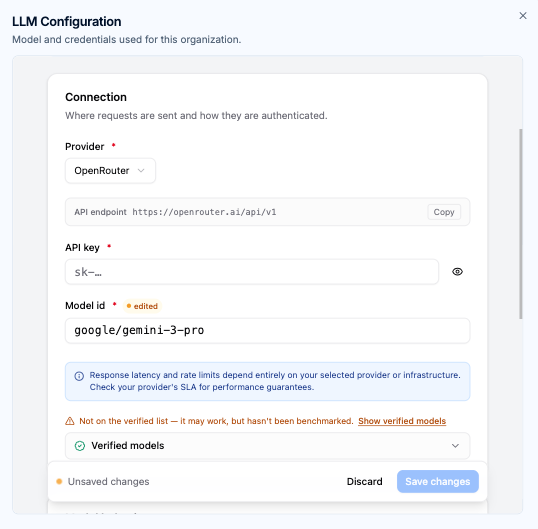
The configuration interface for LLM (Large Language Model) settings is the gateway to this advanced functionality. It is not merely a form for entering credentials; it is a structural blueprint for how your organization interacts with AI intelligence. Let’s break down the critical components visible in the system configuration.
1. Connection and Routing
The foundation of the system is the Provider and API Endpoint configuration. In the context of the image provided, the user has selected “OpenRouter.” This demonstrates the flexibility of the architecture to route requests through aggregators or direct provider gateways.
How it works:
- The Provider dropdown acts as a selector for the identity of the AI service.
- The API Endpoint field defines the exact network address (URL) where VPasCode sends its requests. This ensures that traffic is directed to your specific, approved server or cloud instance.
2. Authentication and Security
Security is paramount in enterprise environments. The API key field is the mechanism for authentication. When you input your credentials here, VPasCode uses them to establish a secure tunnel between the diagramming tool and the AI provider.
This aligns with the Dedicated API Management principle. By managing these keys within the workspace, you satisfy internal security auditing requirements and gain visibility into usage tracking. The system ensures that every request is authorized before it leaves your local environment.
3. Model Selection and Verification
The Model ID field is where the “brain” of the operation is defined. In the example, the configuration points to google/gemini-3-pro. This allows for Tailored Model Selection.
Depending on the complexity of the diagram—whether it is a simple flowchart or a complex microservices architecture—you can switch between:
- High-Throughput Models: For rapid iteration and simple syntax generation.
- High-Reasoning Models: For multi-tier architecture design and complex code parsing.
System Fallback and Reliability
A common concern in custom configurations is reliability. What happens if your custom endpoint is down or the model is unavailable? The system architecture addresses this through Automated System Fallback.
This feature ensures continuous operational uptime. If the custom routing is disabled or fails, the system instantly falls back to Visual Paradigm’s default AI infrastructure. This hybrid approach guarantees that your team’s workflow is never interrupted by infrastructure hiccups.
Advanced Behavioral Configuration
Once the connection is established, the power of the system lies in its configurability. Beyond basic connectivity, you can engage in Advanced Behavioral Configuration.
This allows workspace managers to fine-tune parameters such as:
- Max Output Tokens: Limiting the length of generated diagrams or code to fit specific UI constraints.
- Reasoning Effort: Adjusting how much “computational thinking” the model performs before answering.
This ensures that the AI output aligns with your team’s exact technical requirements, preventing hallucinations or overly verbose responses.
Centralized Governance for Teams
The architecture supports Centralized Workspace Governance. This means that administrators can establish workspace-wide AI configurations. Instead of every developer configuring their own API keys, the administrator sets the standard. This ensures consistent operational standards across all team members and simplifies the onboarding process for new engineers.
Conclusion
The Custom AI Endpoint Support in VPasCode represents a significant leap in enterprise AI modeling. By providing granular control over connection, authentication, and model selection, it empowers organizations to harness the power of Generative AI without compromising on security or governance. Whether you are routing through OpenRouter, Google, or a private cloud instance, the system is built to support your specific operational standards.