


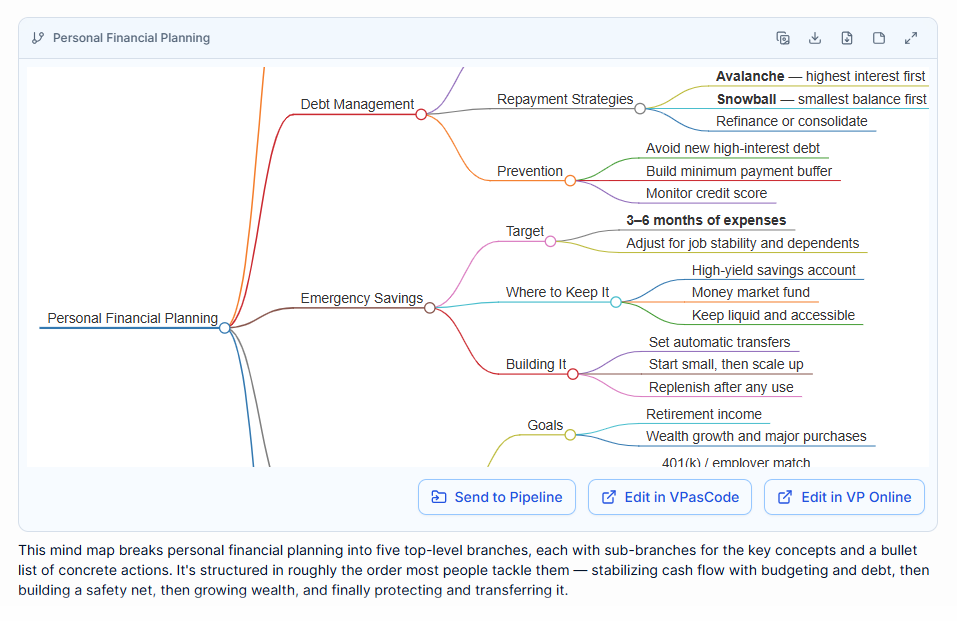
In the realm of technical documentation and system analysis, Visual Paradigm (VP) has long been a staple for creating structured diagrams. However, the landscape of diagramming is shifting from manual, node-by-node construction to intelligent, conversational generation. The tool shown in the reference image—specifically the AI Chatbot integrated within Visual Paradigm—demonstrates a significant leap in how we approach complex topics like Personal Financial Planning.
This tutorial explores how to leverage AI-driven mind mapping to structure complex data, understand the underlying MarkMap syntax used for generation, and refine hierarchical models through conversational interaction.
The Shift from Manual to Conversational Modeling
Traditionally, creating a comprehensive mind map required a user to manually drag nodes, draw connectors, and adjust alignment. When dealing with a broad topic like financial planning, the cognitive load of organizing the hierarchy can be as difficult as the subject matter itself.
The AI Diagramming Chatbot addresses this by acting as a conversational workspace. Instead of starting with a blank canvas, the user provides a prompt or a topic, and the AI generates a structured foundation. This approach is particularly powerful for:
- Rapid Prototyping: Quickly visualizing a new project scope.
- Idea Expansion: Taking a simple concept and branching it out into detailed sub-topics.
- Structural Refinement: Reordering logic or creating specific hierarchies (e.g., “Make this suitable for beginners”).
Understanding the MarkMap Syntax
Under the hood, the AI generates diagrams using a specific text-based syntax known as MarkMap. While the user interacts with a chat interface, the “code” that renders the visual nodes and lines is essentially a structured text file. Understanding this syntax allows you to manually edit the diagram if the AI’s output needs a quick tweak.
The structure typically relies on indentation to define hierarchy. A root node sits at the top level, and indented lines below it become children (branches).
Here is a breakdown of the syntax logic used to generate the Personal Financial Planning model shown in the image:
- Debt Management
    - Repayment Strategies
        - Avalanche
        - Snowball
        - Refinance or consolidate
    - Prevention
        - Avoid new high-interest debt
        - Build minimum payment buffer
        - Monitor credit score
- Emergency Savings
    - Target
        - 3-6 months of expenses
        - Adjust for job stability and dependents
    - Where to Keep It
        - High-yield savings account
        - Money market fund
        - Keep liquid and accessible
    - Building It
        - Set automatic transfers
        - Start small, then scale up
        - Replenish after any use
- Goals
    - Retirement income
    - Wealth growth and major purchases
    - 401(k) / employer match
In this snippet, notice how the main topic # Personal Financial Planning is the root. The items - Debt Management and - Emergency Savings are first-level branches. The text following --- in the original output (like Avalanche or Snowball) often represents specific values or detailed descriptions attached to those nodes.
Refining the Model through Conversation
The true power of the VP AI Chatbot lies in its ability to refine the model iteratively. Once the initial map is generated, you can treat the diagram as a living document. The system allows for specific instructions to reshape the data structure.
1. Restructuring Hierarchy
If the AI generates a list that feels flat or disorganized, you can ask it to reorganize. For example, you might request: “Group all ‘Prevention’ tactics under a new ‘Risk Management’ branch.” The AI will then redraw the connections and hierarchy to reflect this new logic.
2. Audience Adaptation
Models must often be tailored to their consumers. You can instruct the AI to simplify or complicate the content.
Example Prompt: “Make the structure more suitable for beginners.”
Result: The AI might replace technical jargon (like “Liquidity Management”) with plain language (like “How to keep cash safe”) and expand on specific definitions.
3. From Idea to Document Outline
The diagram is not just a visual aid; it can serve as a scaffold for content creation. The generated mind map can be used as an outline for a formal document, a presentation, or a project plan. The visual hierarchy translates directly into the Table of Contents for your deliverables.
Visualizing the Financial Planning Model
The specific diagram provided illustrates a robust approach to Personal Financial Planning. It breaks down a complex life goal into five actionable top-level branches:
- Debt Management: Focusing on repayment strategies (Avalanche vs. Snowball) and prevention.
- Emergency Savings: Covering the target amount (3-6 months), where to store it, and how to build it.
- Goals: Addressing long-term wealth growth and retirement.
This logical sequence—moving from stabilizing cash flow (debt) to safety (savings) to growth (goals)—demonstrates how the AI can naturally apply industry-standard financial logic to the structure of the map.
Conclusion
The integration of AI into tools like Visual Paradigm transforms diagramming from a drawing exercise into a strategic thinking partner. By understanding the MarkMap syntax and utilizing conversational commands to refine the model, you can rapidly develop comprehensive, logically sound diagrams for any complex topic, ensuring your documentation is as intelligent as the data it represents.