


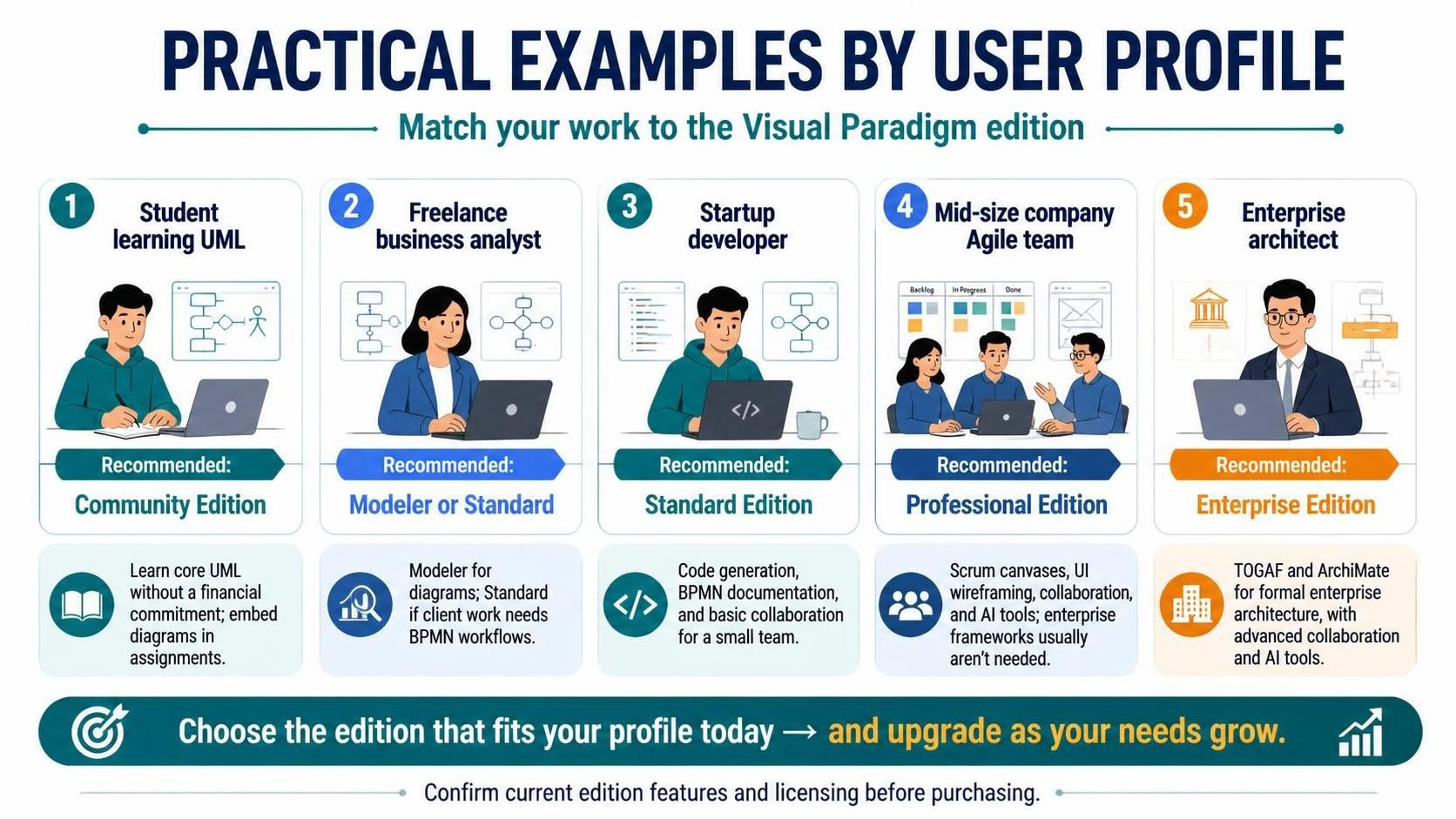
In the complex landscape of software engineering and business analysis, the choice of a modeling tool is not merely a purchasing decision; it is a strategic alignment of resources. Visual Paradigm, a leading enterprise architecture and software engineering tool, structures its licensing into distinct editions tailored to specific user needs. This tutorial explores how different professional profiles—from students learning the ropes to Enterprise Architects managing global systems—can leverage specific features to maximize efficiency and minimize cost.
We will break down the five primary user personas and map them to the appropriate Visual Paradigm edition, analyzing the technical capabilities that drive these recommendations.
1. The Student: Mastering UML Fundamentals
For the student learning software engineering, the barrier to entry should be low, but the learning potential must be high. The primary goal here is to understand the syntax and semantics of Unified Modeling Language (UML) without the distraction of enterprise complexity.
Recommended: Community Edition
The Community Edition is the ideal starting point. It provides access to core UML tools, allowing you to create use cases, class diagrams, and sequence diagrams. While the free version includes watermarks on exported images, this is often irrelevant for academic submissions where diagrams are embedded directly into documents or code comments.
' Student Example: Use Case Diagram
@startuml
left to right direction
actor Student
usecase "Study UML" as UC1
usecase "Practice Diagrams" as UC2

Student --> UC1
Student --> UC2
@enduml
Key Takeaway: Focus on the Model rather than the Export. The Community Edition forces you to rely on the software’s native features rather than premium output options, teaching you the raw mechanics of modeling.
2. The Freelance Business Analyst: Precision and Workflow
Freelancers operate on thin margins and tight deadlines. They require tools that handle specific deliverables without bloating the license cost. The decision tree here often depends on the complexity of the process flows required by the client.
Recommended: Modeler or Standard Edition
- Modeler Edition: If your scope is strictly limited to creating system designs, data flow diagrams (DFD), and structural UML diagrams, the Modeler edition is sufficient. It is a lightweight solution for technical documentation.
- Standard Edition: This becomes necessary if your clients require Business Process Model and Notation (BPMN) workflows. Standard Edition bridges the gap between technical design and business process mapping, allowing you to document complex user flows that drive system requirements.
3. The Startup Developer: Speed and Automation
In the startup environment, time is currency. The goal is to get a Minimum Viable Product (MVP) running quickly. Developers in this space need tools that facilitate the “Model-to-Code” lifecycle.
Recommended: Standard Edition
The Standard Edition is the sweet spot for startup developers. It unlocks critical features that accelerate development:
- Code Generation: Automatically generate Java, C#, or Python skeletons from your Class Diagrams.
- Code Reverse Engineering: Import existing codebases to visualize them as diagrams, aiding in legacy code refactoring.
- BPMN Workflows: Document user flows to ensure the frontend matches backend logic.
- Basic Collaboration: Small teams can work on shared projects without the overhead of enterprise server management.
Tip: Avoid paying for enterprise-level features you won’t use. Stick to the Standard Edition until you have a dedicated team of 10+ people.
4. The Mid-Size Company Agile Team: Visualization and Iteration
As teams grow, the methodology often shifts to Agile or Scrum. The modeling tool must adapt from static diagrams to dynamic project management and rapid prototyping.
Recommended: Professional Edition
The Professional Edition is designed to support the Agile lifecycle. It goes beyond static diagrams to support the active development process.
- Scrum Canvases: Visualize your backlog, sprint planning, and retrospectives directly within the tool.
- UI Wireframing: Create low-fidelity prototypes to validate user interfaces before writing a single line of code.
- Enhanced Collaboration: Multi-user editing capabilities allow the team to work on the same model simultaneously.
- AI Tools: Leverage AI assistants to generate boilerplate code or suggest architectural improvements.
5. The Enterprise Architect: Formalism and Governance
At the highest level of corporate architecture, the stakes are high. Architectures must be scalable, secure, and compliant with industry standards. This is where the Enterprise Edition shines.
Recommended: Enterprise Edition
The Enterprise Edition is non-negotiable for formal Enterprise Architecture (EA) work. It provides:
- TOGAF and ArchiMate Support: Native support for these industry-standard frameworks is crucial for maintaining documentation that satisfies corporate governance and audit requirements.
- Advanced Collaboration: Features like version control integration and server-based collaboration are essential for large, distributed teams.
- AI-Powered Analytics: Advanced tools help analyze the impact of changes across the entire system landscape.
Conclusion
Selecting the right Visual Paradigm edition is a matter of matching your workflow requirements to the tool’s capabilities. Whether you are a student avoiding financial commitment, a freelancer needing BPMN support, or an Enterprise Architect managing TOGAF compliance, there is a specific edition designed to fit your profile perfectly.
As your needs evolve, remember that these tools are designed to grow with you. Start with the edition that fits your current project scope, and upgrade as your complexity demands it.