


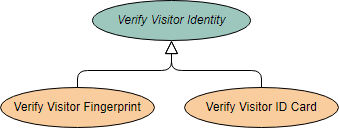
In the realm of systems engineering and software architecture, modeling complex business processes requires a balance between high-level abstraction and specific implementation details. One of the most powerful, yet often misunderstood, concepts in Use Case modeling is Inheritance. This tutorial explores how to effectively use abstract use cases to create flexible, reusable system models, specifically focusing on the “Verify Visitor Identity” scenario depicted in the provided diagram.
We will break down the architecture of this diagram, explain the semantic difference between the abstract parent and its concrete children, and discuss how to leverage these concepts in your Visual Paradigm projects.
The Architecture of the Diagram
The diagram provided illustrates a classic hierarchy of use cases. At the top, we see a parent use case, and below it, two child use cases connected by a specific relationship. This structure is not merely decorative; it represents a strict logical relationship known as Generalization (or Inheritance).
The Parent: An Abstract Foundation
The top node, Verify Visitor Identity, is rendered as a teal oval with italicized text. In UML and Visual Paradigm syntax, this styling is the universal indicator that the use case is Abstract.
- Meaning: An abstract use case defines a general goal or a set of behaviors that are common to a family of use cases. It represents a concept that cannot be directly executed by an actor.
- Why it exists: In our example, a security guard or a system cannot simply “Verify Visitor Identity” as a single, atomic action. The system requires specific details on how that verification occurs.
- Constraint: Because it contains incomplete information, you cannot instantiate an abstract use case. You cannot assign a specific actor to perform the action Verify Visitor Identity directly without specifying the method.
The Children: Concrete Implementations
Beneath the abstract parent are two orange ovals: Verify Visitor Fingerprint and Verify Visitor ID Card. These are Concrete use cases.
- Inheritance: By inheriting from the parent, these child use cases automatically acquire the general behavior of verifying identity. They do not need to redefine the rules for “who” is verifying or “what” the general outcome is.
- Specialization: These nodes add specific details (the “how”) to the abstract concept. One specifies biometric data (fingerprint), while the other specifies document-based data (ID card).
- Execution: These are the actual steps a user can perform. An actor can interact with the system to verify a fingerprint or verify an ID card.
The Generalization Relationship
The line connecting the parent to the children is the Generalization relationship. Visually, it is represented by a solid line ending in a large, hollow triangular arrowhead pointing toward the parent.
This relationship implies an “Is-A” relationship. In the context of our diagram:
- A “Verify Visitor Fingerprint” use case Is-A “Verify Visitor Identity” use case.
- A “Verify Visitor ID Card” use case Is-A “Verify Visitor Identity” use case.
This structure allows for polymorphism in the system design. If the system requirements change such that all verification methods must now include a timestamp and a photo log, you can add that behavior to the abstract parent Verify Visitor Identity. Both the fingerprint and ID card children will automatically inherit these new requirements without needing individual modification.
Implementing Abstract Use Cases in Visual Paradigm
When building this model in Visual Paradigm, you must explicitly define the nature of the use cases. The visual cue (italics) is generated automatically based on the object’s properties.
To achieve the diagram shown above, follow these logical steps within the tool:
- Create the Parent: Add a new Use Case named “Verify Visitor Identity”.
- Mark as Abstract: Right-click the use case and select Properties (or press Ctrl+1). In the Use Case Properties dialog, check the box labeled Abstract. You will immediately see the name change to Verify Visitor Identity.
- Create Children: Add “Verify Visitor Fingerprint” and “Verify Visitor ID Card”. Ensure these are NOT marked as abstract.
- Link Them: Select the “Generalization” tool from the toolbar. Draw a line from the child use cases (the source) to the parent use case (the target). The arrowhead should point to the abstract parent.
Why Use Abstraction in Business Modeling?
It might seem redundant to create an abstract node that cannot be executed. However, this abstraction is crucial for scalability and clarity in complex business systems.
Imagine a high-security facility with 50 different ways to verify identity (Face ID, Iris Scan, Retina Scan, RFID, etc.). If you model all 50 as separate, flat use cases, your diagram becomes a messy web of disconnected lines. By creating an abstract Verify Visitor Identity node, you create a “bucket” or a “category” that logically groups all these specific methods. This simplifies the view for stakeholders who are more interested in the types of verification available rather than the minutiae of every single one.
Extending the Model: <> and <>
As mentioned in the context of the example, once you have established these base use cases, you can further structure them. The abstract nature of the parent allows you to define common behaviors that might be shared across all children, or behaviors that vary depending on the specific child.
For instance, you might have a <
Summary
The diagram provided is a textbook example of hierarchical modeling. By utilizing the abstract use case Verify Visitor Identity, we have created a flexible framework that accommodates multiple verification methods (Fingerprint, ID Card) while maintaining a clean, manageable system architecture. This approach ensures that your business requirements are modeled with precision, scalability, and clarity.