


In the realm of software engineering, the bridge between abstract business goals and concrete technical specifications is often paved with requirements. Visual Paradigm, a comprehensive modeling tool, provides a robust mechanism for anchoring these requirements directly to Use Cases. This tutorial explores how to effectively manage requirements within the “Return Book” use case, ensuring that every functional and non-functional constraint is explicitly defined and traceable.
Why Link Requirements to Use Cases?
Use cases are not merely diagrams; they represent specific business goals or user interactions. By embedding requirements directly into a use case definition, you ensure that the development team is building exactly what the business needs. This approach prevents common pitfalls such as:
- Scope Creep: Unwanted features that do not align with the core goal.
- Costly Rework: Development time wasted on features that will later be discarded.
- Traceability Gaps: The inability to verify if a specific requirement has been met.
Understanding the Requirement Types
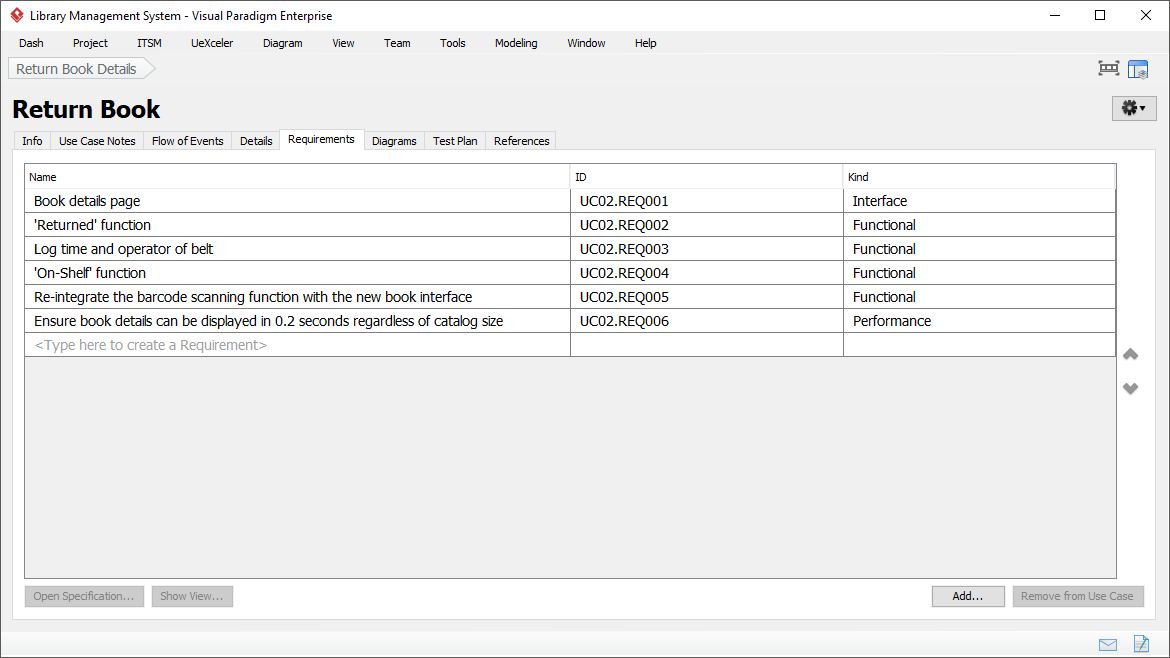
Looking at the “Return Book” use case context, we can categorize the listed requirements into distinct types. Visual Paradigm allows you to tag these requirements, as seen in the “Kind” column of the screenshot.
1. Functional Requirements
These define specific behaviors or functions the system must perform. In our example, the system needs to physically or logically handle a book return. Key functional requirements include:
- ‘Returned’ function: The system must register the status change of a book to “Returned”.
- Log time and operator: The system must record metadata (timestamp and user ID) during the transaction.
- ‘On-Shelf’ function: The system must update the inventory status to reflect that the book is available for lending again.
- Barcode Integration: The requirement to re-integrate scanning functions with the new interface ensures legacy compatibility or hardware alignment.
2. Interface Requirements
Interface requirements dictate how the user interacts with the system. The requirement “Book details page” specifies that the user must be presented with specific data upon initiating the return process. This ensures the operator knows exactly which item is being processed before confirming the action.
3. Performance Requirements
Non-functional requirements are just as critical as functional ones. The screenshot highlights a performance metric: “Ensure book details can be displayed in 0.2 seconds regardless of catalog size”. This defines a Service Level Agreement (SLA) for the system’s responsiveness, ensuring that the library remains efficient even as the database grows.
How to Manage Requirements in Visual Paradigm
Visual Paradigm’s Requirements tab within the Use Case editor streamlines this process. Here is a step-by-step guide to managing these constraints effectively:
- Access the Tab: Navigate to the Use Case editor and select the “Requirements” tab. This isolates the requirements from the general description and flow of events.
- Define the Name: Enter a clear, concise description of the constraint. Avoid ambiguity; instead of “Fast loading,” use “Load within 0.2s.”
- Assign an ID: Visual Paradigm automatically generates IDs (e.g., UC02.REQ001), but you can customize these to align with external documentation or project standards.
- Classify the Kind: Select the appropriate type from the “Kind” dropdown (Functional, Interface, Performance, etc.). This allows for filtering and reporting later in the project lifecycle.
- Link to Diagrams: Use the “Show View” or “Diagrams” tabs to ensure these text-based requirements are visually represented in your UML diagrams, such as adding notes to actors or system boundaries.
Conclusion
By rigorously applying the “Requirements in Use Case” approach in Visual Paradigm, you transform a simple list of features into a structured, manageable, and traceable blueprint for development. This method ensures that every line of code written for the “Return Book” process is justified by a clear, categorized requirement, ultimately saving time and resources.