


In the modern landscape of software architecture and technical documentation, diagrams often become “dead ends.” They are created, rendered as images, and pasted into documents. Once that image is static, it loses its context and becomes difficult to update without reverting to the original source file—which is often lost or locked in an incompatible tool.
This tutorial explores a transformative workflow introduced by Visual Paradigm: From Image Reference to Living Diagram. By leveraging AI-powered diagram generation, we can turn any static image, screenshot, or hand-drawn sketch into a fully editable, structured model. This guide walks you through the system architecture of this workflow, explaining how to bridge the gap between visual concepts and editable diagram-as-code.
1. The Paradigm Shift: Static vs. Living Diagrams
Traditionally, the lifecycle of a diagram was linear and restrictive. You created a diagram in a tool, exported it as a JPEG or PNG, and that image became the final artifact. If you needed to make a change, you had to open the original file, make the edit, and re-export. If you only had the image, you were stuck.
The VPasCode AI Diagram Generation feature fundamentally changes this dynamic. It treats the image not as the final destination, but as the starting point of a new workflow. This approach utilizes a “Diagram-as-Code” philosophy, where the visual representation is generated from a script. This allows for:
- Version Control: Diagrams can be stored alongside your code.
- Modifiability: Changes are made to the source text, not by dragging pixels.
- Portability: Models can be easily migrated between tools.
2. The 6-Step Workflow Architecture
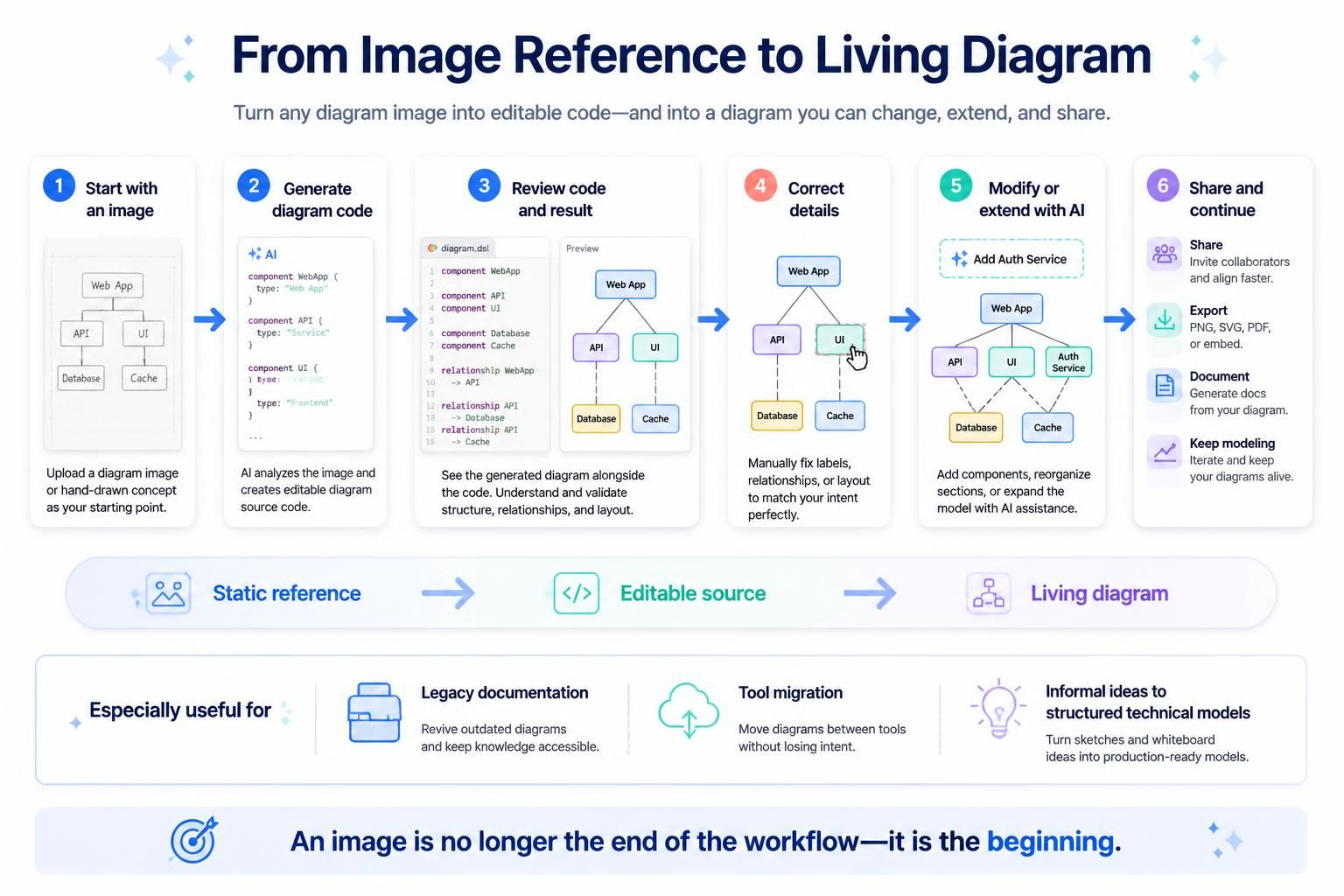
The transition from a static reference to a living model follows a structured six-step process. Each step leverages specific capabilities of the Visual Paradigm ecosystem to ensure accuracy and efficiency.
Step 1: The Starting Point (Image Ingestion)
The workflow begins with the most common artifact in software development: an existing image. This could be:
- A screenshot of an existing system architecture.
- A scanned image of a whiteboard sketch.
- A hand-drawn concept of a new component.
Instead of treating this image as a final product, you upload it as the “seed” for the generation engine.
Step 2: AI-Driven Code Generation
Once the image is ingested, the VPasCode AI analyzes the visual elements—nodes, shapes, and connecting lines—and reconstructs them into an editable diagram script. This process effectively “reverse-engineers” the visual representation into a structured format.
Step 3: Code Review and Validation
The AI does not just produce an image; it produces code. The system renders a preview of the diagram alongside the generated source code. This step is critical for verification. You must review the generated code to ensure that the AI has correctly interpreted the relationships (e.g., distinguishing between a dependency and a flow) and component types.
Step 4: Correction and Refinement
Even with high-accuracy AI, minor adjustments are often necessary. In this phase, you manually correct labels, fix relationship arrows, or adjust layout details. Because the diagram is now based on code, these corrections are precise and structural rather than graphical.
Step 5: AI-Assisted Modification
Once the base model is established, the “Living Diagram” aspect comes alive. You can ask the AI to modify or extend the diagram. For example, you can instruct the system to “Add an Auth Service component” or “Reorganize the layout to be horizontal.” The AI updates both the code and the visual rendering in real-time.
Step 6: Sharing, Exporting, and Documentation
The final phase involves leveraging the generated model for the rest of the project lifecycle. The diagram can be:
- Shared: Collaborators can access the live model to align faster.
- Exported: Generate high-quality PNG, SVG, or PDF files for reports.
- Documented: Automatically generate technical documentation from the diagram.
3. Key Use Cases and Architectural Benefits
This workflow is not just a novelty; it addresses specific pain points in enterprise architecture and development teams.
Migrating Legacy Documentation
Many organizations struggle with “legacy documentation”—diagrams that exist only as images in PDFs or Word documents. This workflow allows teams to revive outdated diagrams, convert them into editable code, and keep that knowledge accessible for modernization.
Tool Migration
Moving diagrams between different tools is often a nightmare of redrawing. By converting an image from Tool A into a script in Visual Paradigm, you can migrate the diagram without losing the intent or structure of the original model.
Informal Ideas to Structured Models
Technical ideas often start as informal sketches. This workflow bridges the gap between a rough idea and a production-ready model, allowing architects to turn whiteboard sketches into structured technical models rapidly.
Conclusion
The introduction of AI Diagram Generation marks a significant leap forward in how we work with visual models. By eliminating the tedious aspect of manual recreation, VPasCode ensures that your diagrams are no longer dead ends. Every image becomes the starting point for a living, evolving diagram that grows with your project. Whether you are a developer, architect, or technical writer, this workflow empowers you to move from visual concept to editable code faster than ever before.