


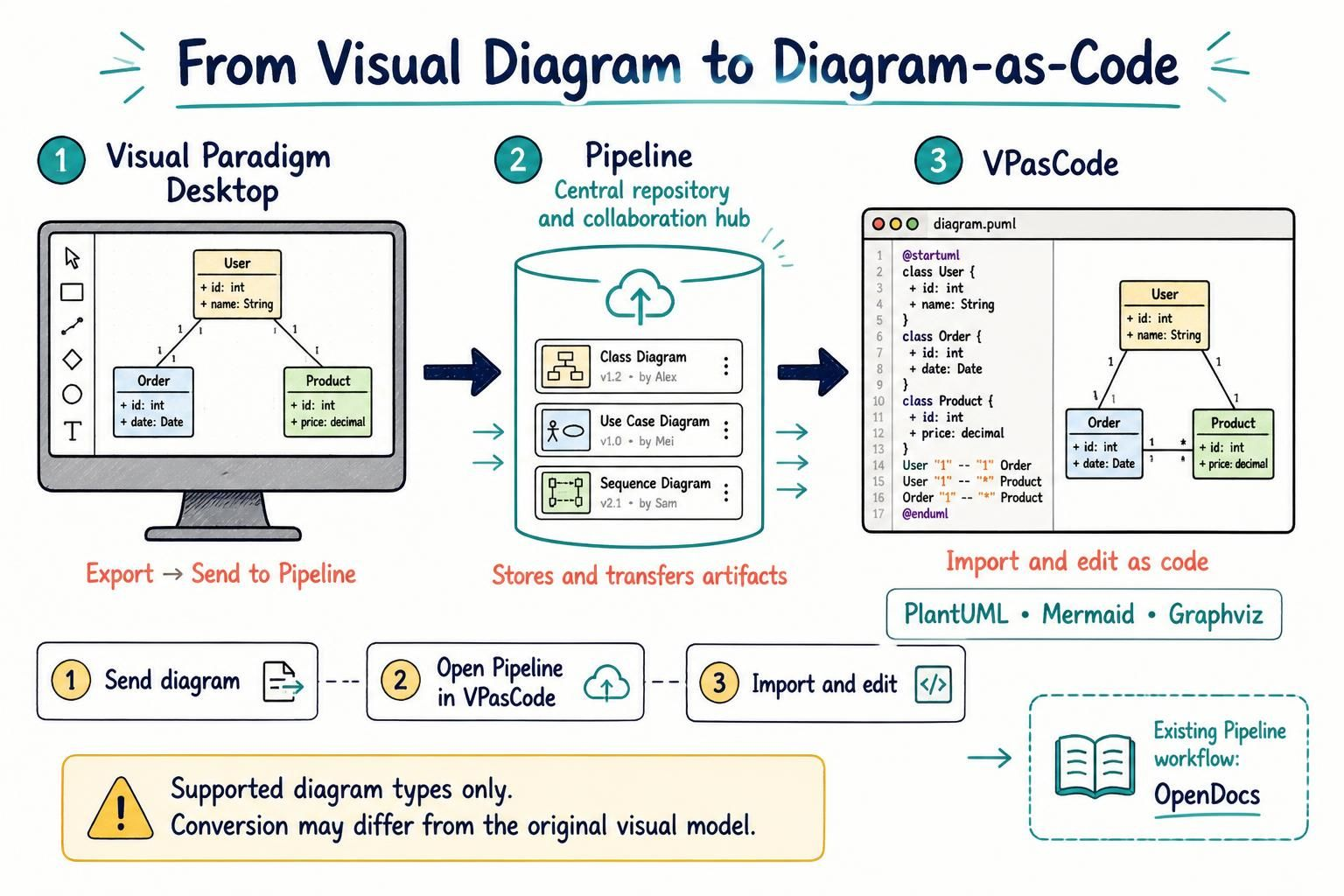
In the modern software development lifecycle, the gap between visual architects and text-based developers can often be a significant friction point. Historically, a diagram created in a visual tool like Visual Paradigm Desktop was often treated as a final artifact—locked away in a proprietary format. However, the industry is shifting towards a more fluid “Diagram-as-Code” approach, where models are treated as source code.
This tutorial explores a powerful new workflow integration within the Visual Paradigm ecosystem: the ability to transform visual diagrams into text-based syntax (PlantUML, Mermaid, or Graphviz) using the Pipeline and VPasCode. This process bridges the gap between visual modeling and code-centric editing.
The Core Architecture: A Three-Step Workflow
The integration relies on a central hub known as the Pipeline. Think of the Pipeline not just as a file storage location, but as a shared repository and collaboration hub designed to facilitate the movement of artifacts between different Visual Paradigm applications.
The workflow consists of three distinct stages:
1. Visual Paradigm Desktop (The Source)
The process begins in Visual Paradigm Desktop, the robust visual modeling environment. Here, users create their models using a graphical user interface (GUI). Whether it is a Class Diagram, Use Case Diagram, or Sequence Diagram, the focus is on visual clarity and rapid modeling.
Once the model is ready, the user exports the diagram to the Pipeline. This action “sends” the artifact, making it available for retrieval by other tools in the ecosystem.
2. The Pipeline (The Central Repository)
The Pipeline serves as the bridge. It stores the diagram artifact and manages its version history (e.g., v1.2 by Alex, v1.0 by Mei). Crucially, for supported diagram types, the Pipeline acts as a converter. It doesn’t just store the visual file; it can generate and store a diagram-as-code version of that diagram.
This step ensures that the artifact is not isolated. It allows the diagram to move from the “visual world” to the “code world” seamlessly.
3. VPasCode (The Text Editor)
The final destination is VPasCode. This tool is designed for users who prefer working with text-based diagram syntax. By retrieving the artifact from the Pipeline, users can access the generated code. This code can be in PlantUML, Mermaid, or Graphviz formats, depending on the diagram type.
Once in VPasCode, the diagram is no longer a static image. It is editable text, allowing for version control (Git), automation, and collaboration with developers who might not have the visual modeling software installed.
Technical Implementation: Code Generation
When a diagram is sent from Desktop to the Pipeline, the system attempts to convert the visual elements into a standardized syntax. Below is an example of how a Class Diagram created visually in Desktop might appear when retrieved in VPasCode.
Consider a simple model containing User, Order, and Product classes. The visual tool renders this as boxes and lines, but the Pipeline converts this into the following PlantUML syntax:
@startuml
class User {
  + id: int
  + name: String
}

class Order {
  + id: int
  + date: Date
}

class Product {
  + id: int
  + price: decimal
}

User "1" -- "1" Order
User "1" -- "*" Product
Order "1" -- "*" Product
@enduml
This transformation allows you to utilize standard text-editing features like diff-checking, search-and-replace, and syntax highlighting directly on your diagrams.
Why Use This Workflow?
The primary advantage of this architecture is flexibility. It allows different stakeholders to work in their preferred environments:
- Modelers: Can rapidly prototype and refine the system structure using the visual tools in Visual Paradigm Desktop.
- Developers: Can inspect the diagram logic, verify relationships, and make minor tweaks directly in the code using VPasCode.
- Project Managers: Can utilize the Pipeline to ensure that the documentation (OpenDocs) remains synchronized with the actual model.
This creates a reusable artifact loop. You are not treating the diagram as a static picture; you are treating it as a living component of the project that can be edited in multiple ways.
Conclusion
By integrating Visual Paradigm Desktop, the Pipeline, and VPasCode, the ecosystem supports a hybrid approach to modeling. You start with the speed of visual drag-and-drop and end with the precision of text-based syntax. This flexibility ensures that your diagrams remain accessible, version-controllable, and relevant to the entire development team.