BPMN

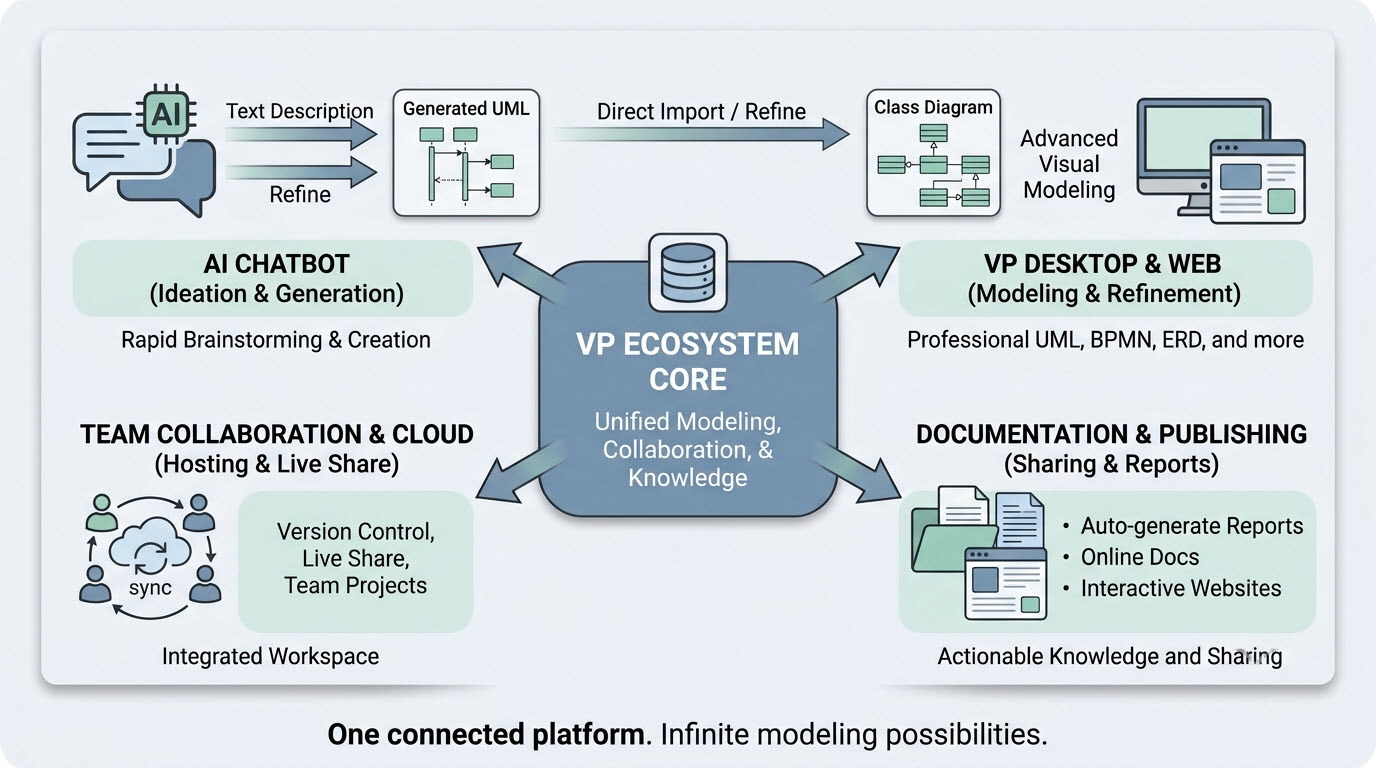
VP Ecosystem Core Platform System Architecture Diagram

VP Ecosystem Core Platform System Architecture Diagram

ntroduction to BPMN and the Visual Paradigm Ecosystem
BPMN (Business Process Model and Notation) 2.0 is the global standard for visualizing, documenting, and analyzing business processes. It serves as a universal language that bridges the gap between business strategy and technical implementation.

Visual Paradigm offers a comprehensive ecosystem that integrates BPMN with advanced AI capabilities, allowing users to move from text descriptions to production-ready models instantly. This ecosystem is not just a diagramming tool but a collaborative platform for end-to-end process engineering.

The Four Pillars of the Visual Paradigm AI Ecosystem
The platform unifies four key modeling environments:

VP Desktop (Visual Model): The flagship application for deep, offline modeling of complex projects, integrating AI generation with advanced editing and version control.
OpenDocs: A knowledge management platform that embeds live, AI-assisted diagrams directly into documents.
Conversational Co-Pilot (AI Chatbot): An interactive tool for rapid ideation, allowing users to generate and refine diagrams through natural language conversation.
Web Apps (Guided Tools): Browser-based tools for step-by-step modeling and collaboration without desktop installation.

Diagram Example: The Visual Paradigm AI Ecosystem connects an “AI Chatbot” for rapid ideation, “VP Desktop & Web” for advanced modeling, “Documentation & Publishing” for reports, and “Team Collaboration & Cloud” for live sharing, all unified under a “VP Ecosystem Core.”

2. Key Concepts in BPMN and AI Integration
2.1 The Challenge of Traditional BPMN Modeling
Traditional BPMN diagramming requires manual effort to drag and drop elements, align swimlanes, and connect sequence flows. This process is often slow, prone to inconsistencies, and requires significant expertise to ensure compliance with BPMN 2.0 standards. Standard text-to-diagram tools (like Mermaid) often fail with BPMN because they cannot handle the complex geometric constraints of swimlanes and the strict matrix routing required for enterprise-grade processes.

2.2 AI-Powered Text-to-BPMN Generation
Visual Paradigm’s AI engine uses Natural Language Processing (NLP) to overcome these barriers. Instead of learning a complex declarative syntax, users provide plain-English procedural descriptions. The AI then:

Extracts Semantics: Identifies organizational entities (pools/lanes), actions (tasks), and decisions (gateways).
Generates Objects: Instantiates explicit modeling objects within the editor rather than drawing flat shapes.
Optimizes Layout: Applies smart routing rules to minimize line crossings and ensure swimlanes are geometrically contained.
Creates Interactive Models: The output is a fully editable BPMN 2.0 diagram, not just a static image.

Checkout Process State Machine Diagram

Checkout Process State Machine Diagram

BPMN Call Activities
A BPMN Call Activity references an Activity defined in a process that is external to the current process definition. It allows you to create a reusable process definition that can be reused in multiple other process definitions.

The figure below shows a BPMN Call Activity example. It consists of a Call Activity Register that references the Register task defined in a global process.

Order Processing Workflow Diagram

Order Processing Workflow Diagram

BPMN Sub-Processes
In BPMN, a sub-process is a compound activity that represents a collection of other tasks and sub-processes. Generally, we create BPMN diagrams to communicate processes with others. To facilitate effective communications, we really do not want to make a business process diagram too complex. By using sub-processes, you can split a complex process into multiple levels, which allows you to focus on a particular area in a single process diagram.

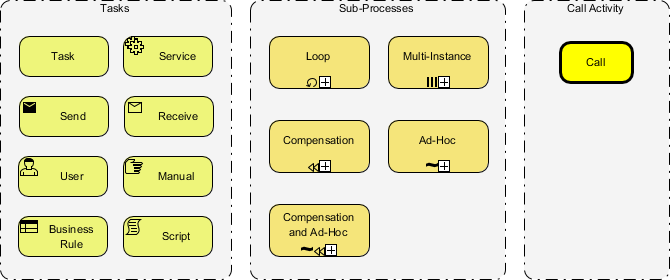
BPMN specifies five types of markers for Sub-Processes.

Order Pickup and Delivery Notification Flow

Order Pickup and Delivery Notification Flow

BPMN Tasks
A BPMN task is an atomic activity within a process flow. You create a task when the activity cannot be broken down to a finer level of detail. Generally, a person or applications will perform the task when it is executed.

In BPMN 2.0, there are different types of tasks identified for use in representing more specific behavior that tasks might represent. Here is a list of BPMN 2.0 task type:

Service Task
Send Task
Receive Task
User Task
Manual Task
Business Rule Task
Script Task

In the following sections we will go over each of these BPMN task types by providing you with an example for each of them.

BPMN Shipment Process Diagram with Swimlanes

BPMN Shipment Process Diagram with Swimlanes

What is BPMN?
BPMN, short for Business Process Modeling Notation, is widely used modeling language for creating process workflows or business process flowcharts. BPMN introduces a set of graphical notations that can be easily understood by everyone, from technical people such as business analysts, software developers, and data architects to business stakeholders such as the end users and other business stakeholders. This helps people communicate process workflow design ideas effectively.

BPMN 2.0 Tasks, Sub-Processes, and Call Activity Elements

BPMN 2.0 Tasks, Sub-Processes, and Call Activity Elements

Activities are critical components of BPMN – All business processes are primarily formed by different kinds of BPMN activities. With Visual Paradigm, you can draw your own BPMN diagram by using different kinds of activities. In this article, we will explain the different kinds of BPMN 2.0 activities you can use in modeling a business process with BPMN.

BPMN Nobel Prize Nomination Process Flow

BPMN Nobel Prize Nomination Process Flow

Business Process Modeling Tool
Easy and fun business process modeling
Looking for a Business Process Modeling tool?
Operating their businesses without well documented processes is just like a pilot who is flying blind without properly functioning instruments and navigation. Well documented and streamlined processes are essential in a smooth functioning of a team focused towards a shared goal. Visual Paradigm streamlines the entire business process modeling process for business Analysts ranging from Process Mapping, Process Discovery, to Process Simulation and Animation for business Improvements including: 1) Align Operations with Business Strategy, 2) Improve Process Communication, 3) Increase Control and Consistency, 4) Improve Operational Efficiencies and finally 5) Gain Competitive Advantage.

Gain Competitive Advantage with Powerful BPMN Editor
Powerful Features, Affordable Prices
Powerful and intuitive connection rules validating
Flexible pools and lanes editing for easy updating and medication
Process drill-down and collapse
Map process with other standards or subdiagram or even user case or user stories
Attach working process with a process
Export your diagram image on-demand
Compare diagram version with Visual-Diff
Advanced Process Modeling Features
Auto transform as-is or to-be gap analysis
Transform BPMN diagram to RACI or CRUD Chart
Perform Process animation to illustrate different choice of path in BPMN
Perform Process Simulation to evaluate cost, or identify bottleneck
Manage co-editing with your teammate and manage changes
Transform business process to user stories or user cases and subsequently to Agile process backlog seamlessly.
Best One-Stop-Shop Solution
Generate nice report automatically
Design your own custom report with powerful report designer
Proceed your business initiatives to software design team using seamless one-stop-shop platform such as UML, Scrum Agile Process Management and etc.
Comment, annotate and collaborate discuss diagram with your remote team member anywhere and anytime over the cloud with PostMania
Key features and benefits

Cross-Platform for Windows, Unix, Mac OS
International Major IT Award Winners that trusted by over million of users, government units, blue-chips and IT consultants
Offer a set of editions suitable for wide-range of stakeholders for IT or Business field
Seamlessly transfer your work to different people and teams without encountering application silos
Buy one get one free! Now, licensed users of VP desktop editions can enjoy the corresponding version of Visual Paradigm Online for free!
Used by the World’s Best-Known Enterprises
We are trusted by millions of users in companies ranging from small business to Fortune 500 companies, universities and government units.

BPMN Process Flow: Notation Explained

BPMN Process Flow: Notation Explained

Boundary vs Interrupting vs Non-Interrupting vs Catching vs Throwing Events
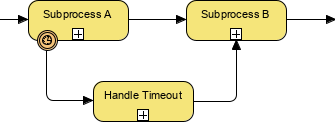
A boundary event is an event shown on an activity boundary that can be triggered or thrown at any time while the associated task or activity is being performed.  In other words, a boundary event is a type of intermediate event.

In the example below, a Timer boundary event is shown.  Some boundary events are time-based while others are based on a condition which must resolve to ‘True’ in order for that branch of the flow to proceed.

BPMN Event Types Diagram

BPMN Event Types Diagram

Types of Event
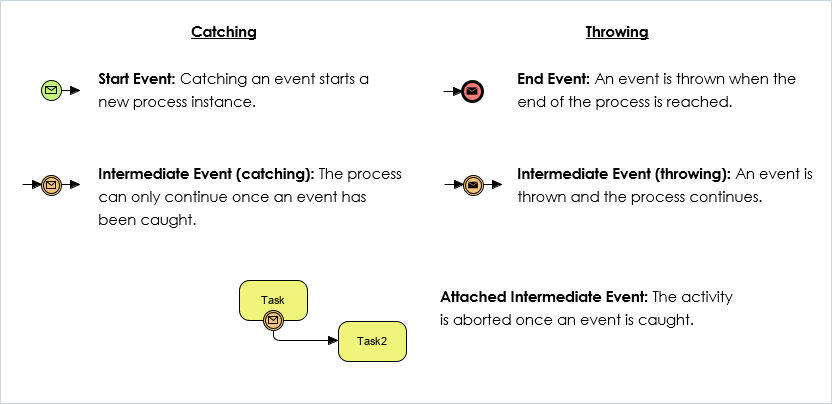
Events that occur at the beginning of the process are called Start events(thin narrow line) – and every process starts with an event.
Events that occur in the middle of the process (between activities) are called Intermediate events (thin double line).
Events that occur at the end of the process are called End events(thick single line) and every process has at least one end event.

Simple BPMN Diagram Example

BPMN Diagram Subprocess Timeout Handling

BPMN Diagram Subprocess Timeout Handling

Boundary vs Interrupting vs Non-Interrupting vs Catching vs Throwing Events
A boundary event is an event shown on an activity boundary that can be triggered or thrown at any time while the associated task or activity is being performed.  In other words, a boundary event is a type of intermediate event.

In the example below, a Timer boundary event is shown.  Some boundary events are time-based while others are based on a condition which must resolve to ‘True’ in order for that branch of the flow to proceed.

Interrupt vs Non-Interrupt Event
Introduced in BPMN 2.0 is the concept of non-interrupting events.   Interupting and non-interupting events are only relevant to intermediate events, especially boundary intermediate events. Boundary events can further be divided into two types: interrupting and non-interrupting, as a boundary events are associated with flow elements and can be configured to interrupt their usual behavior. They are illustrated with a solid line and a dashed line respectively.

An interrupting event (solid line) is more common that a non-interrupting event (dashed line). As the name implies, once triggered, the current task stops and the flow of control continues along the new path.
A non-Interrupting Timer Event attached at the boundary of the subprocess A will not be interrupted. Subprocess A will complete and the flow will continue on to subprocess B while a parallel flow will continue from the Non-Interrupting Timer Event onto the Handle Timeout subprocess.

BPMN Event Types Catching Throwing Attached

BPMN Event Types Catching Throwing Attached

Catching vs Thowing Event in BPMN
In BPMN there are three types of events. Start Events, Intermediate Events, and End Events. All of these can be catching and throwing events.

Catching events are events with a defined trigger. They are started once the trigger has activated or fired.
Throwing events are triggers for catching events and are triggered by the process.

Nobel Prize Nomination Flowchart Process

Nobel Prize Nomination Flowchart Process

Online BPMN Tool
Business Process Diagram maker with professional tools and templates

Make a BPMN Diagram
Draw BPMN diagrams online
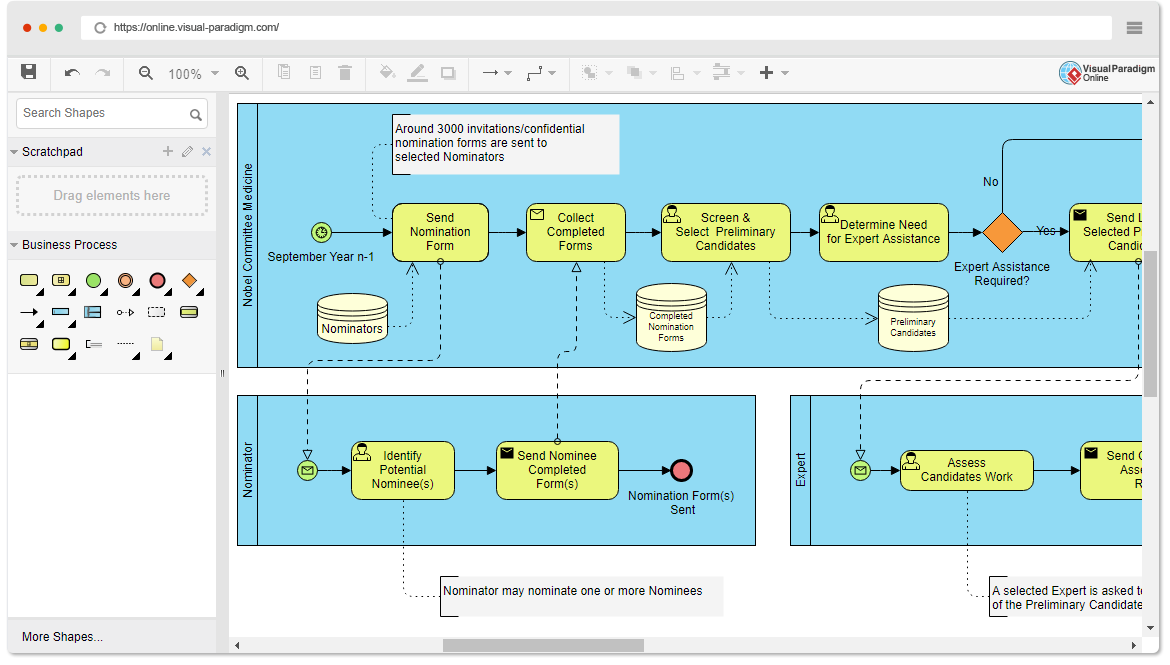
Business Process Model and Notation (BPMN) provides a graphical representation of business workflows that anyone can easily understand; aiding in business process analysis and business process improvements. You can now draw business workflow with Visual Paradigm’s online BPMN diagram tool.

Need some inspiration? We’ve put together some BPMN Business Process Diagram examples below to help you get started. Click on a process diagram to view it, or click the edit button to start editing. More BPMN examples and templates are available in the online drawing tools of Visual Paradigm Online.

Pizza Order Process

Lên đầu trang