


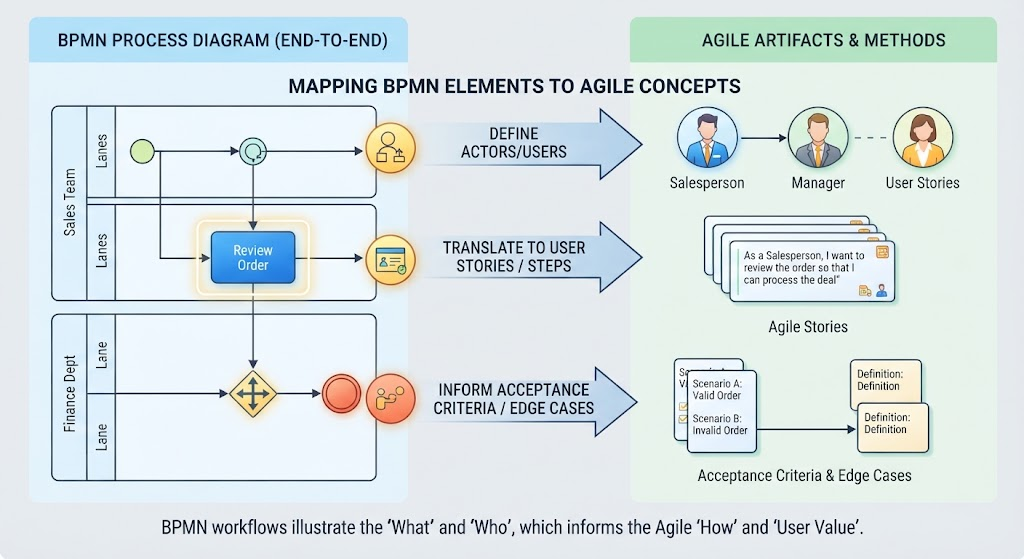
In the world of software development and business analysis, bridging the gap between high-level business processes and technical implementation can be challenging. This tutorial explores the vital relationship between Business Process Model and Notation (BPMN) and Agile methodologies. We will dissect how specific BPMN elements serve as the foundational source material for creating effective Agile artifacts.
The core philosophy is simple yet powerful: BPMN workflows illustrate the ‘What’ and ‘Who’, which informs the Agile ‘How’ and ‘User Value’. By understanding the structural mapping of process diagrams to user stories, teams can ensure that the software being built perfectly aligns with business requirements.
1. Defining Actors: BPMN Pools and Lanes
The first step in translating a process to an Agile team structure is identifying the participants. In BPMN, these participants are visually represented by Pools and Lanes.
- Pools: Represent the highest level of separation, often a different organization or system boundary.
- Lanes: Subdivide a Pool to represent specific roles, departments, or actors within a system.
When moving to Agile, these visual containers translate directly into the Actors or Users defined within User Stories. If a BPMN diagram shows a “Sales Team” lane and a “Finance Dept” lane, these are your primary personas. You cannot write a meaningful User Story without knowing exactly who is performing the action.
2. The Core Action: Mapping Tasks to User Stories
Once the actors are defined, we look at the work they perform. In BPMN, the actual work is represented by Tasks or Activities.
The Translation Rule: Every BPMN Task should ideally translate into a specific User Story or a distinct step in a larger workflow.
Consider a process diagram containing a task labeled Review Order. In an Agile context, this single block of logic becomes the centerpiece of a User Story. The visual representation of the task (the blue rectangle) provides the necessary context for the development team to understand the functional requirement.
@startuml
' Visualizing the Translation Logic
title BPMN Task to Agile User Story Mapping

actor "Salesperson" as Sales
rectangle "BPMN Task: Review Order" as Task {
    participant "Input Data" as In
    participant "Logic" as Logic
    participant "Output" as Out
}

rectangle "Agile User Story" as Story {
    actor "Salesperson" as StoryActor
    component "Backlog Item" as Item
}

Sales --> Task
Task --> StoryActor
StoryActor --> Item

note right of Story
  The Task defines the
  'What' and 'How'
  The Story captures the 'Value'
end note
@enduml
3. Handling Complexity: Gateways and Events
Real-world processes are rarely linear. They involve decisions, loops, and errors. BPMN handles this through Gateways (diamonds) and Events (circles).
These elements are critical for defining the Acceptance Criteria and identifying Edge Cases. When a developer reads a User Story, they need to know what happens if the process takes a different path. BPMN visualizes these paths explicitly.
- Exclusive Gateways: Represent decision points. In Agile, these become “If/Else” conditions in your acceptance criteria.
- Events: Represent triggers (Start) or outcomes (End/Errors). These define the boundaries of the workflow.
For example, a gateway leading to a “Red Circle” (Error Event) informs the team of a failure path. This translates to an acceptance criterion stating: “When the order is invalid, the system must display an error message.”
4. Practical Application: The Review Order Scenario
Let us apply these concepts to a concrete scenario involving a Sales Team and a Finance Department.
The BPMN View
Imagine a diagram with a Start Event, a task Review Order in the Sales Lane, and a Gateway in the Finance Lane that leads to either a success or failure event.
The Agile Translation
Here is how the content from the diagram transforms into Agile artifacts:
- Actor Mapping: The “Sales Team” lane becomes the Salesperson persona.
- Story Creation: The “Review Order” task becomes the User Story:
As a Salesperson, I want to review the order, So that I can process the deal. - Acceptance Criteria: The Gateway and subsequent paths define the criteria:
Scenario A: Valid Order
- System proceeds to Finance.
Scenario B: Invalid Order
- System blocks processing and alerts user.
Conclusion
By strictly mapping BPMN Pools to Actors, Tasks to User Stories, and Gateways to Acceptance Criteria, organizations can create a seamless flow from business strategy to technical execution. This structured approach ensures that the “What” in your process diagram is perfectly realized in the “How” of your software.