


In the realm of software architecture, a Use Case Diagram is the blueprint that bridges the gap between business requirements and technical implementation. It answers the fundamental question: Who is using the system, and what goals are they trying to achieve?
This tutorial guides you through the architecture of an Online Shopping System, demonstrating how to structure complex interactions using the VPasCode editor. We will explore the logical separation of actors, the hierarchy of tasks, and the critical modeling relationships that define system behavior.
Understanding the Actors: The Users of Your System
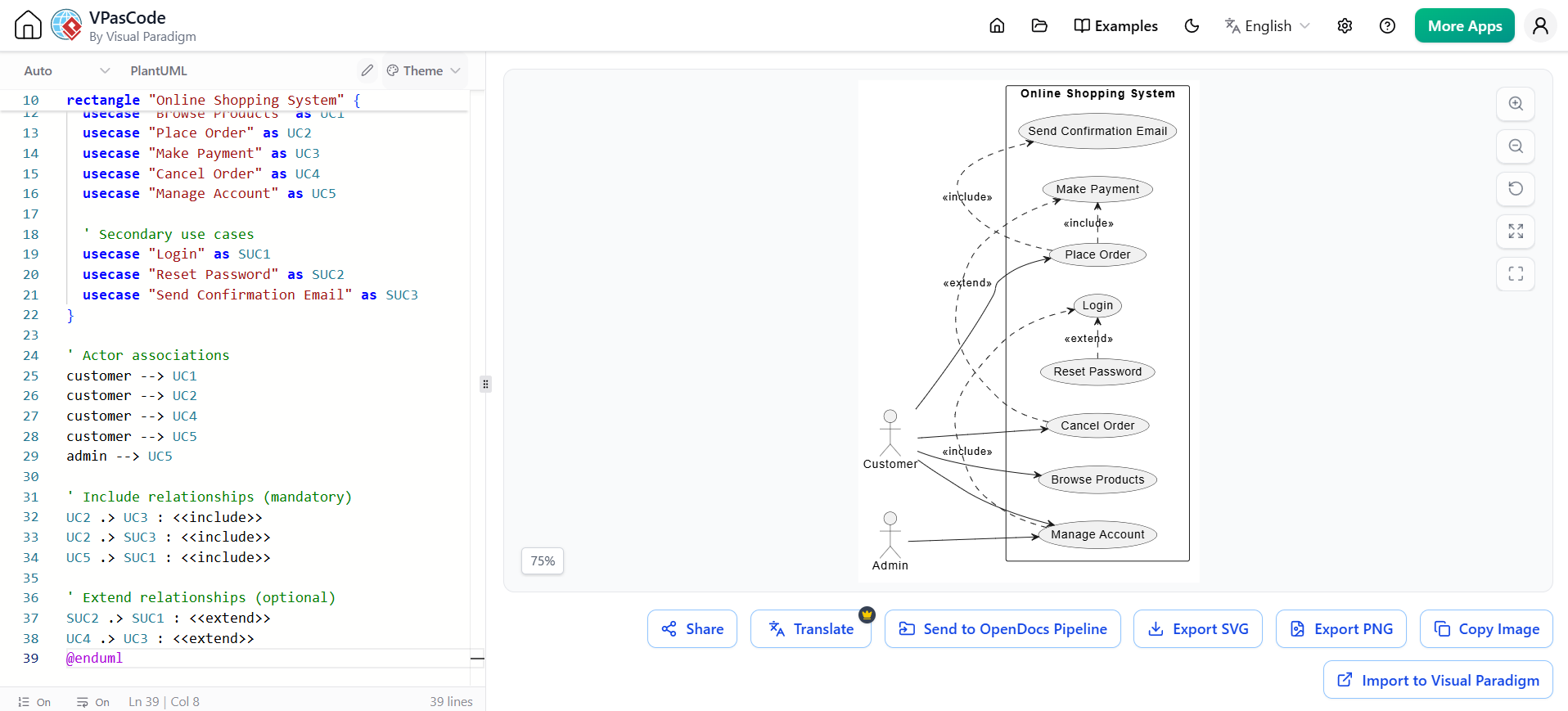
Every robust system relies on distinct roles. In our online shopping scenario, we identify two primary actors: the Customer and the Admin. These are not merely labels; they represent the external entities initiating actions within the system boundary.
- Customer: The primary stakeholder interested in purchasing goods and managing their profile.
- Admin: The system manager responsible for overseeing user data and account management.
In VPasCode, defining these actors is the first step. They serve as the anchors for all connections (associations) in your diagram. The code structure allows you to map these actors to specific capabilities, ensuring that every user action has a corresponding use case defined.
Defining Actor Associations
Associations represent the communication channels between actors and use cases. In our architecture, the Customer has the capability to perform several core actions:
- Browse Products: The foundational step of the shopping journey.
- Place Order: The critical transaction event.
- Cancel Order: A necessary recovery mechanism for mistakes or cancellations.
- Manage Account: Handling personal details and settings.
Conversely, the Admin is granted access to the Manage Account use case, highlighting a specific permission boundary where administrative oversight is required.
Structuring the System: The Use Case Hierarchy
Complex systems are best understood when broken down into manageable chunks. VPasCode allows you to encapsulate these chunks using a rectangle block. This container, labeled “Online Shopping System,” visually and logically groups related use cases.
Within this boundary, we define a hierarchy of tasks. Some are primary, meaning they are the direct goals of the user (e.g., “Place Order”). Others are secondary or supporting tasks (e.g., “Login,” “Reset Password”). By organizing these into a cohesive list, we create a clear map of the system’s functionality.
rectangle "Online Shopping System" {
    usecase "Browse Products" as UC1
    usecase "Place Order" as UC2
    usecase "Make Payment" as UC3
    usecase "Cancel Order" as UC4
    usecase "Manage Account" as UC5

    ' Secondary use cases
    usecase "Login" as SUC1
    usecase "Reset Password" as SUC2
    usecase "Send Confirmation Email" as SUC3
}
The Logic of Interaction: Include and Extend
The true power of a Use Case Diagram lies in the relationships between the bubbles (use cases). VPasCode enables you to express these dependencies using two specific keywords: <<include>> and <<extend>>.
1. The “Include” Relationship (Mandatory)
An include relationship implies that the base use case must perform the included use case to complete its task. It is a mandatory dependency. In our shopping system, consider the Place Order process:
- Make Payment: You cannot place an order without paying. This is an inclusion. The “Place Order” use case includes “Make Payment.”
- Send Confirmation Email: Once the order is placed and paid, the system must notify the user. The “Place Order” use case includes “Send Confirmation Email.”
- Login: To place an order, a user must be authenticated. Therefore, “Place Order” includes “Login.”
This logic is captured in the code by linking the target use case to the base use case using the : < syntax.
2. The “Extend” Relationship (Optional)
An extend relationship represents an optional behavior that adds functionality to a base use case under specific conditions. It is the “what if” scenario.
- Reset Password: A customer might want to reset their password. This is not part of the standard “Login” flow, but it extends the login experience when a user has forgotten their credentials.
- Cancel Order: A user might choose to cancel an order after it has been placed. This is an optional extension of the “Place Order” process, triggered by a specific user decision.
' Include relationships (mandatory)
UC2 .> UC3 : <>
UC2 .> SUC3 : <>
UC5 .> SUC1 : <>

' Extend relationships (optional)
SUC2 .> SUC1 : <>
UC4 .> UC3 : <>
Advanced Architecture: Managing Complexity
As systems grow, diagrams can become cluttered. VPasCode offers features to manage this complexity, such as the ability to generate reports and sub-diagrams based on the code structure. By defining your use cases and relationships clearly in the text editor, you create a “source of truth” that can be analyzed by AI tools or exported for version control.
This text-based approach ensures that your architecture remains portable and versionable. Instead of dragging boxes around a canvas, you are defining the logic of your system in code, which is often more precise and easier to maintain for large-scale projects.
Conclusion
By mastering the syntax of VPasCode, you transform the abstract concept of “user requirements” into a concrete, visual architecture. Whether you are defining mandatory payments via include relationships or optional password resets via extend relationships, the code provides a rigorous framework for designing scalable software systems.