


Revolutionizing System Design with AI-Driven Modeling
In the realm of software architecture and system design, the initial phase of creating a model is often the most daunting. Traditionally, a Product Owner or Architect faces a blank canvas and must manually sketch out every class, attribute, and relationship. However, the landscape of modeling is shifting dramatically with the introduction of intelligent assistants. The VP AI Chatbot represents a paradigm shift, allowing users to bypass the tedious manual drawing process by simply typing natural language requirements.
Instead of wrestling with toolbars and alignment grids, the AI analyzes your prompts and instantly constructs a baseline UML diagram. This capability not only accelerates the design process but also ensures that the initial structure is robust and logically sound.
From Prompt to Visual Reality
Let us look at a practical example of this workflow in action. Imagine a scenario where you need to visualize the data state of a Library Management System. Rather than spending hours defining classes for “Student,” “Book,” and “Loan,” you simply interact with the AI interface.
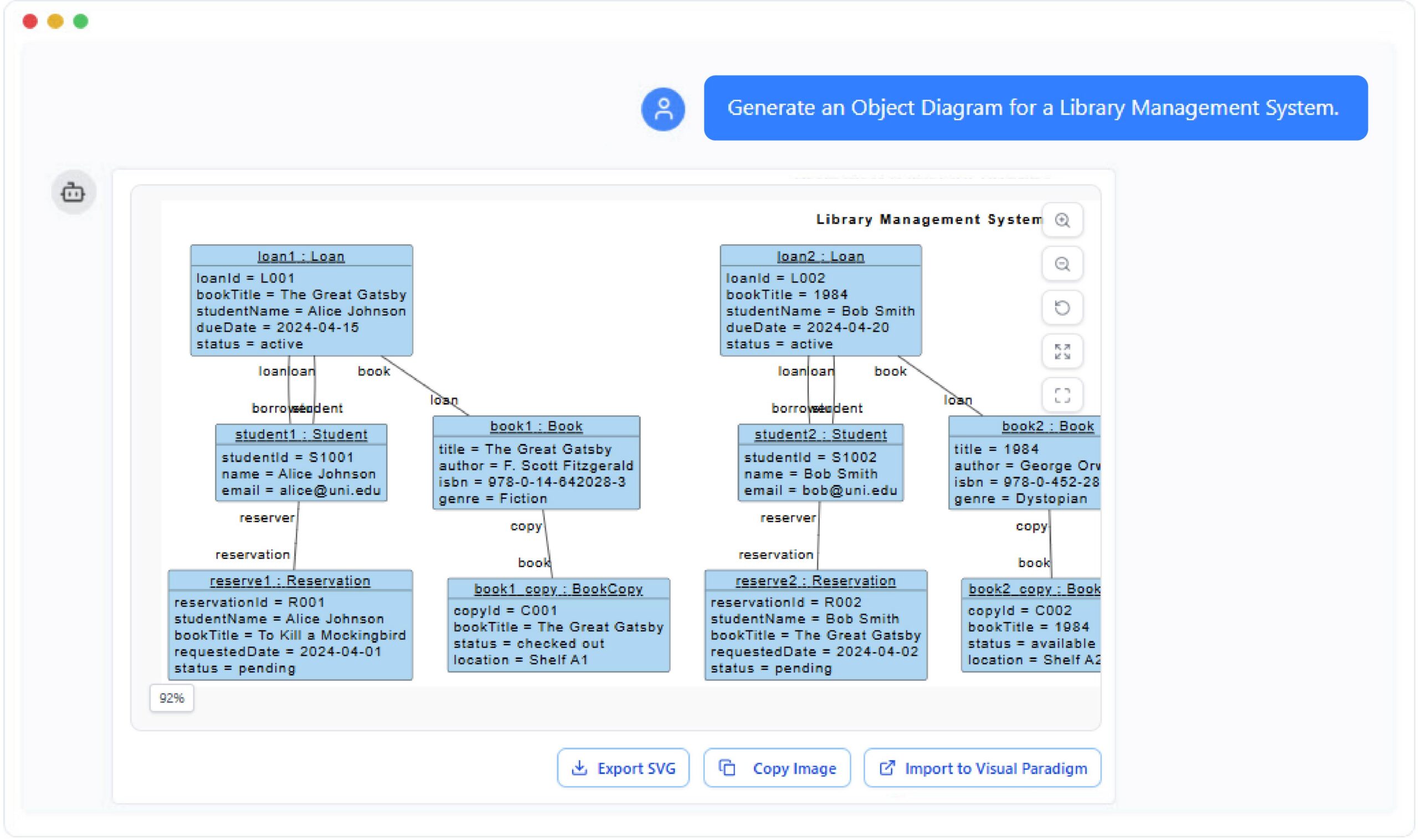
Consider the prompt displayed in the interface: Generate an Object Diagram for a Library Management System. This single sentence triggers a complex analysis engine. The AI interprets the domain, identifies key entities, and understands the relationships between them. The result is an immediate, high-fidelity diagram that captures the essence of the system’s data.
Understanding the Output: Object Diagrams
The image generated by the AI is not just a random collection of boxes; it is a specific type of UML diagram known as an Object Diagram. It is crucial to distinguish this from a Class Diagram. While a Class Diagram acts as a blueprint showing the structure and types of objects (like defining that a Student has a name), an Object Diagram represents a snapshot of the system at a specific moment in time.
Looking closely at the generated diagram, we can see several instances of objects, denoted by the format instanceName : ClassName. For example:
- loan1 : Loan and loan2 : Loan represent specific borrowing events happening in the library.
- student1 : Student and student2 : Student represent actual people (Alice Johnson and Bob Smith) interacting with the system.
- book1 : Book and book2 : Book represent specific physical copies (e.g., The Great Gatsby and 1984).
The diagram effectively visualizes the relationships and data values. For instance, we can see that loan1 is associated with student1 (Alice Johnson) and a specific book. Furthermore, the diagram reveals a Reservation object (reserve1 : Reservation), showing that Alice has also requested a copy of To Kill a Mockingbird which is currently in a “pending” status. This level of detail provides immediate insight into the system’s state without writing a single line of code.
Seamless Integration with Visual Paradigm
The true power of this feature lies in its integration with the broader Visual Paradigm ecosystem. The interface provides options to Export SVG, Copy Image, and crucially, Import to Visual Paradigm.
When you click the Import to Visual Paradigm button, the generated diagram is not just saved as a static picture. It is converted into editable UML artifacts within your project. This means:
- Refinement: You can take the AI-generated baseline and refine it. If the AI missed a relationship or added an unnecessary attribute, you can manually adjust it within the robust modeling environment.
- Code Generation: Once the model is finalized, Visual Paradigm can generate source code (Java, C#, Python, etc.) directly from these classes and objects, effectively turning your natural language prompt into a functional code skeleton.
- Reverse Engineering: If you already have a codebase, you can reverse engineer it to see how it compares to the AI-generated model, ensuring your implementation matches your design intent.
Conclusion
The workflow demonstrated here—starting with a natural language prompt and ending with a structured, data-rich Object Diagram—illustrates the future of software engineering. It democratizes the modeling process, allowing architects to focus on the logic and relationships of the system rather than the mechanics of drawing lines and boxes. By leveraging the VP AI Chatbot, teams can iterate faster, validate requirements earlier, and build more reliable systems.