Understanding the Role of Data in Business Processes
In the world of process modeling, we often focus heavily on the activities themselves—the “tasks” that people perform. However, a process isn’t just about action; it’s about transformation. And what gets transformed? Information. Whether it’s a customer order, an email notification, or a database record, data is the lifeblood of any workflow.
When you are designing a model in Visual Paradigm, using the correct symbols ensures that your diagrams accurately reflect reality. Let’s walk through the specific symbols used for Data Flow Elements and Data Storage & Communication as defined in the BPMN 2.0 specification.
The Journey of Data: Input and Output
Imagine a task where a user needs to enter information into a system. How do we represent that this information is coming from somewhere before the work begins?
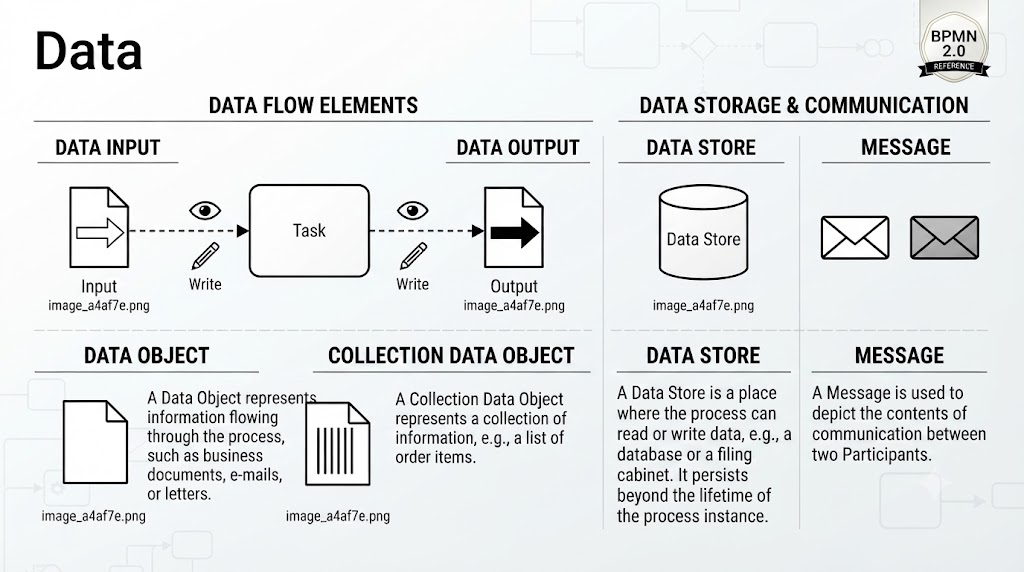
- Data Input: This symbol looks like a piece of paper with an arrow pointing into the task. It represents the source of data entering a process. In our diagram, notice the dashed line connecting the input document to the task. This indicates that the task requires this specific data to function.
- Data Output: Conversely, once the work is done, what leaves the task? The Data Output symbol (a document with an arrow pointing away) signifies the result of the activity. For instance, after processing an order, a confirmation letter might be generated.
It is also important to note the small icons associated with these flows. You will see a pencil icon labeled “Write.” This implies that the task not only receives the data but actively modifies or creates new data based on the input before producing the output.
Visualizing What We Are Working With
Sometimes, we don’t need to show the flow of data in and out of a specific task. Instead, we simply want to visualize the documents or objects involved in the broader process. This is where Data Objects come into play.
- Data Object: Represented by a simple document icon, this is a generic placeholder for information flowing through the process. Think of it as a business document, an email, or a letter. It helps stakeholders quickly identify what kind of paperwork or digital file is relevant without cluttering the diagram with complex arrows.
- Collection Data Object: What happens when a single document isn’t enough? Imagine a scenario where a manager reviews a list of ten different items. A Collection Data Object—shown as a document with vertical lines inside—represents a collection of information, such as a list of order items or a batch report.
Where Data Lives: Storage and Communication
Processes rarely happen in a vacuum. Data often needs to be saved for later use, or sent to someone outside the immediate scope of the current task. Visual Paradigm provides clear symbols for these scenarios.
Data Store is depicted as a cylinder. This is the standard representation for a database, a filing cabinet, or any repository where data persists beyond the lifetime of a single process instance. If your process needs to check inventory levels, you would draw a connection between the task and the Data Store to show that data is being read or written there.
Finally, consider communication. When two participants (or pools) exchange information, we use the Message symbol. Visually, this is represented by an envelope. It distinguishes internal data movement from external communication. The diagram shows both open and closed envelopes, which can help differentiate between messages that have been delivered versus those pending or archived.
Key Takeaways
To wrap up our tutorial, let’s review the core concepts we covered regarding data handling in BPMN 2.0:
- Input/Output: Use these to define exactly what data enters and leaves a specific task.
- Data Objects: Use generic documents for single items and collection objects for lists or batches.
- Data Stores: Remember the cylinder shape for databases and persistent storage.
- Messages: Use the envelope to denote communication between different parts of your process.
By mastering these symbols, you ensure that your process models are not just pictures of tasks, but comprehensive maps of how information drives your business forward.