


Welcome to Your Guide on BPMN Data Modeling
Hello and welcome! Today, we are diving into one of the most critical aspects of Business Process Model and Notation (BPMN) 2.0: Data. In any business process, information is the lifeblood that keeps operations running. Understanding how data moves, changes, and is stored is essential for creating accurate and functional process models. Think of this as our tutorial session where we will unpack the specific symbols and concepts used to represent information.
Understanding Data Flow Elements
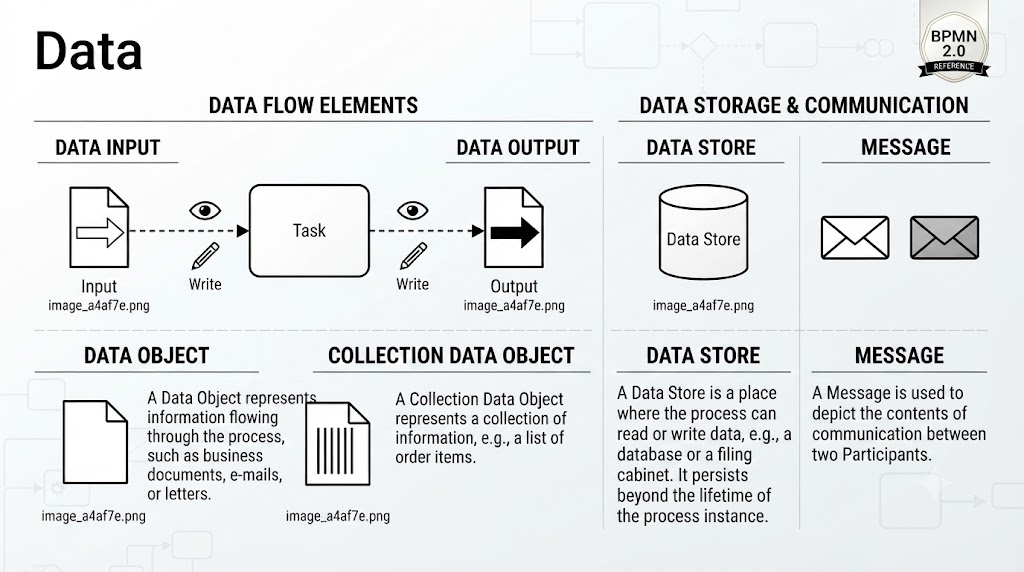
Let’s start by looking at how data interacts with the actual work being done, which we call a “Task.” In the upper left section of our diagram, we see the concept of Data Flow Elements. This illustrates the lifecycle of information as it enters and leaves a specific activity.
First, consider Data Input. Imagine a document arriving at a desk. In BPMN, this is represented by a document icon with an arrow pointing toward the Task. This signifies that the task requires this specific piece of information to begin. You might also see a “Write” action associated with this, indicated by a pencil icon, suggesting that the process might be creating or updating this input data before it is used.
Conversely, look at Data Output. Once the task is complete, new information is generated. This is shown as a document with an arrow pointing away from the Task. Just like the input, the output can be associated with a “Write” action, meaning the task has produced a new document, email, or record that needs to be passed on to the next step or stored.
Single Objects vs. Collections
Moving down to the bottom left, we encounter the distinction between a standard Data Object and a Collection Data Object. This is a subtle but vital difference for modeling accuracy.
A standard Data Object represents a single piece of information flowing through the process. Think of a specific business document, a single email, or a formal letter. It is a singular entity. However, real-world processes often deal with groups of items. This is where the Collection Data Object comes in. Visually distinguished by lines inside the document icon, it represents a collection of information. A classic example would be a list of order items. Instead of modeling every single item as a separate process, you model the entire list as one data object.
Data Storage and Communication
Finally, let’s look at how data is kept safe and how it travels between different parts of an organization. This section covers Data Storage & Communication.
We have the Data Store, depicted as a cylinder. This is the digital or physical equivalent of a database or a filing cabinet. It is used when a process needs to read or write data that persists beyond the lifetime of the process instance itself. If you need to remember a customer’s balance for next month, you write it to a Data Store.
Lastly, we have the Message. Messages are used to depict the contents of communication between two participants. Imagine two different departments or systems talking to each other. The envelope icon represents this exchange. It ensures that the model clearly shows when information is being sent from one actor to another, distinguishing internal data flow from external communication.
Summary
By mastering these elements—Inputs, Outputs, Objects, Collections, Stores, and Messages—you gain the ability to build process models that are not just diagrams, but functional representations of how information drives your business. Keep practicing with these symbols, and you’ll soon be modeling complex workflows with ease!
Related posts:
 Mastering BPMN Loop Markers: A Practical Guide to Email Management
 Mastering BPMN Cross-Functional Flows: A Nobel Prize Process Analysis
 Mastering BPMN 2.0: Orchestrating Multi-Party Order Fulfillment with Choreography Diagrams
 Mastering BPMN Swimlanes: A Deep Dive into the Supplier Qualification Process