Welcome to this tutorial session on Business Process Management (BPM). Today, we are going to dissect a real-world scenario to understand how organizations identify inefficiencies. We will be looking at the As-Is State of a manufacturing fulfillment process at a company we will call Apex Manufacturing Inc.
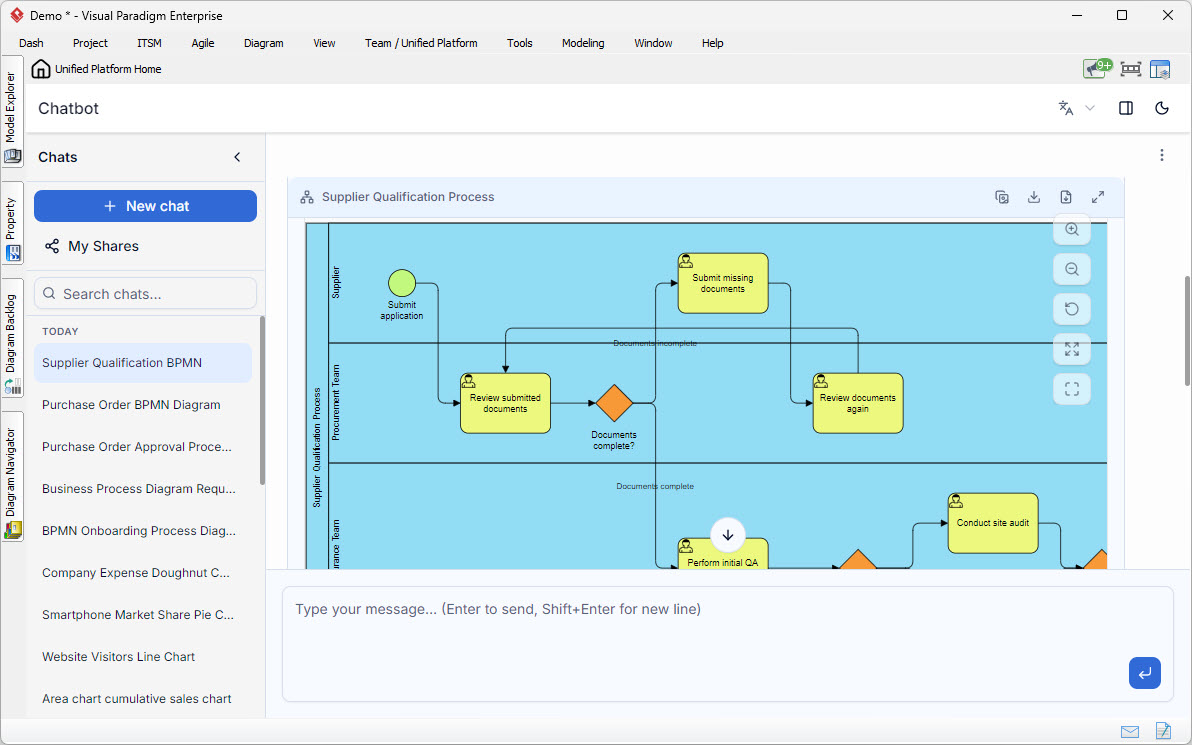
The goal of an “As-Is” analysis is simple but critical: map out exactly how things are done right now, without any bias or idealization. By visualizing the current workflow, we can spot the bottlenecks, the redundancies, and the data silos that are costing the company time and money. In this example, we utilize the power of Visual Paradigm to structure this analysis. Visual Paradigm’s BPMN (Business Process Model and Notation) capabilities allow us to create clear, semantic diagrams like the one we are discussing, making complex workflows easy to interpret for stakeholders.
Deconstructing the Current Workflow
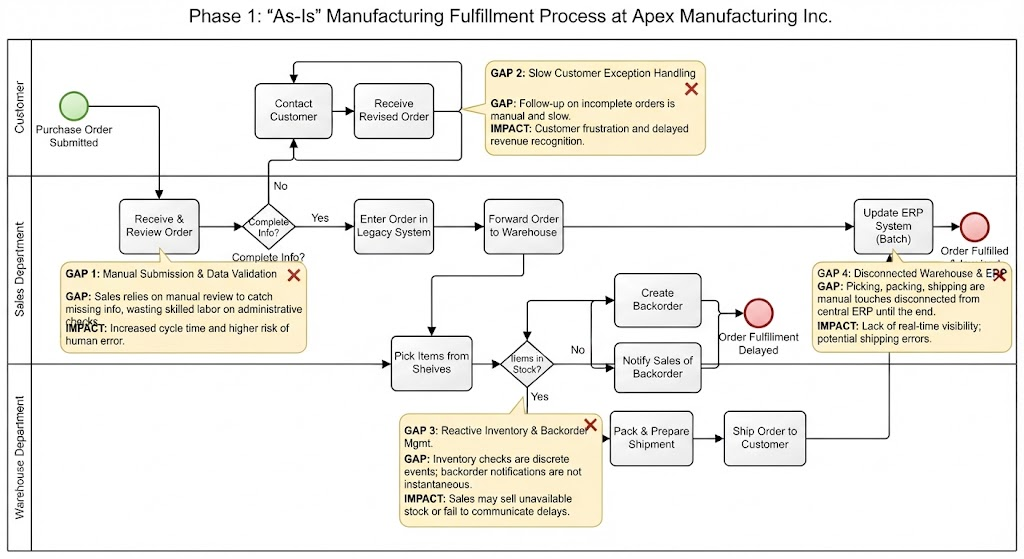
Let’s walk through the swimlane diagram representing Apex Manufacturing’s current fulfillment process. The diagram is divided into three distinct lanes: Customer, Sales Department, and Warehouse Department. This separation helps us see where responsibilities lie and where communication breaks down.
The process begins in the Customer Lane. A customer submits a Purchase Order (PO). However, notice that there is no automated validation at this stage. The order simply enters the Sales Department. This is the first sign of a manual dependency.
Once the order lands in the Sales Department, the representative must “Receive & Review Order.” They then face a decision point: “Complete Info?” If the answer is No, the process enters a reactive loop. The representative must manually “Contact Customer” to ask for missing details. This creates a delay loop where the process halts completely until the customer responds. This is a classic example of reactive error handling.
Once the order is deemed complete, it is entered into a legacy system and forwarded to the Warehouse. Here, we see a critical disconnect. The Warehouse Department manually picks items. If the item is not in stock, a backorder is created, and sales is notified. This notification likely happens via email or a phone call—a “separate, likely non-integrated channel.”
Finally, the most alarming part of the As-Is state occurs at the very end of the cycle. The task “Update ERP System” is performed as a Batch update. This means that for the entire duration of picking, packing, and shipping, the central financial and inventory database is completely out of sync with reality. Visual Paradigm allows us to highlight these specific risks, often using annotation boxes (like the yellow ones in our diagram) to flag GAPs directly on the model.
Identifying the Critical Gaps
Through detailed analysis of this diagram, we can identify four specific areas where the process is failing. These are the “Gaps” we must address to move toward a “To-Be” (optimized) state.
1. Order Submission & Data Validation
The current gap is that Sales relies on manual review to catch missing information. In a modern environment, this should be automated. By using Visual Paradigm’s simulation features, we can model a scenario where a digital form validates fields (like address, SKU, quantity) before the order even enters the Sales lane. This prevents skilled sales labor from being wasted on administrative checks.
2. Customer Exception Handling
The gap here is the manual and slow follow-up on incomplete orders. The diagram shows a “Contact Customer” step that creates a delay. The impact is significant: customer frustration and delayed revenue recognition. An optimized process would utilize a self-service portal where the customer receives an instant notification and can upload the missing info immediately, closing the loop much faster.
3. Inventory and Backorder Management
Currently, inventory checks are discrete events. The warehouse checks stock only after the order arrives. This is a gap. If inventory checks were continuous, the system would know stock levels in real-time. The impact of the current gap is that sales teams might sell stock that isn’t actually available, or they fail to communicate delays proactively. Visual Paradigm helps map these dependencies, showing us that the “Pick Items” task is disconnected from the “Create Backorder” logic.
4. Warehouse Fulfillment & ERP Synchronization
This is perhaps the most dangerous gap. Picking, packing, and shipping are manual touches disconnected from the central ERP until the very end. The impact is a lack of real-time visibility. If the ERP isn’t updated until the end, the company cannot track cash flow or inventory levels accurately during the fulfillment phase. This creates a risk of shipping errors and financial discrepancies.
Action Plan: Bridging the Gaps
Now that we have identified the problems, we must formulate an Action Plan. This plan moves from immediate fixes to long-term architectural changes.
- Automate Data Validation: Implement a digital intake form for Purchase Orders. This form should validate data fields (e.g., required fields, valid SKU formats) before submission. This directly addresses Gap 1.
- Streamline Exception Handling: Create a customer-facing portal or automated email workflow. When incomplete info is detected, the system should automatically prompt the customer to complete the data, rather than waiting for a sales rep to make a phone call. This addresses Gap 2.
- Integrate Inventory Systems: Connect the Warehouse management system directly to the Sales system. Inventory levels should be visible to Sales in real-time to prevent selling unavailable stock. This addresses Gap 3.
- Real-Time ERP Integration: Eliminate the “Batch Update.” Every transaction (Pick, Pack, Ship) should trigger an immediate API call to the ERP system. This ensures financial and inventory data are always in sync. This addresses Gap 4.
Implementation Plan: A Phased Approach
Implementing these changes cannot happen overnight. We must use a phased approach to ensure stability. Visual Paradigm’s Process Mining and Project Management tools can be used to track the progress of this implementation.
- Phase 1: Process Standardization (Months 1-2)
Before automation, we must standardize the rules. We will define exactly what constitutes “Complete Info” and standardize the backorder notification process. We will model these new rules in Visual Paradigm to ensure clarity before writing code. - Phase 2: Digital Intake & Validation (Months 3-4)
Deploy the new digital Purchase Order form. This eliminates the manual review phase (Gap 1) and reduces the entry of bad data at the source. - Phase 3: System Integration (Months 5-8)
Begin the technical integration between the Sales, Warehouse, and ERP systems. We will start with the inventory check integration to stop sales from selling phantom stock. We will then move to real-time ERP updates. - Phase 4: Optimization & Monitoring (Month 9+)
Once the system is live, we use the “To-Be” process model to monitor performance. We will track cycle times and error rates to ensure the new process is delivering the expected improvements.
Conclusion
By analyzing the “As-Is” state, we transformed a confusing set of manual tasks into a clear roadmap for improvement. The diagram serves not just as a picture, but as a diagnostic tool. It highlights where the “red X” marks are—where the process is broken. By leveraging tools like Visual Paradigm to design, model, and simulate these changes, Apex Manufacturing can move from a reactive, manual operation to a streamlined, automated, and data-driven fulfillment center.