Enhancing Model Accuracy with Visual Paradigm’s AI Refinement
When designing complex systems like an Automated Teller Machine (ATM), the initial model is rarely the final product. Systems evolve, requirements shift, and edge cases are discovered during the design phase. This is where the power of AI-assisted modeling, such as VPasCode within Visual Paradigm, truly shines. It allows you to refine your diagrams iteratively, ensuring your logic is robust before you begin implementation.
One of the most critical features in this workflow is the ability to visually compare your original model against the AI-refined version. This ensures transparency and gives you full control over the changes proposed by the system.
Understanding the Side-by-Side Comparison
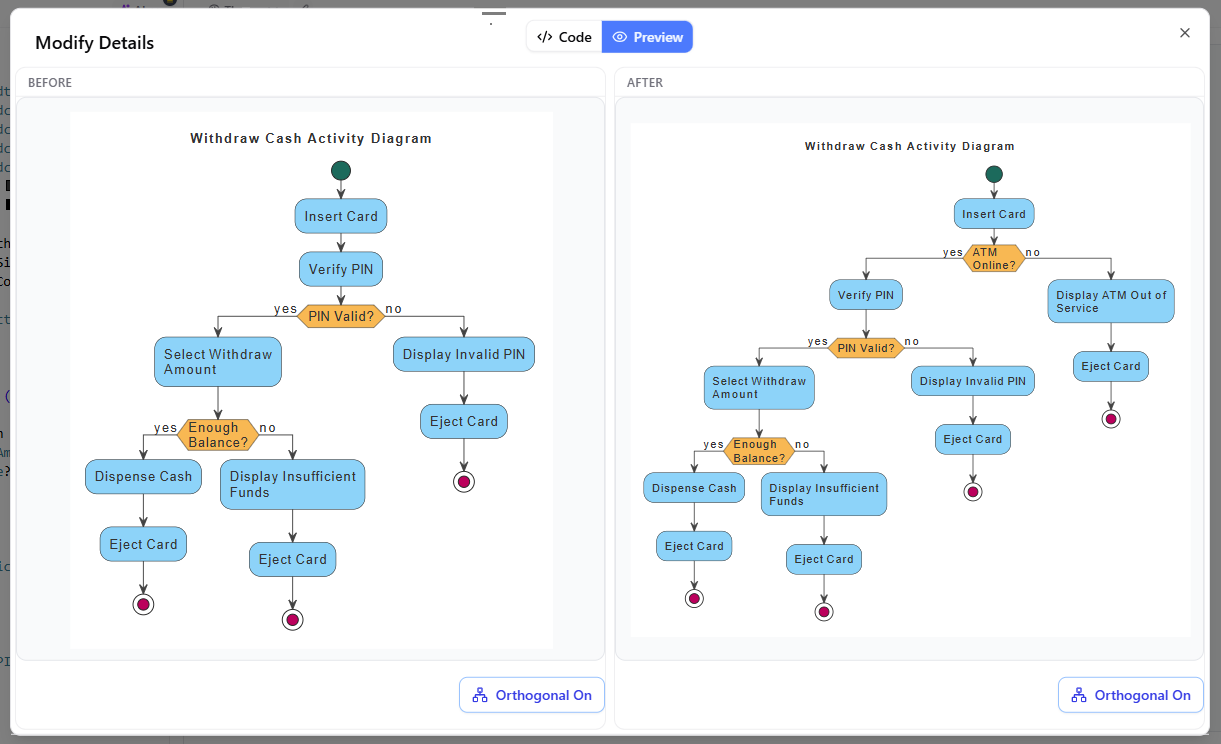
Visual Paradigm provides a dedicated interface for reviewing these refinements. Instead of simply overwriting your work, the system presents a Modify Details window that splits the view into two distinct sections: BEFORE and AFTER. This side-by-side layout allows you to inspect exact line-by-line changes alongside a comparative visual preview.
Let’s look at a practical example involving a Withdraw Cash Activity Diagram. In the “BEFORE” pane, you might see a straightforward flow: a user inserts a card, verifies a PIN, and proceeds to select a withdrawal amount. However, a robust system design must account for connectivity issues.
In the AFTER pane, the AI has introduced a significant logical improvement. It adds a new decision node labeled “ATM Online?” immediately after the card is inserted. This small addition drastically changes the behavior of the system:
- If the ATM is Online (“yes”), the flow proceeds normally to verify the PIN.
- If the ATM is Offline (“no”), the system immediately displays “Display ATM Out of Service,” ejects the card, and terminates the process.
This refinement demonstrates how VPasCode can anticipate real-world scenarios that a human designer might overlook in a quick draft, adding necessary error handling to the model.
Deep Diving into Changes with Code Diff
While the visual preview is excellent for high-level logic, sometimes you need to understand the underlying structure or specific elements that were altered. Visual Paradigm offers an optional View Details feature that launches a side-by-side code diff window.
This capability is particularly useful for modelers who prefer a technical overview. By clicking this option, you can inspect the exact modifications made to the model’s representation. It bridges the gap between visual modeling and the technical specifications, ensuring that the AI’s suggestions align with your architectural standards.
Finalizing Your Design
The beauty of this workflow lies in the “inspect before finalize” approach. You are not forced to accept the AI’s suggestion blindly. You can review the BEFORE and AFTER states, verify that the new “ATM Online?” logic fits your requirements, and then accept the changes. This ensures that your final diagram is not just a static drawing, but a refined, executable specification ready for the next stage of development.
By leveraging these comparison tools, Visual Paradigm empowers you to build higher-quality models with confidence, knowing that every refinement has been carefully vetted.