Mastering Event Handling in BPMN: Boundary, Interrupting, and Non-Interrupting Events
Welcome to this tutorial session where we will demystify one of the most powerful yet often misunderstood aspects of Business Process Model and Notation (BPMN): Boundary Events. In complex business environments, processes rarely run in a perfect vacuum. They are constantly subject to external triggers, timeouts, or error conditions. Understanding how to model these reactions is crucial for creating accurate and resilient process models.
In this guide, we will explore the nuances of boundary events, distinguishing between interrupting and non-interrupting behaviors, and discuss how Visual Paradigm facilitates the modeling of these critical scenarios.
Understanding the Boundary Event
At its core, a boundary event is an event type that is attached to the boundary of an activity, task, or subprocess. Unlike standard start or end events, boundary events are intermediate events that can be triggered or thrown at any time while the associated activity is being performed.
Think of a boundary event as a safety mechanism or a monitor. It sits on the “edge” of your process element, waiting for a specific condition to occur—such as a timer expiring or an error message arriving—while the main task is still running.
Interrupting vs. Non-Interrupting Events
Since the introduction of BPMN 2.0, the notation has evolved to offer more granular control over process flow. Boundary events are categorized into two distinct types based on how they affect the activity they are attached to: Interrupting and Non-Interrupting. This distinction is visually represented by the line style connecting the event to the activity boundary.
1. Interrupting Boundary Events (Solid Line)
An interrupting event is depicted with a solid line connecting the event to the activity. As the name implies, this is the most common form of boundary event. When this event is triggered, it effectively “interrupts” the current flow.
Once triggered, the activity currently being performed is immediately stopped, and the process flow diverts along the path connected to the boundary event. The original activity is discarded, and the process moves forward down the new branch. This is typically used for error handling (e.g., if a payment fails, stop the order processing and move to an error handling subprocess) or strict timeouts (e.g., if a response isn’t received within 5 minutes, cancel the request).
2. Non-Interrupting Boundary Events (Dashed Line)
In contrast, a non-interrupting event is illustrated with a dashed line. This configuration is less common but incredibly useful for scenarios where you want to react to an event without stopping the primary work.
When a non-interrupting event is triggered, the activity it is attached to continues to run its course. Simultaneously, the process spawns a parallel flow along the path connected to the boundary event. Both flows eventually converge or terminate independently.
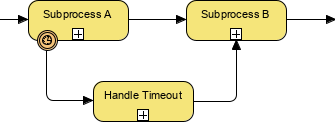
Consider the scenario illustrated in the example below. We have a Non-Interrupting Timer Event attached to the boundary of Subprocess A.
- The Main Flow: Subprocess A begins execution. Despite the timer ticking, it will not stop Subprocess A. Once Subprocess A is complete, the flow continues to Subprocess B.
- The Parallel Flow: If the timer fires (the timeout condition is met) while Subprocess A is running, a parallel path is activated. The process moves to the Handle Timeout subprocess.
- Convergence: Even though the timeout was handled, the main thread eventually proceeds to Subprocess B regardless of the timeout status.
Implementing These Concepts in Visual Paradigm
Visual Paradigm provides a robust environment for designing BPMN 2.0 models, making the implementation of these event types intuitive and precise.
Creating Boundary Events: To add a boundary event in Visual Paradigm, you simply drag an event from the palette and drop it onto the boundary of a task or subprocess. The software automatically recognizes the attachment point.
Configuring Interrupting Behavior: One of the key features of Visual Paradigm is its flexibility in configuration. By default, boundary events are often created as interrupting. However, you can easily modify this behavior:
- Select the boundary event in your diagram.
- Open the Properties view (usually found on the right-hand side).
- Locate the event configuration settings. You will see a checkbox for Interrupting.
- If checked, the event will use a solid line and stop the activity (Interrupting).
- If unchecked, the event will switch to a dashed line and allow the activity to continue (Non-Interrupting).
This visual feedback in Visual Paradigm ensures that your model accurately reflects the intended logic. The dashed line immediately signals to stakeholders that the main process is resilient and will complete even if the condition on the boundary is met.
Conclusion
Choosing between an interrupting and a non-interrupting boundary event is a strategic decision that impacts how your business process handles exceptions and time-based triggers. Whether you need to stop a process immediately due to an error or simply need to be notified of a delay without halting production, understanding these distinctions is vital.
By leveraging Visual Paradigm, you can easily toggle between these states, ensuring your diagrams are not just visually accurate but logically sound representations of your business reality.