Mastering BPMN Gateways: The Traffic Controllers of Your Business Processes
Welcome to this tutorial session on Business Process Model and Notation (BPMN). Today, we are diving into one of the most critical elements of process modeling: the Gateway. If you have ever looked at a complex process map and wondered how a single path can suddenly branch into multiple possibilities or how separate streams come back together, the answer lies in the Gateway.
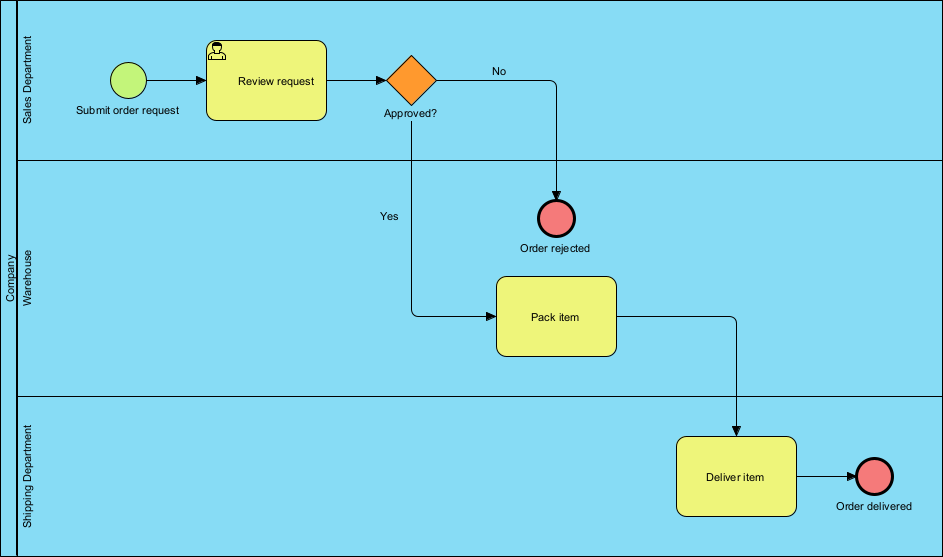
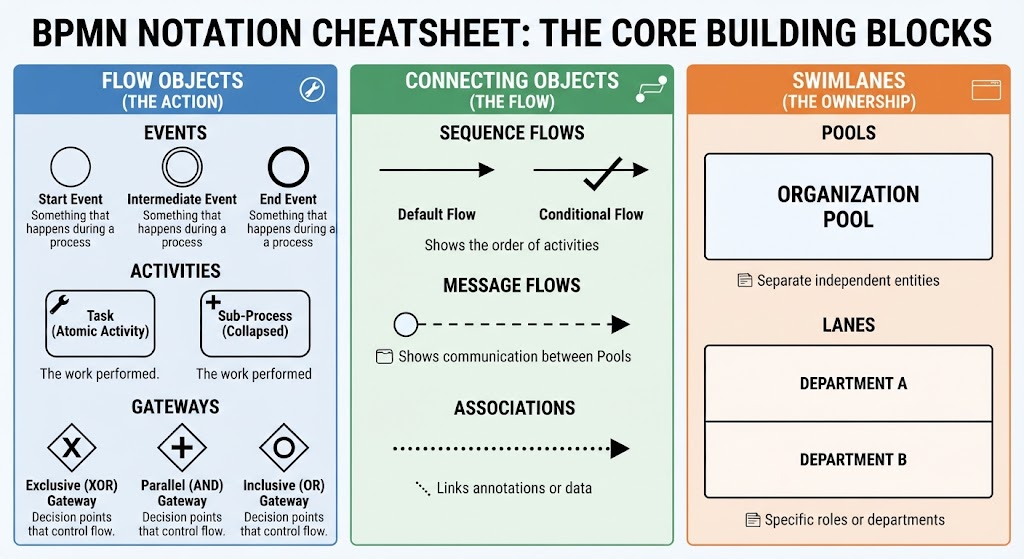
In BPMN, the Gateway is represented by the familiar diamond shape. It acts as a traffic controller for your Sequence Flow, determining the divergence (splitting) and convergence (merging) of paths. Without gateways, your processes would be linear and rigid. With them, they become dynamic, logical, and responsive to real-world conditions. Internal markers within the diamond indicate the specific type of behavior control being applied.
The Three Pillars of Process Logic
While there are many specialized gateways, the three most fundamental types you need to master are the Exclusive Gateway, the Inclusive Gateway, and the Parallel Gateway. These tools allow you to model decisions, forks, and merges effectively.
1. The Exclusive Gateway: Making Decisions
The most common type of gateway is the Exclusive Gateway. As the name suggests, this gateway forces the process to follow only one path out of the available options. It is the digital equivalent of a fork in the road where you can only choose one direction.
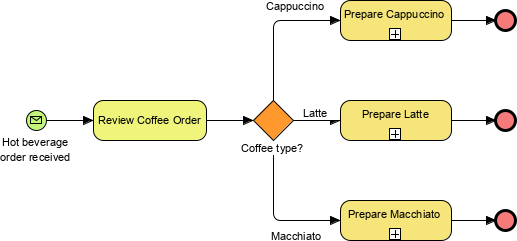
Consider the “Hot beverage order” example provided in our diagram. We start with a “Hot beverage order received” event, which leads to a “Review Coffee Order” task. At this point, the process hits an Exclusive Gateway labeled “Coffee type?”. Here, the logic dictates that the order must be either a Cappuccino, a Latte, or a Macchiato. It cannot be all three simultaneously in this specific flow.
In Visual Paradigm, designing this logic is intuitive. You can drag an Exclusive Gateway onto your canvas and connect it to your tasks. The tool automatically handles the logic, allowing you to define conditions on the outgoing sequence flows. For instance, you might label the path “If Order = Cappuccino” leading to the “Prepare Cappuccino” task. Visual Paradigm also allows you to set a “default” flow for scenarios where no specific condition is met, ensuring your process never gets stuck.
2. The Parallel Gateway: Doing It All
While the Exclusive Gateway forces a choice, the Parallel Gateway does the opposite: it requires you to follow all paths. This is used for forking a process into multiple simultaneous activities or merging them back together once they are complete.
Notice the small markers in our diagram. While the diamond represents the decision point, you might see markers like a plus sign (+) in other contexts. This often signifies parallel execution. Imagine a scenario where, after reviewing the order, you need to prepare the coffee and pack the pastry at the same time. A Parallel Gateway would split the flow into two concurrent streams. The process cannot move to the next step until both the coffee is ready and the pastry is packed.
Visual Paradigm excels here by managing the synchronization of these parallel threads. When modeling complex workflows, you don’t need to worry about the underlying logic of “wait for all inputs”; the tool visualizes the split and the join clearly, ensuring your stakeholders understand that these steps happen concurrently.
3. The Inclusive Gateway: Flexible Choices
Sometimes, reality is more complex than a simple “either/or” or “all of the above.” This is where the Inclusive Gateway shines. It allows the process to follow one or more paths based on specific conditions. Unlike the Exclusive Gateway, which forces a single path, the Inclusive Gateway evaluates multiple conditions. If two conditions are true, two paths are taken.
For example, in our coffee shop, an Inclusive Gateway could handle a “Special Requests” scenario. If a customer requests “Extra Hot” AND “No Sugar,” the process might split into two paths: one to adjust the temperature and another to adjust the ingredients. If they only request “Extra Hot,” only that path is taken.
When using Visual Paradigm, the Inclusive Gateway provides a flexible way to model these nuanced requirements. You can attach multiple conditions to the outgoing flows. The tool’s simulation capabilities are particularly useful here; you can run a “dry run” of your process to verify that the Inclusive Gateway correctly handles scenarios where zero, one, or multiple paths are activated.
Conclusion
Gateways are the brain of your BPMN diagrams. They transform a simple list of tasks into a robust, logical system. Whether you are making a simple decision with an Exclusive Gateway, splitting tasks for efficiency with a Parallel Gateway, or handling complex requirements with an Inclusive Gateway, Visual Paradigm provides the environment to model, simulate, and implement these concepts with precision.