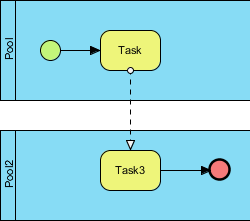
In the world of Business Process Model and Notation (BPMN), clarity is king. A well-drawn diagram tells a story about how work gets done, who does it, and how information moves. However, beginners often struggle with a fundamental concept: distinguishing between the flow of control within a process and the flow of communication between different entities. This tutorial breaks down the two primary types of connectors—Sequence Flow and Message Flow—using a practical diagram example.
The Architecture of the Diagram
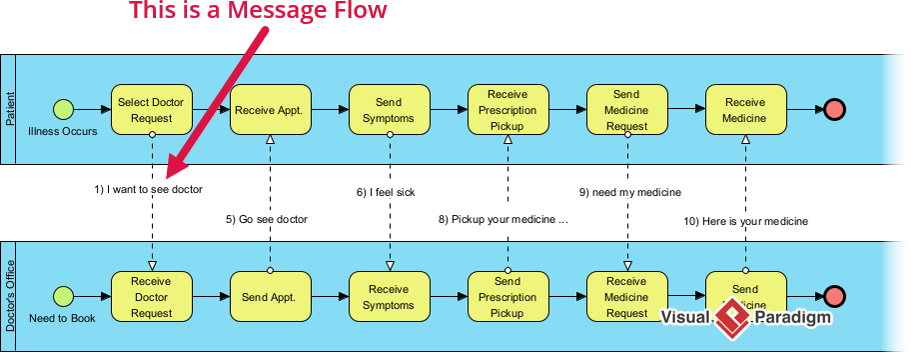
Before diving into the connectors, let’s look at the structure of the diagram provided. It represents a collaborative process involving two distinct participants, or “Pools.”
- Pool 1 (Top Blue Area): Represents the first participant (e.g., a Customer or a specific department). It contains a Start Event, a Task, and an Intermediate Event.
- Pool 2 (Bottom Blue Area): Represents a separate participant (e.g., a Vendor or a different department). It contains a Task and an End Event.
1. Sequence Flow: The Internal Path
Within a single participant, the order of operations is defined by the Sequence Flow. This is the backbone of any business process.
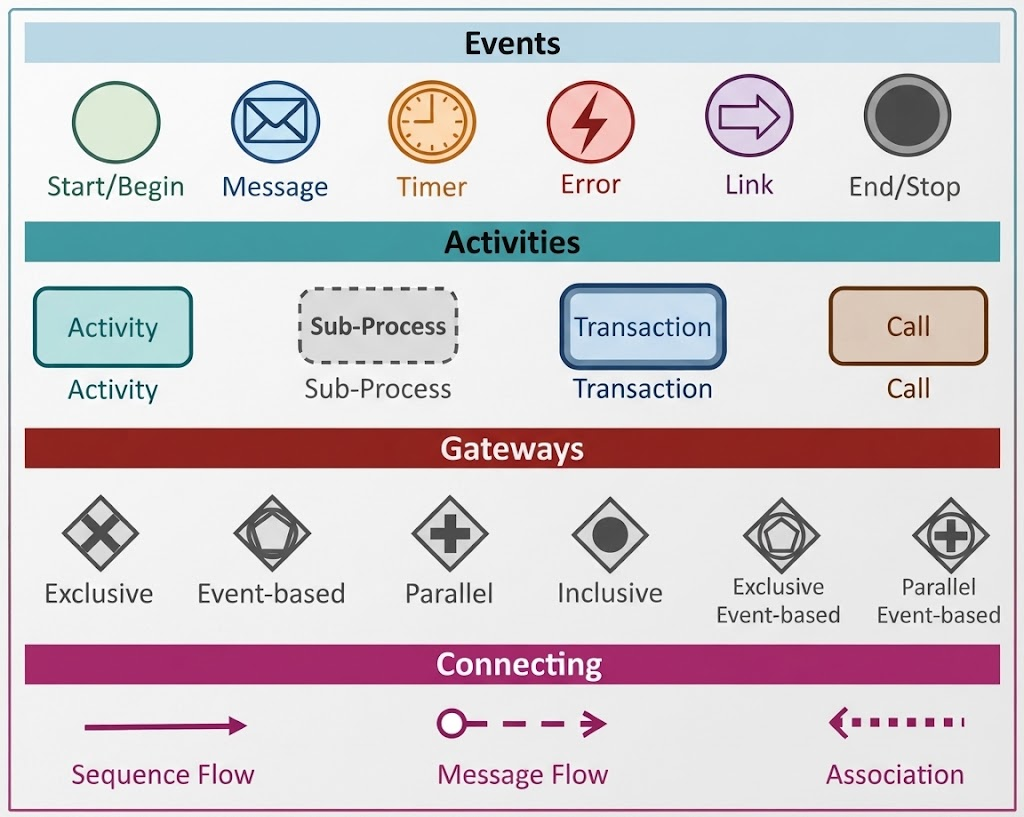
Visual Indicator: A solid line with a solid arrowhead.
In our diagram, look at the top section inside Pool 1. You will see a green circle (the Start Event) connected to a yellow rectangle (a Task). The arrow connecting them is solid.
- What it means: This indicates a direct, sequential dependency. As soon as the Start Event is triggered, the flow immediately proceeds to the Task. The system or actor “knows” exactly what to do next.
- Rule of Thumb: Sequence flows are used to connect flow objects within the same participant. You cannot use a sequence flow to jump out of a pool.
2. Message Flow: The Inter-Participant Bridge
When a process involves multiple parties, we need a way to show that one party is communicating with another. This is where the Message Flow comes into play.
Visual Indicator: A dashed line with an open (hollow) arrowhead.
In the diagram, notice the vertical dashed line connecting the circle at the bottom of Pool 1 to the Task in Pool 2.
- What it means: This represents the transmission of a message or an artifact. Once the task in Pool 1 is finished and the intermediate event is reached, a message is “thrown” across the boundary to Pool 2.
- The Trigger: The receiving participant (Pool 2) cannot start their task (Task3) until that message arrives. The dashed line visually represents the “handshake” or handover between the two distinct entities.
- Strict Restriction: As per BPMN standards, you cannot use a message flow to connect flow objects within the same participant. If the connection stays inside the blue box, it must be a sequence flow.
Step-by-Step Process Walkthrough
Let’s trace the lifecycle of this process to see how these flows interact dynamically:
- Initiation (Pool 1): The process begins at the green circle (Start Event) in Pool 1.
- Execution (Sequence Flow): The flow moves via a solid line to the first yellow Task. This is an internal action performed by the first participant.
- Communication (Message Flow): Upon completing the task, the process reaches an Intermediate Event (the small circle). A dashed line indicates that a message is sent to Pool 2. This crosses the boundary, signifying a change in ownership or responsibility.
- Response (Pool 2): The message arrives at Pool 2, triggering the second yellow Task (Task3).
- Termination: After Task3 is completed, the process concludes at the red circle (End Event).
Key Takeaway
Understanding the difference between these two flows is critical for accurate modeling. Sequence Flow answers “What happens next?” inside a single unit. Message Flow answers “Who is telling whom what?” between different units. By correctly applying solid lines for internal logic and dashed lines for external communication, your diagrams will effectively communicate complex business interactions.