In the world of business process modeling and system architecture, efficiency is paramount. Often, a single task needs to be performed not once, but many times—for every customer, every order, or every candidate in a hiring pool. Processing these tasks sequentially (one after another) can create bottlenecks. To solve this, modelers utilize a powerful mechanism known as the Parallel Multi-Instance Marker.
This tutorial will walk you through the architecture, visual symbolism, and logical implementation of this critical modeling concept, demonstrating how to transform a linear process into a scalable, concurrent system.
1. Visual Identification: The Symbol
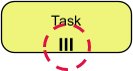
When reviewing a process diagram, identifying the correct control structures is the first step. The Parallel Multi-Instance Marker is distinct and easily recognizable.
- The Icon: It appears as three vertical parallel lines (
|||). - The Location: These lines are typically situated at the bottom of an activity box or task rectangle.
- The Meaning: This symbol indicates that the activity contained within the box is not a single event, but a container for multiple simultaneous events.
2. Core Concept: Simultaneous Scaling
The primary function of the multi-instance marker is to enable simultaneous scaling. Without this marker, a process might require a decision gateway to branch out for every individual item, cluttering the diagram and slowing down the model.
With the marker, the modeler defines a single activity box that automatically replicates itself based on a specific logic trigger. Instead of drawing 50 boxes for 50 interviews, you draw one box with the ||| marker, and the system engine handles the replication.
Defining the Instance Count
How does the system know how many times to run the task? The count is not static; it is determined by a numeric expression evaluated at the start of the task.
For example, if you have a data object representing a list of job applicants, the system might evaluate an expression like:
count(applicants)
If the list contains 5 names, the system instantly creates 5 instances of the task. If the list grows to 100, it creates 100 instances. This dynamic calculation ensures the process scales automatically with your data volume.
3. Data Handling: Independent Execution
A critical architectural feature of this marker is how it manages data. Each of the created instances operates independently.
This means that while the tasks run in parallel, they do not interfere with one another’s data inputs. The system iterates through the collection (e.g., the list of applicants) and binds specific parameters to each instance. Instance A processes Applicant A, while Instance B processes Applicant B, all happening at the exact same time.
4. The Completion Lifecycle: The Synchronization Gate
Understanding when a process “finishes” is vital for flow control. In a parallel multi-instance scenario, the lifecycle follows a specific rule:
- Trigger: The parent activity initiates the creation of child instances.
- Execution: All child instances run concurrently (simultaneously).
- Completion: The parent activity is considered complete only when all child instances have finished.
This acts as a synchronization point. The process cannot move to the next step until the entire batch has been processed. If one instance takes a long time, the parent task waits for it, ensuring data integrity and completeness.
5. Real-World Application: Mass Interview Scheduling
To visualize this in a practical context, consider a Hiring Manager scenario. The manager has shortlisted five candidates and needs to send them interview invitations.
Without Parallel Multi-Instance: The system would have to loop through the list sequentially. Candidate 1 receives an email, the task finishes, then Candidate 2 receives one, and so on. This takes time.
With Parallel Multi-Instance:
- The system identifies the list of 5 candidates.
- The
|||marker triggers the “Send Invitation” task. - The system instantly generates 5 parallel instances of the email task.
- All five emails are sent simultaneously.
- The “Send Invitations” phase of the workflow is considered complete only once all five emails are confirmed sent.
6. Technical Implementation Tip: Visual Paradigm
For practitioners using tools like Visual Paradigm, implementing this architecture is streamlined through the Data Mapping feature.
You do not need to manually write complex iteration code or create loops in the background. By binding a collection (such as a list of candidates) to the multi-instance marker, the tool automatically generates the necessary iteration logic. It handles the “magic” of splitting the data and recombining the results, allowing you to focus on the high-level process flow rather than the underlying syntax.
Summary
The Parallel Multi-Instance Marker is an essential tool for creating robust, scalable system architectures. By replacing repetitive sequential steps with a single, dynamically replicated activity, you can model complex, high-volume processes with clarity and efficiency.