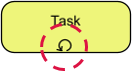
In the realm of business process modeling and software architecture, few concepts are as critical as handling repetition efficiently. Whether you are designing a complex workflow for enterprise resource planning or automating a simple data entry routine, you will inevitably encounter scenarios where a task must be repeated until a specific outcome is achieved. This is where the Loop Marker becomes an indispensable tool in your modeling arsenal.
Visual Identification and Core Function
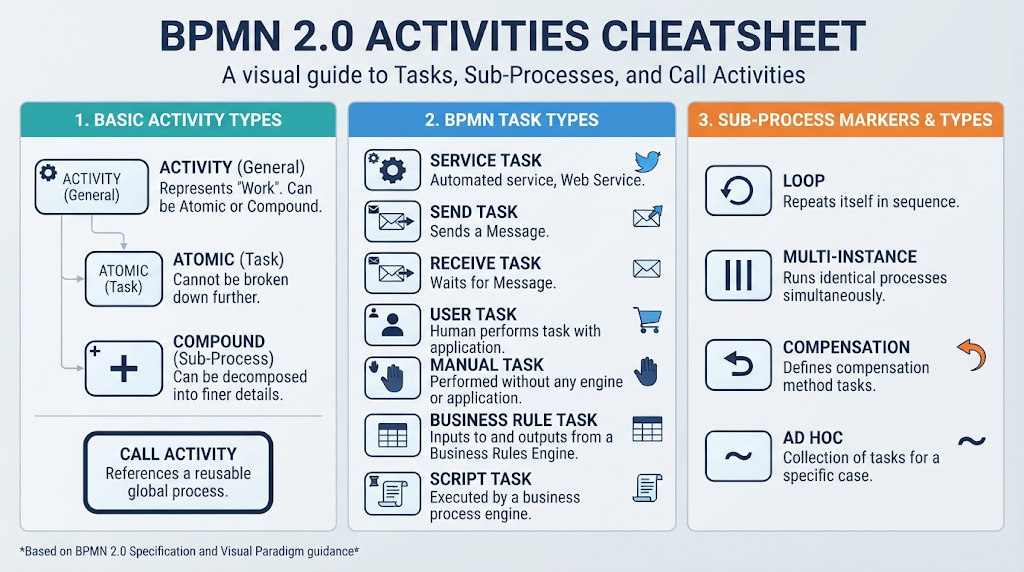
At its most basic level, a loop marker is a graphical indicator used within a task rectangle to denote that the enclosed activity is not a one-off event, but rather a repeating cycle. In tools like Visual Paradigm, this is represented by a circular arrow located at the bottom-center of the task box.
The primary function of this symbol is to signal that the system will execute the activity multiple times. Crucially, this repetition is not infinite; it is governed by a specific logic. The loop persists strictly until a defined exit condition becomes true. This allows modelers to represent complex, conditional workflows without cluttering the diagram with endless arrows and decision diamonds.
The Logic of Repetition: While vs. Do-While
One of the most powerful aspects of the loop marker is its flexibility regarding when the exit condition is checked. This distinction is vital for accurate process logic and is often the difference between a system that works and one that crashes or behaves unexpectedly.
- The “While” Loop (Pre-check): In this scenario, the condition is validated before the activity starts. If the condition is not met immediately, the activity might never execute. This is ideal for scenarios where a task should only happen if specific prerequisites are already in place.
- The “Do-While” Loop (Post-check): Here, the condition is validated after the activity completes. This guarantees that the task runs at least once before the system checks if it should stop. This is essential for tasks like “Check for updates,” where you need to perform the action once to see if there is anything to update.
Real-World Application: The Vendor Invoice Scenario
To truly understand the value of a loop marker, let us look at a practical example from the supply chain domain: Vendor Invoice Follow-up.
Imagine an automated procurement system that needs to ensure a vendor has submitted an invoice. The process flow might look like this:
- The system sends a reminder email to the vendor.
- It enters a loop to check if the invoice has been uploaded to the portal.
- The Loop: If the invoice is not found, the system waits 24 hours and sends another reminder, looping back to step 2.
- Termination: The loop continues strictly until the exit condition—”Invoice Received”—becomes true.
Without a loop marker, modeling this would require drawing a feedback arrow from the “Check Invoice” decision node back to the “Send Reminder” task, which can quickly make a diagram messy and hard to read. The loop marker encapsulates this entire logic cleanly within the task itself.
Implementation Guide: Setting Up Loops in Visual Paradigm
Visual Paradigm provides a user-friendly interface for defining these complex logic structures without requiring you to write raw code. Here is how you can implement a loop marker effectively:
- Locate the Task: Identify the task rectangle in your process diagram that requires repetition.
- Add the Marker: Right-click on the task and navigate to Markers > Loop. This will instantly add the circular arrow symbol to the task.
- Define the Condition: Open the Properties pane for the task. You will see a field specifically for the Loop Condition.
- Map Data Variables: Instead of writing complex syntax, use the built-in expression editor to map this condition directly to your process data variables. For example, you might set the condition to
invoice_status != 'received'.
By utilizing the Loop Marker, you ensure your diagrams are not only visually clean but also logically robust, accurately representing the repetitive nature of real-world business operations.