In the world of Business Process Management (BPM), not every process is a straight line. Sometimes, the path depends entirely on the human element. This is where the Adhoc Subprocess comes into play. In this tutorial, we will break down the specific marker used to denote this flexibility, how it changes the behavior of a process flow, and when you should apply it to your diagrams.
Visualizing the Adhoc Marker
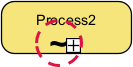
When looking at a process diagram, specifically within a Sub-Process container, you will often see a distinct symbol located at the bottom center. This visual cue is the key to unlocking dynamic behavior.
The symbol consists of two main components:
- The Tilde (~): This wavy line represents flexibility. It visually suggests that the standard “straight and narrow” rules of sequence flow do not apply here.
- The Plus (+): This indicates that the container is expandable or contains multiple activities.
When combined, these elements form the Adhoc Marker. It acts as a warning label to the reader: “Do not expect a rigid order here.”
The Core Concept: Decoupling Sequence Flow
Standard BPMN processes rely on Sequence Flows—the arrows that dictate strictly Task A must happen before Task B. However, real-world work is rarely that rigid. The Adhoc Subprocess is designed to relax standard sequence flow rules.
Inside an Adhoc Subprocess, the following rules apply:
- Independence: Tasks within the container are largely independent of one another.
- Dynamic Ordering: There is no pre-defined “next step.” The order of execution is not dictated by the diagram.
- Runtime Decision: The “flow” is determined by the human actor or the specific system logic at runtime.
Why Use “Human Flexibility”?
The primary driver for an Adhoc Subprocess is User Discretion. This modeling element acknowledges that the person performing the work knows best what needs to be done next. It shifts the control from the Process Modeler (who draws the arrows) to the Actor (who executes the tasks).
Real-World Application: The Medical Checkup
To truly understand the power of the Adhoc Marker, let’s look at a classic real-world example: A Medical Patient Checkup.
Imagine a doctor enters an examination room. A rigid flowchart might say: 1. Take Blood Pressure → 2. Listen to Heart → 3. Check Temperature. But in reality, the doctor operates based on clinical judgment, not a pre-printed list.
Scenario A: The patient complains of a heart murmur. The doctor skips the blood pressure and goes straight to listening to the heart.
Scenario B: The patient is healthy. The doctor might skip the temperature check entirely.
Scenario C: The doctor decides to check the temperature before the blood pressure.
In a process model, if we modeled this with standard arrows, we would have to create a complex web of decision diamonds (Gateways) to account for every possible combination of order and skipping. By using an Adhoc Subprocess, we simply group these tasks (Blood Pressure, Heart, Temperature) inside a container with the tilde marker. This tells the workflow engine: “The doctor will handle the order.”
Technical Implementation in Visual Paradigm
For those using tools like Visual Paradigm or similar BPMN modeling software, implementing this concept is straightforward.
- Element Selection: You do not apply this marker to a single Task. You must apply it to a Sub-Process element.
- Marker Toolbar: Look for the marker toolbar. By selecting the Sub-Process element, you can toggle the “Adhoc” marker (the tilde).
- VPasCode Syntax: If you are defining processes via code (VPasCode), this is often represented by specific tags or attributes that define the subprocess as adhoc, ensuring that the generated engine treats the internal tasks as a pool of available work rather than a sequence.
Summary of Key Concepts
The Adhoc Marker is a powerful tool for modeling systems that rely on human intelligence and adaptability. It moves away from the “one size fits all” linear approach and embraces the chaos and efficiency of dynamic decision-making.
Remember: If your process requires a human to decide what to do next, or if tasks can be skipped based on context, reach for the Adhoc Subprocess.