In the world of Business Process Model and Notation (BPMN), a picture is worth a thousand words. However, even the clearest diagram can sometimes leave stakeholders scratching their heads. This is where the Annotation Marker comes into play. It is the bridge between a visual representation of a process and the human-readable context required to truly understand it.
This tutorial explores the anatomy, function, and strategic use of BPMN annotations, utilizing a real-world example from a recruitment workflow.
The Anatomy of an Annotation
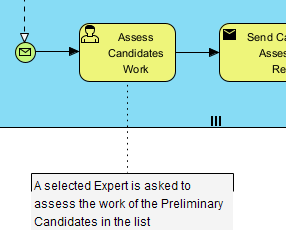
An annotation is a specialized symbol designed to hold supplementary text notes for human readers. Unlike gateways or sequence flows, it exists purely for documentation purposes. Visually, it is distinct and easy to identify:
- The Symbol: It appears as an open bracket (resembling the letter ‘C’ or a curly brace) connected to a process element.
- The Connector: It uses a standard
Associationconnector, which is a dotted line with an open arrow pointing toward the element being annotated. - The Container: The text itself is contained within a rectangular box, often with a slightly raised look to distinguish it from the process flow.
Function: Context Over Logic
The most critical concept to grasp about annotations is their Execution Impact: Zero.
When a business analyst or software developer looks at a BPMN diagram, they are looking for instructions on how the engine should run. An annotation provides context, not commands.
- For Stakeholders: It clarifies business rules. For example, instead of writing “Requires VP approval if amount > $10,000” inside a task box (which makes the box huge and unreadable), you place that rule in an annotation.
- For Developers: It provides implementation details. It explains why a task exists or what specific data logic is happening behind the scenes without cluttering the visual flow.
Case Study: The “Assess Candidates Work” Task
Let’s analyze the specific diagram provided in the context to see this in action. We see a process flow containing a task labeled “Assess Candidates Work”.
Without an annotation, this task is ambiguous. Who is doing the assessing? What exactly is being assessed? Is it a manual step or automated?
By attaching an annotation, the diagram provides the following critical clarity:
“A selected Expert is asked to assess the work of the Preliminary Candidates in the list”
This single note transforms the task from a generic box into a specific business event. It tells us:
- The Actor: A “Selected Expert” (not just any worker).
- The Input: “Preliminary Candidates in the list” (implying a specific data object exists).
- The Action: “Assess” (defining the nature of the work).
Best Practices for Modeling
While annotations are powerful tools, they should be used with discipline to maintain diagram readability. Here are a few tips for effective modeling:
- Don’t Overuse: If you find yourself annotating every single task, your diagram is likely too dense. Consider splitting complex processes into sub-processes instead.
- Keep it Concise: Annotations are for notes, not full paragraphs of policy. If the explanation is too long, it belongs in a separate requirement document.
- Use Automation Tools: Modern tools like Visual Paradigm offer features like “Model Transcription” or “AI Description Generators.” These can auto-suggest clear, concise annotations based on the task name and connected data objects, helping you keep your diagrams clean.
By mastering the Annotation Marker, you ensure that your technical diagrams are not just functional maps, but comprehensive documents that serve both the machine and the human reader.