


In the complex world of software engineering, clarity is currency. Architects and developers often struggle to communicate high-level concepts to stakeholders or detailed implementation plans to developers. This is where the C4 Model shines. It provides a standardized, hierarchical way to visualize software architecture. In this tutorial, we will dissect a real-world example using Visual Paradigm to understand the Component Level of the C4 hierarchy.
What is the C4 Model?
The C4 model is a collection of diagrams designed to describe the architecture of software systems. It uses a set of simple, consistent notations to create a “zoomable” model of your software. It starts broad with Context Diagrams (Level 1) and drills down into Container Diagrams (Level 2) and finally Component Diagrams (Level 3).
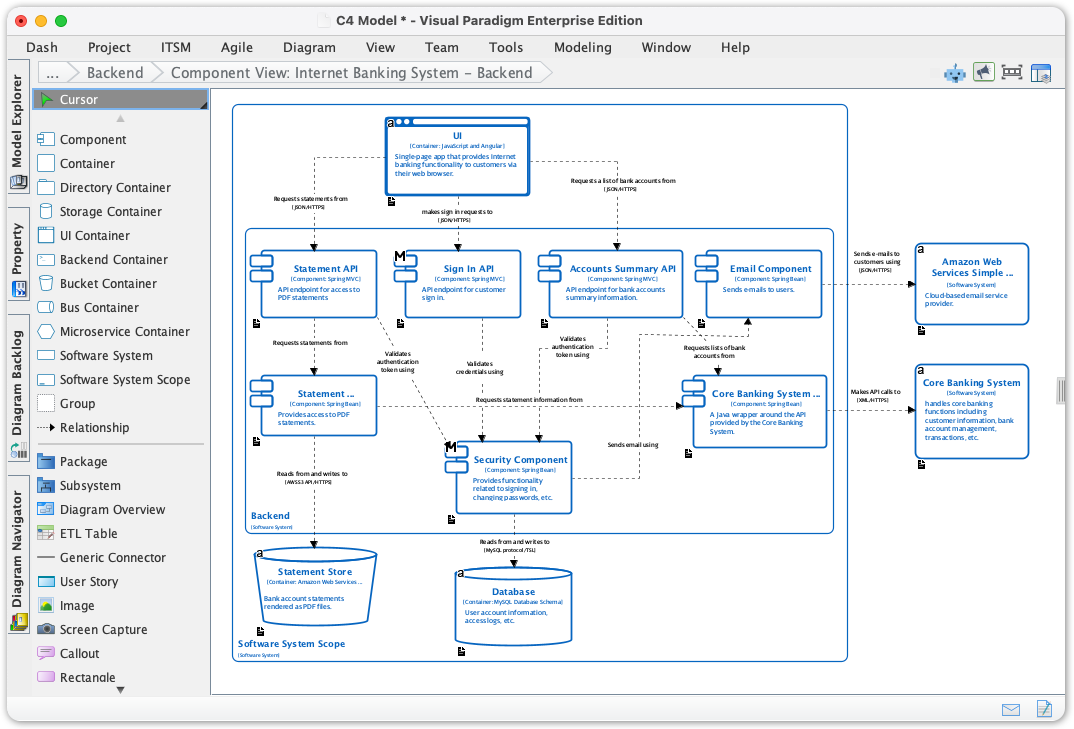
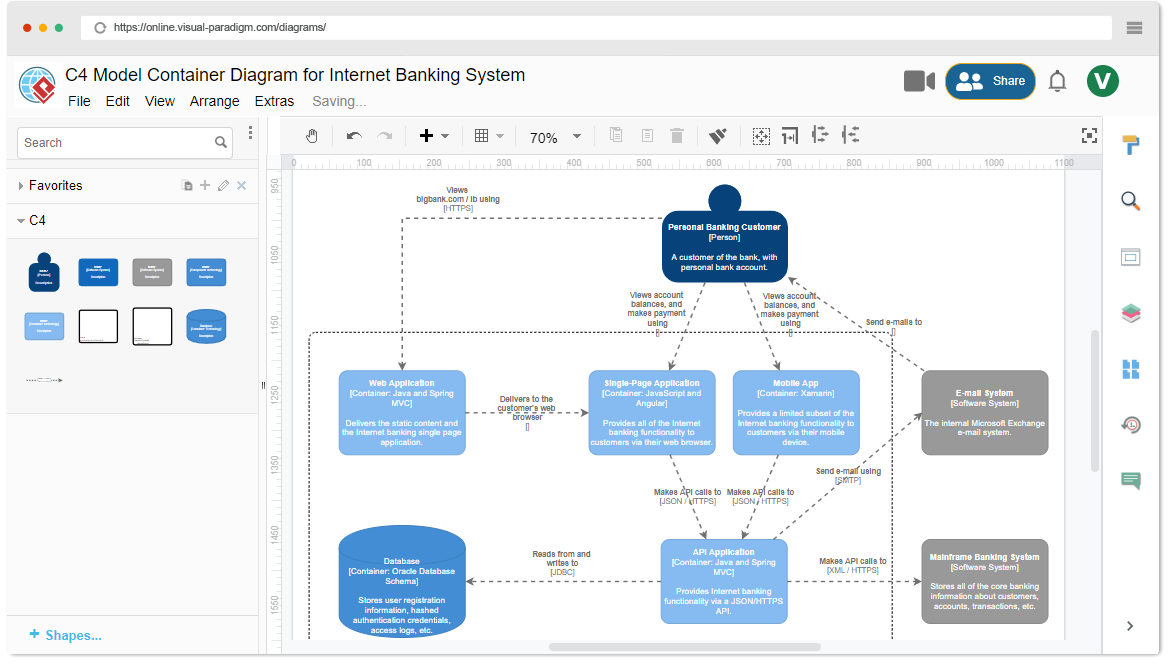
The image provided showcases a Component View of a “Backend” system. This is a crucial level of abstraction where we stop looking at the system as a “black box” (Container) and start looking at the internal building blocks that make it work.
Deconstructing the Component Diagram
Let’s walk through the specific elements visible in this Visual Paradigm diagram for an Internet Banking System. The diagram is organized into a “Software System Scope” labeled Backend.
1. The UI Container (Top Level)
At the very top, we see the UI Container. This represents the single-page application (likely built with JavaScript and Angular) that the user interacts with. The diagram shows that this container makes requests to the backend APIs via JSON over HTTPS. This establishes the entry point for user traffic.
2. Internal Components (The Building Blocks)
Inside the Backend system, we see several distinct Components. In the C4 model, components are logical groupings of behavior. They are not necessarily physical microservices, but distinct parts of the codebase.
- Statement API: A component built with
Spring MVCthat handles the API endpoint for accessing PDF statements. - Sign In API: Another
Spring MVCcomponent responsible for customer authentication. - Accounts Summary API: Handles the logic for retrieving summary information about bank accounts.
- Email Component: A
Spring Bootcomponent specifically designed to send emails to users.
3. Interactions and Relationships
The arrows connecting these boxes are just as important as the boxes themselves. They represent data flow and dependencies:
- Requests and Calls: Notice the arrow from the UI to the Accounts Summary API labeled “Requests a list of bank accounts.” This tells the developer exactly what endpoint is being called.
- Validation: The Security Component sits in the middle, validating authentication tokens and credentials. It interacts with the Sign In API and other APIs to ensure security before data is processed.
- External Calls: The Core Banking System (a separate Software System) is shown on the right. The backend components make API calls (XML/HTTPS) to this legacy or external system to fetch actual banking data.
4. Data Storage and Infrastructure
At the bottom of the diagram, we see the persistence layer. The C4 model distinguishes between different types of storage:
- Statement Store: Represented as a cylinder (Container), this is likely an Amazon Web Service (S3) bucket where rendered PDF files are stored.
- Database: Also a cylinder, this is a MySQL database container holding user account information and access logs.
The relationships show that the backend components read from and write to these storage elements via specific protocols (e.g., HTTPS API or direct DB access).
Why Choose Visual Paradigm for C4 Modeling?
While many tools can draw boxes and arrows, Visual Paradigm stands out as a comprehensive ecosystem for software architecture. Here is why it is the preferred choice for enterprise architects:
1. Full-Stack C4 Support
Visual Paradigm doesn’t just handle one level; it supports the full suite. As seen in the screenshot, you can seamlessly move from high-level context diagrams down to detailed component deployments. It supports all six essential C4 diagram types, ensuring consistency across your documentation.
2. Standardization and Compliance
One of the biggest pain points in architecture is inconsistent notation. Visual Paradigm enforces the C4 methodology strictly. When you create a “Component,” it automatically adopts the correct shape and styling. This standardization allows teams to understand diagrams instantly, regardless of who drew them.
3. The Ecosystem
Visual Paradigm is more than just a diagramming tool; it is a modeling platform. It integrates with:
- Agile Development: Link diagrams to user stories and epics.
- DevOps: Visualize infrastructure and deployment flows.
- Code Generation: Reverse engineer existing Java code into C4 diagrams to keep documentation up to date.
Conclusion
By breaking down the Internet Banking System into Containers and Components, Visual Paradigm helps teams visualize the “who, what, and how” of their software. Whether you are a developer needing to understand the codebase or an architect explaining the system to a client, the C4 Model provides the necessary clarity to succeed.
Related posts:
 Master Conversation-Driven C4 Modeling with AI
 Refining Use Case Diagrams: From Basic to Advanced E-commerce Models
 Mastering Software Architecture: A Comprehensive Guide to the C4 Model and Visual Paradigm
 Mastering the C4 Model: A Step-by-Step Guide to the Container Diagram for an Internet Banking System